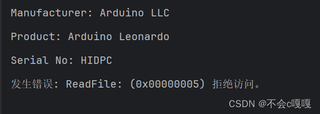
Arduino Leonardo 端代码:
#include <Keyboard.h>

void setup() {
  // 开始键盘模拟
  Keyboard.begin();
}

void loop() {
  // 发送字符 "Hello"
  Keyboard.print("Hello");
  delay(1000);  // 每1秒发送一次
}


pyhton 代码

``import hid

# 查找设备的 Vendor ID 和 Product ID
VID = 0x2341  # Arduino Leonardo 的 Vendor ID (可以根据你的设备调整)
PID = 0x8036  # Arduino Leonardo 的 Product ID

# 枚举连接的设备
for device in hid.enumerate():
    print(f"Device: {device}")

try:
    # 打开设备
    h = hid.Device(VID, PID)

    # 打印设备信息
    print(f"Manufacturer: {h.manufacturer}")
    print(f"Product: {h.product}")
    print(f"Serial No: {h.serial}")

    # 读取数据(假设设备发送64字节数据)
    while True:
        data = h.read(64)  # 读取64字节数据
        if data:
            print("收到的数据: ", data)
except Exception as e:
    print(f"发生错误: {e}")
finally:
    # 关闭设备
    h.close()
通信会被拒绝访问