arduino编程里面,'output'was not declared in this scope的错误该怎么解决
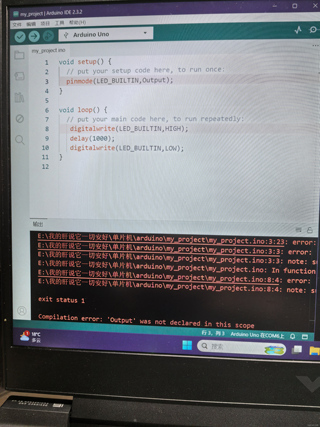
刚开始学结果遇到了这个问题😭

arduino编程里面,'output'was not declared in this scope的错误该怎么解决
刚开始学结果遇到了这个问题😭
 分享
分享
 关注
关注🕒上午好,题主!目前:🟢[在线]
📢参考GPT-4o mini 模型、由清水白石008整理提供!
📣今日金句:“成功是由无数次失败和重新开始的勇气组成的。” — 迈克尔·乔丹
在 Arduino 编程中,遇到 'output' was not declared in this scope 的错误通常意味着你在代码中使用了一个名为 output 的变量或函数,但在使用之前并没有声明它。以下是一些常见的解决方法:
确保你在使用 output 之前已经声明了它。例如,如果 output 是一个变量,你需要在使用之前定义它:
int output; // 声明变量

void setup() {
    // 初始化代码
}

void loop() {
    output = digitalRead(2); // 使用变量
}
确保你在代码中使用的变量名或函数名拼写正确。C++ 是区分大小写的,所以 Output 和 output 是不同的标识符。
如果你在一个函数内部使用 output,确保它在该函数的作用域内可用。如果你在一个函数中定义了 output,而在另一个函数中使用它,你需要将其声明为全局变量,或者将其作为参数传递。
int output; // 全局变量

void setup() {
    // 初始化代码
}

void loop() {
    output = digitalRead(2); // 在 loop 中使用
}
如果 output 是某个库中的函数或变量,确保你已经正确包含了该库,并且库的版本是最新的。例如:
#include <SomeLibrary.h> // 确保包含了正确的库

void setup() {
    // 初始化代码
}

void loop() {
    output = someLibraryFunction(); // 使用库中的函数
}
以下是一个简单的 Arduino 示例,展示了如何正确声明和使用变量:
int output; // 声明一个全局变量

void setup() {
    pinMode(2, INPUT); // 设置引脚 2 为输入
    Serial.begin(9600); // 初始化串口
}

void loop() {
    output = digitalRead(2); // 读取引脚 2 的值
    Serial.println(output); // 打印输出
    delay(1000); // 延迟 1 秒
}
在修改代码后,确保重新编译并上传到 Arduino 板上,以查看更改是否解决了问题。
通过检查变量或函数的声明、拼写错误、作用域以及库的使用,通常可以解决 'output' was not declared in this scope 的错误。如果问题仍然存在,请提供更多的代码上下文,以便更好地帮助你。
分享 创建了问题
10月2日
创建了问题
10月2日

