
用element官网的代码尝试了一下,代码如下:
<script setup>
import { User, Lock } from '@element-plus/icons-vue'
import { ref } from 'vue'
</script>
<template>
    <el-row>
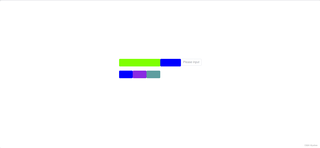
      <el-col :span="24"><div class="grid-content ep-bg-purple" style="background-color:chartreuse"/></el-col>
    </el-row>
    <el-row>
      <el-col :span="12"><div class="grid-content ep-bg-purple" style="background-color: blue"/></el-col>
      <el-col :span="12"><el-input v-model="input"  placeholder="Please input" /></el-col>
    </el-row>
    <el-row>
      <el-col :span="8"><div class="grid-content ep-bg-purple" style="background-color: blue"/></el-col>
      <el-col :span="8"><div class="grid-content ep-bg-purple-light" style="background-color: blueviolet" /></el-col>
      <el-col :span="8"><div class="grid-content ep-bg-purple" style="background-color: cadetblue" /></el-col>
    </el-row>
    <el-row>
      <el-col :span="6"><div class="grid-content ep-bg-purple" /></el-col>
      <el-col :span="6"><div class="grid-content ep-bg-purple-light" /></el-col>
      <el-col :span="6"><div class="grid-content ep-bg-purple" /></el-col>
      <el-col :span="6"><div class="grid-content ep-bg-purple-light" /></el-col>
    </el-row>
    <el-row>
      <el-col :span="4"><div class="grid-content ep-bg-purple" /></el-col>
      <el-col :span="4"><div class="grid-content ep-bg-purple-light" /></el-col>
      <el-col :span="4"><div class="grid-content ep-bg-purple" /></el-col>
      <el-col :span="4"><div class="grid-content ep-bg-purple-light" /></el-col>
      <el-col :span="4"><div class="grid-content ep-bg-purple" /></el-col>
      <el-col :span="4"><div class="grid-content ep-bg-purple-light" /></el-col>
    </el-row>
  </template>

  <style lang="scss">
  .el-row {
    margin-bottom: 20px;
  }
  .el-row:last-child {
    margin-bottom: 0;
  }
  .el-col {
    border-radius: 4px;
  }

  .grid-content {
    border-radius: 4px;
    min-height: 36px;
  }
  </style>
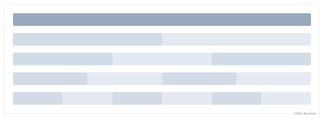
官网提供的效果如下:
网页显示的布局如下:
F12调出控制台后显示的似乎又是对的:
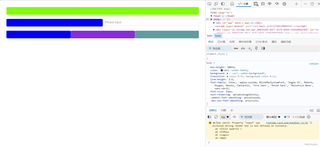
这种情况是由什么原因引起的呢?


