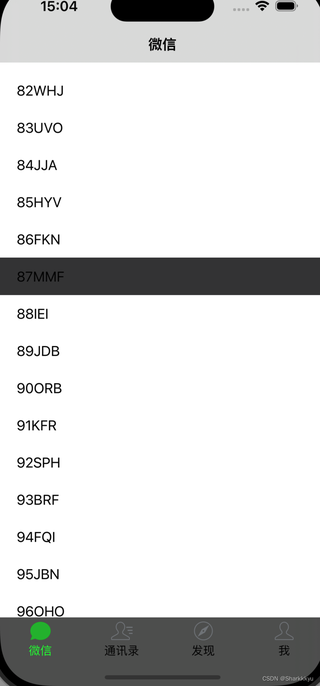
预期是tabbar背景色始终是白色。为什么在tableview的范围内时tabbar背景色是灰色,滑动到底以后tabbar背景色就会变成白色?
//
//  MessageTableViewController.m
//  MyWechat
//
//  Created by Songmin Yu on 2024/10/12.
//

#import "MessageTableViewController.h"
#import "../SearchBar/SearchViewController.h"
#import "../SearchBar/SearchDetailVC.h"
@interface MessageTableViewController ()<UISearchControllerDelegate, UISearchBarDelegate>
@property(strong, nonatomic) UISearchController *searchController;
@property (strong, nonatomic)SearchViewController *searchVC;
@property (strong, nonatomic) IBOutlet UITableView *tableView;
@property (strong, nonatomic) NSMutableArray *dataListArry;

@end

@implementation MessageTableViewController
- (void)viewWillAppear:(BOOL)animated {
    [super viewWillAppear:YES];
    self.tabBarController.tabBar.hidden = NO;
    self.tabBarController.tabBar.backgroundColor = [UIColor whiteColor];
    self.tableView.backgroundColor = [UIColor colorWithWhite:1.0 alpha:1.0];
    self.view.backgroundColor = [UIColor whiteColor];
    self.navigationItem.title = @"微信";
}

- (void)viewDidLoad {
    [super viewDidLoad];

    self.dataListArry = [NSMutableArray arrayWithCapacity:100];
    //产生100个数字+三个随机字母
    for (NSInteger i =0; i<100; i++) {
        [self.dataListArry addObject:[NSString stringWithFormat:@"%ld%@",(long)i,[self shuffledAlphabet]]];
    }
    [self initSearchController];
    NSLog(@"%@",self.tabBarController.tabBar.barTintColor);
}

- (void)didReceiveMemoryWarning {
    [super didReceiveMemoryWarning];
    // Dispose of any resources that can be recreated.
}

- (void)initSearchController{
    self.searchVC = [[SearchViewController alloc]initWithNibName:@"SearchViewController" bundle:nil];

    //创建UISearchController
    self.searchController = [[UISearchController alloc]initWithSearchResultsController:self.searchVC];
    self.searchController.searchResultsUpdater = self.searchVC;
    self.searchController.delegate = self;
    self.searchController.searchBar.delegate = self;
    [self.searchController.searchBar sizeToFit];
    self.searchController.searchBar.placeholder = @"搜索";


    //包着搜索框外层的颜色
    self.searchController.searchBar.tintColor = [UIColor colorWithRed:22.0/255 green:161.0/255 blue:1.0/255 alpha:1];
    if (@available(iOS 11.0, *)) {
        self.navigationItem.searchController = self.searchController;
    } else {
        self.tableView.tableHeaderView = self.searchController.searchBar;
    }
    self.definesPresentationContext = YES;
    self.searchVC.nav = self.navigationController;
    self.searchVC.searchBar = self.searchController.searchBar;
    self.tableView.tableFooterView = [[UIView alloc]initWithFrame:CGRectZero];
    [self.tableView scrollToRowAtIndexPath:[NSIndexPath indexPathForRow:0 inSection:0] atScrollPosition:UITableViewScrollPositionTop animated:NO];
}

//产生3个随机字母
- (NSString *)shuffledAlphabet {
    NSMutableArray * shuffledAlphabet = [NSMutableArray arrayWithArray:@[@"A",@"B",@"C",@"D",@"E",@"F",@"G",@"H",@"I",@"J",@"K",@"L",@"M",@"N",@"O",@"P",@"Q",@"R",@"S",@"T",@"U",@"V",@"W",@"X",@"Y",@"Z"]];

    NSString *strTest = [[NSString alloc]init];
    for (int i=0; i<3; i++) {
        int x = arc4random() % 25;
        strTest = [NSString stringWithFormat:@"%@%@",strTest,shuffledAlphabet[x]];
    }
    return strTest;
}
#pragma mark - tableView
//设置区域的行数
- (NSInteger)tableView:(UITableView *)tableView numberOfRowsInSection:(NSInteger)section{
    return [self.dataListArry count];
}

//返回单元格内容
- (UITableViewCell *)tableView:(UITableView *)tableView cellForRowAtIndexPath:(NSIndexPath *)indexPath{
    static NSString *identifier = @"cell";
       UITableViewCell *cell = [tableView dequeueReusableCellWithIdentifier:identifier];
       cell.backgroundColor = [UIColor whiteColor];
       if (!cell) {
           cell = [[UITableViewCell alloc]initWithStyle:UITableViewCellStyleDefault reuseIdentifier:identifier];
       }
       // 使用 attributedText 属性设置文本颜色为黑色
       NSMutableAttributedString *attributedText = [[NSMutableAttributedString alloc] initWithString:self.dataListArry[indexPath.row]];
       [attributedText addAttribute:NSForegroundColorAttributeName value:[UIColor blackColor] range:NSMakeRange(0, attributedText.length)];
       cell.textLabel.attributedText = attributedText;
    return cell;
}

#pragma mark - UISearchBarDelegate
- (BOOL)searchBarShouldBeginEditing:(UISearchBar *)searchBar {
    [searchBar setShowsCancelButton:YES animated:YES];
    for (id obj in [searchBar subviews]) {
        if ([obj isKindOfClass:[UIView class]]) {
            for (id obj2 in [obj subviews]) {
                if ([obj2 isKindOfClass:[UIButton class]]) {
                    UIButton *btn = (UIButton *)obj2;
                    [btn setTitle:@"取消" forState:UIControlStateNormal];
                }
            }
        }
    }
    return YES;
}

- (void)searchBarSearchButtonClicked:(UISearchBar *)searchBar{
    SearchDetailVC *vc = [[SearchDetailVC alloc]initWithNibName:@"SearchDetailVC" bundle:nil];
    [self.navigationController pushViewController:vc animated:YES];
//    self.searchController.active = NO;
}
- (void)searchBarCancelButtonClicked:(UISearchBar *)searchBar {
    [self.searchVC.searchBar setShowsCancelButton:NO animated:YES];
}

#pragma mark - UISearchControllerDelegate代理
//测试UISearchController的执行过程
- (void)willPresentSearchController:(UISearchController *)searchController {
    NSLog(@"willPresentSearchController");
    CGRect searchResultsFrame = self.searchVC.view.frame;
    searchResultsFrame.origin.y = CGRectGetMaxY(self.searchController.searchBar.frame);
    self.searchVC.view.frame = searchResultsFrame;
    self.tabBarController.tabBar.hidden = YES;
    self.edgesForExtendedLayout = UIRectEdgeTop;
    NSLog(@"this is searchController %f,%f",self.searchController.view.frame.origin.y,self.searchController.view.frame.size.height);
    NSLog(@"this is searchVC %f,%f",self.searchVC.view.frame.origin.y,self.searchVC.view.frame.size.height);


}

- (void)didPresentSearchController:(UISearchController *)searchController {
    NSLog(@"didPresentSearchController");
    self.searchVC.dataListArry = self.dataListArry;
}

- (void)willDismissSearchController:(UISearchController *)searchController {
    NSLog(@"willDismissSearchController");
    self.edgesForExtendedLayout = UIRectEdgeTop;
    self.tabBarController.tabBar.hidden = NO;
}

- (void)didDismissSearchController:(UISearchController *)searchController {
    NSLog(@"didDismissSearchController");
}

- (void)presentSearchController:(UISearchController *)searchController {
    NSLog(@"presentSearchController");
}

@end