
要求是:
制作一个在线测试系统, 若用户名为tom,用户密码为123,则跳转到处理的servlet:login中,若用户名和密码不是所要求的,则重新回到登录页面。
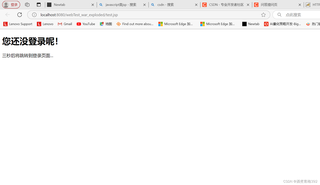
test.jsp测试页面,必须先登录,否则提示用户“您还没登录呢!”,三秒后重新回到login.jsp登录页面。
我用login.jsp登录,登录成功的话,就会转到test.jsp,可是运行login.jsp,会这样
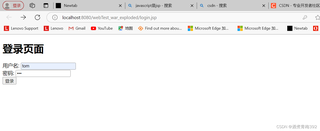
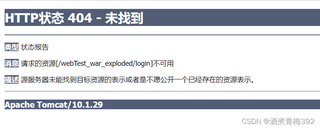
登录后就有问题了:
单独运行test.jsp直接3s退回登陆页面了:
这是login.jsp
<%@ page contentType="text/html;charset=UTF-8" language="java" %>

<!DOCTYPE html>
<html>
<head>
    <title>登录</title>
</head>
<body>
<h1>登录页面</h1>
<form action="test.jsp" method="post">
    用户名: <input type="text" name="username" /><br>
    密码: <input type="password" name="password" /><br>
    <input type="submit" value="登录" />
</form>
<%
    if (request.getAttribute("errorMessage") != null) {
%>
<p style="color:red;"><%= request.getAttribute("errorMessage") %></p>
<%
    }
%>
</body>
</html>
这是test.jsp
<%@ page contentType="text/html;charset=UTF-8" language="java" %>


<%
    String username = request.getParameter("username");
    String password = request.getParameter("password");
    HttpSession sess = (HttpSession) request.getSession();

    if (username != null && password != null) {
        if ("tom".equals(username) && "123".equals(password)) {
            sess.setAttribute("user", username);
        } else {
            request.setAttribute("errorMessage", "用户名或密码错误,请重新登录。");
            request.getRequestDispatcher("login.jsp").forward(request, response);
            return;
        }
    }

    if (sess.getAttribute("user") == null) {
%>
<!DOCTYPE html>
<html>
<head>
    <meta http-equiv="refresh" content="3;url=login.jsp">
    <title>未登录</title>
</head>
<body>
<h1>您还没登录呢!</h1>
<p>三秒后将跳转到登录页面...</p>
</body>
</html>
<%
        return;
    }
%>
<!DOCTYPE html>
<html>
<head>
    <title>Quiz</title>
</head>
<body>
<h2>Quiz</h2>
<form action="index2-link.jsp" method="post">
    <p>1. 在资源管理器中选定多个不连续的文件要使用 :</p>
    <input type="radio" name="question1" value="A Shift键"> A Shift键<br>
    <input type="radio" name="question1" value="B Ctrl键"> B Ctrl键<br>

    <p>2. Windows xp的注册表打开命令是:</p>
    <input type="radio" name="question2" value="A regedit"> A regedit<br>
    <input type="radio" name="question2" value="B msconfig"> B msconfig<br>

    <p>Question 3: Which of the following are programming languages? (Select all that apply)</p>
    <input type="checkbox" name="question3" value="A WORD"> A WORD <br>
    <input type="checkbox" name="question3" value="B EXCEL"> B EXCEL<br>
    <input type="checkbox" name="question3" value="C 记事本"> C 记事本<br>
    <input type="checkbox" name="question3" value="D PowerPoint"> D PowerPoint<br>

    <input type="submit" value="Submit">
</form>
</body>
</html>


