
帮忙写一下横屏抽奖动画,类似于图片这样。根据数据返回的奖项,连续滚动抽奖,只能向右滚动。(如果可以帮忙写个完整的,跟需求一摸一样的代码,可以私信我采纳后可追加酬金)
需要自适应的rpx单位
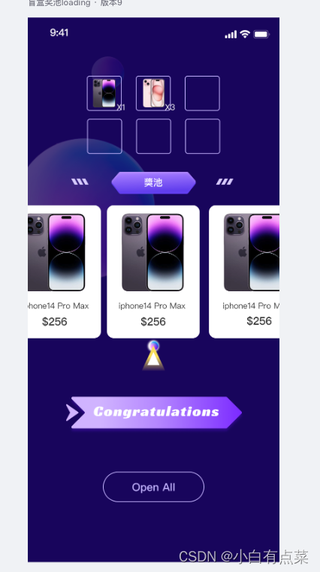

帮忙写一下横屏抽奖动画,类似于图片这样。根据数据返回的奖项,连续滚动抽奖,只能向右滚动。(如果可以帮忙写个完整的,跟需求一摸一样的代码,可以私信我采纳后可追加酬金)
需要自适应的rpx单位
 分享
分享
试试我写的demo;
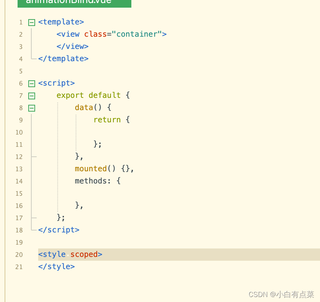
<template>
  <view class="container">
    <!-- 滚动视图容器 -->
    <scroll-view
      :scroll-x="scrollX"
      :scroll-left="scrollLeft"
      :scroll-with-animation="scrollanimation"
      class="scroll-view"
      style="width: 100%; white-space: nowrap"
    >
      <!-- 奖品图片,数据复制三份,形成循环滚动效果 -->
      <view class="item" v-for="(item, index) in tripleItems" :key="index">
        <image :src="item" class="prize-image"></image>
      </view>
    </scroll-view>

    <!-- 抽奖按钮 -->
    <button class="start-button" @click="startLottery">开始抽奖</button>

    <!-- 中间的指针 -->
    <view class="indicator"></view>
  </view>
</template>

<script>
export default {
  data() {
    return {
      items: [
        'https://file.1foo.com/2024/09/28/3131e32d2c53c9cb49c78c3eb8398d6b.png',
        'https://img12.360buyimg.com/n7/jfs/t1/217481/20/44283/56385/670c87bbFdc05d85b/5e20e6ed30c3bf51.jpg.avif',
        'https://img10.360buyimg.com/n1/s450x450_jfs/t1/99552/21/51818/82134/670cea75F8300a539/81d88d53a16b3259.jpg',
        'https://doc-fd.zol-img.com.cn/t_s288x216c4/g6/M00/02/09/ChMkKmFVZ0yINB0MAAlYmEQAeV4AAUK7gIp9KIACViw787.jpg',
        'https://doc-fd.zol-img.com.cn/t_s288x216_w1/g6/M00/02/02/ChMkKmFUJWWIS19nAAVC0sVl3uYAAUJOgPqr_8ABULq603.jpg',
        'https://doc-fd.zol-img.com.cn/t_s288x216c4/g7/M00/0A/0E/ChMkLGIM97mIOIriAAHlrmIjtYkAAAruQB269sAAeXG153.jpg',
        'https://file.1foo.com/2024/09/24/4c9f0db5e60531ce9cf11c18dfba6efd.png',
      ],
      scrollLeft: 0, // 当前的滚动偏移
      interval: null, // 定时器
      duration: 10, // 滚动初始速度
      isScrolling: false, // 控制滚动状态
      itemWidth: 0, // 每个奖品图片的宽度
      scrollanimation:false,//滚动动画
      scrollX:false,//是否可以横向滚动
      currentItems: [], // 当前显示的奖品列表
            windowWidth: 0, // 屏幕宽度
            totalLoops: 3, // 总的循环次数
            currentLoop: 0, // 当前循环次数

            targetIndex: 1, // 中奖图片的索引

            stopScroll: false, // 是否停止滚动
      //中奖
    };
  },
  computed: {
    // 奖池图片复制三份,形成无缝循环效果
    tripleItems() {
      return [...this.items, ...this.items, ...this.items];
    },
  },
  mounted() {
    // 获取每个奖品图片的宽度
    const systemInfo = uni.getSystemInfoSync();
        this.windowWidth = systemInfo.windowWidth;
    this.itemWidth = this.windowWidth / 3; // 每个图片占屏幕宽度的1/3
    // 初始化滚动位置到中间组
    // this.scrollLeft = this.itemWidth * this.items.length;
  },
  methods: {
    startLottery(targetIndex) {
          if (this.isScrolling) return; // 防止重复点击
          this.scrollX=true
          this.isScrolling = true;
          this.stopScroll = false;
          this.currentLoop = 0; // 重置当前循环次数

          // 启动定时器,逐步加速滚动
          this.interval = setInterval(this.scroll, this.duration); // 每16ms更新一次,保证流畅
        },
        scroll() {
          // 每次滚动的距离
          this.scrollLeft += this.itemWidth / 10;

          // 实现无缝滚动
          if (this.scrollLeft >= this.itemWidth * this.items.length * 2) {
            this.scrollLeft = this.scrollLeft - this.itemWidth * this.items.length;
            this.currentLoop++; // 每滚动完一轮,增加当前循环次数
          }

          // 检查是否达到了总循环次数,并且需要停止
          console.log(this.currentLoop >= this.totalLoops,'this.currentLoop >= this.totalLoops');
          if (this.currentLoop >= this.totalLoops && this.shouldStop()) {

            this.stopScroll = true;
            this.stopAtTarget(); // 计算并停止在指定图片
            this.scrollX=false
          }
        },
        shouldStop() {
          // 检查是否已经可以开始减速并最终停止
          const totalDistance = this.itemWidth * this.targetIndex;
          const remainingDistance = this.itemWidth * this.items.length * this.totalLoops - this.scrollLeft;
          // 如果剩余距离小于某个阈值(即接近目标位置),则开始准备停止
          return remainingDistance >= totalDistance;
        },
        stopAtTarget() {
          // 清除定时器,停止滚动
          clearInterval(this.interval);
          this.isScrolling = false;

          // 计算指针需要准确停在目标图片的中间
          const targetPosition = this.itemWidth * this.targetIndex - this.windowWidth / 2 + this.itemWidth / 2;
          this.scrollLeft = targetPosition;
        },
  }
};
</script>

<style scoped>
.container {
  position: relative;
  width: 100%;
  height: 300rpx;
  margin-top: 50px;
  overflow: hidden;
}

.scroll-view {
  height: 200px;
  position: relative;
}

.item {
  display: inline-block;
  width: 33.33%; /* 每个图片占三分之一屏幕宽度 */
  text-align: center;
}

.prize-image {
  width: 100%;
  height: 100px;
  object-fit: contain;
}

.start-button {
  position: absolute;
  bottom: 10px;
  left: 50%;
 transform: translateX(-50%);
  background-color: #ffcc00;
  color: #fff;
  border-radius: 5px;
}

.indicator {
  position: absolute;
  bottom: 60px;
  left: 50%;
  width: 0;
  height: 0;
  border: 15px transparent solid;
  border-bottom: 15px red solid;
  z-index: 1;
  transform: translateX(-50%);
}
</style>
 已结题
(查看结题原因) 10月22日
已采纳回答
10月22日
修改了问题
10月17日
创建了问题
10月17日
已结题
(查看结题原因) 10月22日
已采纳回答
10月22日
修改了问题
10月17日
创建了问题
10月17日


