
WIN环境下,esp-idf4.4版本,目标板esp32cam,通过ESP-PROG上传和调试,如图:
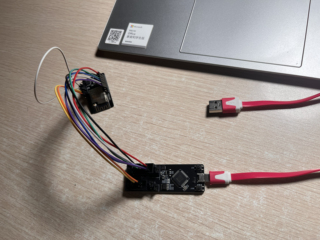
,接线应该没有问题,我在配置JTAG卡时,openocd -f interface/ftdi/esp32_devkitj_v1.cfg -f target/esp32.cfg, 有时正常,但是大部分时间都是下面几种错误信息,不知道是怎么回事,换了个ESPPROG也是这样
正常情况:
正常情况:
openocd -f interface/ftdi/esp32_devkitj_v1.cfg -f target/esp32.cfg
Open On-Chip Debugger v0.12.0-esp32-20230419 (2023-04-18-22:02)
Licensed under GNU GPL v2
For bug reports, read
        http://openocd.org/doc/doxygen/bugs.html
adapter speed: 20000 kHz
Info : Listening on port 6666 for tcl connections
Info : Listening on port 4444 for telnet connections
Info : ftdi: if you experience problems at higher adapter clocks, try the command "ftdi tdo_sample_edge falling"
Info : clock speed 20000 kHz
Info : JTAG tap: esp32.cpu0 tap/device found: 0x120034e5 (mfg: 0x272 (Tensilica), part: 0x2003, ver: 0x1)
Info : JTAG tap: esp32.cpu1 tap/device found: 0x120034e5 (mfg: 0x272 (Tensilica), part: 0x2003, ver: 0x1)
Info : starting gdb server for esp32.cpu0 on 3333
Info : Listening on port 3333 for gdb connections
Info : [esp32.cpu0] Debug controller was reset.
Info : [esp32.cpu0] Core was reset.
Info : [esp32.cpu0] Target halted, PC=0x400835A0, debug_reason=00000001
Info : Set GDB target to 'esp32.cpu0'
Info : [esp32.cpu1] Debug controller was reset.
Info : [esp32.cpu1] Core was reset.
Info : [esp32.cpu1] Target halted, PC=0x40008544, debug_reason=00000000
Info : [esp32.cpu1] Reset cause (12) - (Software CPU1 reset)
Info : [esp32.cpu0] Reset cause (12) - (Software CPU0 reset)

错误一:

Open On-Chip Debugger v0.12.0-esp32-20230419 (2023-04-18-22:02)
Licensed under GNU GPL v2
For bug reports, read
        http://openocd.org/doc/doxygen/bugs.html
adapter speed: 20000 kHz
Info : Listening on port 6666 for tcl connections
Info : Listening on port 4444 for telnet connections
Info : ftdi: if you experience problems at higher adapter clocks, try the command "ftdi tdo_sample_edge falling"
Info : clock speed 20000 kHz
Error: JTAG scan chain interrogation failed: all ones
Error: Check JTAG interface, timings, target power, etc.
Error: Trying to use configured scan chain anyway...
Error: esp32.cpu0: IR capture error; saw 0x1f not 0x01
Warn : Bypassing JTAG setup events due to errors
Warn : [esp32.cpu0] Unexpected OCD_ID = ffffffff
Warn : target esp32.cpu0 examination failed
Warn : [esp32.cpu1] Unexpected OCD_ID = ffffffff
Warn : target esp32.cpu1 examination failed
Info : starting gdb server for esp32.cpu0 on 3333
Info : Listening on port 3333 for gdb connections

错误二:

Open On-Chip Debugger v0.12.0-esp32-20230419 (2023-04-18-22:02)
Licensed under GNU GPL v2
For bug reports, read
        http://openocd.org/doc/doxygen/bugs.html
adapter speed: 20000 kHz
Info : Listening on port 6666 for tcl connections
Info : Listening on port 4444 for telnet connections
Info : ftdi: if you experience problems at higher adapter clocks, try the command "ftdi tdo_sample_edge falling"
Info : clock speed 20000 kHz
Info : JTAG tap: esp32.cpu0 tap/device found: 0x120034e5 (mfg: 0x272 (Tensilica), part: 0x2003, ver: 0x1)
Info : JTAG tap: esp32.cpu1 tap/device found: 0x120034e5 (mfg: 0x272 (Tensilica), part: 0x2003, ver: 0x1)
Warn : [esp32.cpu1] Unexpected OCD_ID = 00000000
Warn : target esp32.cpu1 examination failed
Info : starting gdb server for esp32.cpu0 on 3333
Info : Listening on port 3333 for gdb connections
Info : [esp32.cpu0] Debug controller was reset.
Info : [esp32.cpu0] Core was reset.
Info : [esp32.cpu0] Target halted, PC=0x4000874A, debug_reason=00000000
Info : [esp32.cpu0] Reset cause (1) - (Power on reset)
Warn : [esp32.cpu1] Unexpected OCD_ID = 00000000
Warn : [esp32.cpu1] Unexpected OCD_ID = 00000000
Warn : [esp32.cpu1] Unexpected OCD_ID = 00000000
Warn : [esp32.cpu1] Unexpected OCD_ID = 00000000
Warn : [esp32.cpu1] Unexpected OCD_ID = 00000000


