

c#新建的winform窗口项目,.net framework 4.0版本。
前端:vue,后端c#;
实现的功能:前端点击word文档标题,.net监听的端口,接收到请求后,就把这个word文档从远程服务器下载到用户客户端本地并且调用用户本地的office打开这个word,点击第一次可以成功,第二次就报这个错,我在网上看了很多内容,大部分都是说删除注册表的wps以及其它版本的office,已经试过了,都不行,请各位兄台帮协一下,感激不尽!
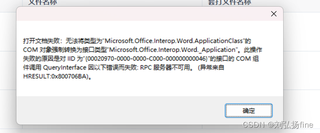
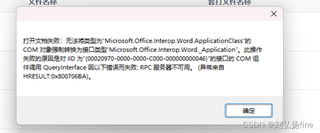
视频在这:https://live.csdn.net/v/430863
前端代码:
/** w编辑操作 */
      handleUpdate(row) {
        let downPath = this.downloadC + row.filepath; // java提供的下载文件的url,此处就是需要下载的文档的url
        const fileUrl = encodeURIComponent(downPath); // 确保 URL 正确编码
        const fileName = encodeURIComponent(row.filename); // 获取并编码文件名
        const apiUrl = `http://localhost:5000/api/?fileUrl=${fileUrl}&fileName=${fileName}&mode=update`; // 添加 filename 参数

        axios.get(apiUrl)
          .then(response => {
            alert(response.data); // 显示服务器返回的信息
          })
          .catch(error => {
            console.error('请求出错:', error);
            alert('下载失败!');
          });
      },
c#代码:
```c#
using System;
using System.Web;
using System.IO;
using System.Net;
using System.Net.Http;
using System.Runtime.InteropServices;
using System.Security.Policy;
using System.Text;
using System.Threading;
using System.Windows.Forms;
using Microsoft.Office.Interop.Word;
namespace AmosOctoFour
{
public partial class Form1 : Form
{
private HttpListener listener;
private Microsoft.Office.Interop.Word.Application wordApp; // Word 应用程序对象
public Form1()
{
InitializeComponent();
// 隐藏窗体
this.WindowState = FormWindowState.Minimized; // 将窗口最小化
this.ShowInTaskbar = false; // 不在任务栏中显示
StartListener(); // 启动 HTTP 监听
// 确保只创建一次 wordApp 实例
if (wordApp == null)
{
wordApp = new Microsoft.Office.Interop.Word.Application();
}
wordApp.DocumentBeforeClose += WordApp_DocumentBeforeClose; // 监听文档关闭事件
}
private void StartListener()
{
listener = new HttpListener();
listener.Prefixes.Add("http://localhost:5000/api/");
listener.Start();
listener.BeginGetContext(new AsyncCallback(OnRequest), listener);
}
private void OnRequest(IAsyncResult result)
{
HttpListener listener = (HttpListener)result.AsyncState;
HttpListenerContext context = listener.EndGetContext(result);
HttpListenerRequest request = context.Request;
HttpListenerResponse response = context.Response;
if (request.HttpMethod == "GET") // 使用 GET 请求
{
string fileUrl = request.QueryString["fileUrl"];
string fileName = request.QueryString["fileName"];
string mode = request.QueryString["mode"];
if (!string.IsNullOrEmpty(fileUrl) && !string.IsNullOrEmpty(fileName) && !string.IsNullOrEmpty(mode))
{
string savePath = Path.Combine(@"C:\files\download", fileName); // 使用传递的文件名
if (File.Exists(savePath))
{
try
{
File.Delete(savePath);
}
catch (Exception ex)
{
response.StatusCode = (int)HttpStatusCode.InternalServerError;
return;
}
}
// 下载文件到指定路径
DownloadFile(fileUrl, savePath);
switch (mode.ToLower())
{
case "readonly":
OpenWordDocumentInReadOnlyMode(savePath);
break;
case "update":
OpenWordDocumentInEditMode(savePath);
break;
case "revisions":
EnableRevisionsInWord(savePath);
break;
case "clear":
ClearRevisionsInWord(savePath);
break;
case "bookmark":
string templateFileUrl = request.QueryString["templateUrl"];
AddBookmarkToWord(savePath, fileName, templateFileUrl);
break;
default:
response.StatusCode = (int)HttpStatusCode.BadRequest; // 未知的操作模式
return;
}
byte[] buffer = Encoding.UTF8.GetBytes("文件处理完成");
response.ContentLength64 = buffer.Length;
Stream output = response.OutputStream;
output.Write(buffer, 0, buffer.Length);
output.Close();
}
else
{
response.StatusCode = (int)HttpStatusCode.BadRequest; // 参数不完整
}
}
else
{
response.StatusCode = (int)HttpStatusCode.MethodNotAllowed;
}
listener.BeginGetContext(new AsyncCallback(OnRequest), listener);
}
private void WordApp_DocumentBeforeClose(Document doc, ref bool Cancel)
{
// 关闭前保存文档,避免丢失数据
//doc.Save();
string filePath = doc.FullName; // 获取文档的完整路径
// 上传文件到服务器
UploadFileToServer(filePath);
// 释放 Word 对象
Marshal.ReleaseComObject(doc);
doc = null;
}
private void OpenWordDocumentInReadOnlyMode(string path)
{
try
{
Document wordDoc = wordApp.Documents.Open(path, ReadOnly: true, Visible: true);
wordApp.Visible = true;
MessageBox.Show("文档已以只读模式打开!");
}
catch (Exception ex)
{
MessageBox.Show("打开文档失败:" + ex.Message);
}
}
private void OpenWordDocumentInEditMode(string path)
{
try
{
//wordApp = new Microsoft.Office.Interop.Word.Application(); // 创建 Word 应用程序实例
Document wordDoc = wordApp.Documents.Open(path, ReadOnly: false, Visible: true);
wordApp.Visible = true;
//MessageBox.Show("文档已以编辑模式打开!");
}
catch (Exception ex)
{
MessageBox.Show("打开文档失败:" + ex.Message);
}
}
private void EnableRevisionsInWord(string path)
{
try
{
// 打开文档
Document wordDoc = wordApp.Documents.Open(path, ReadOnly: false, Visible: true);
wordApp.Visible = true;
// 激活修订功能
wordDoc.TrackRevisions = true;
// 设置视图为“最终版本,显示修订标记”
wordApp.ActiveWindow.View.RevisionsView = WdRevisionsView.wdRevisionsViewFinal;
wordApp.ActiveWindow.View.ShowRevisionsAndComments = true;
wordApp.ActiveWindow.View.ShowFormatChanges = true;
// 添加批注
AddCommentsToRevisions(wordDoc);
}
catch (Exception ex)
{
MessageBox.Show("启用修订模式失败:" + ex.Message);
}
}
/// <summary>
/// 为文档中的修订添加批注
/// </summary>
private void AddCommentsToRevisions(Document document)
{
try
{
// 清空之前的批注(可选)
foreach (Comment comment in document.Comments)
{
comment.Delete();
}
// 获取所有修订
Revisions revisions = document.Revisions;
int revisionCount = revisions.Count;
for (int i = 1; i <= revisionCount; i++)
{
Revision revision = revisions[i];
Range range = revision.Range;
string revisionText = range.Text;
// 根据修订类型生成批注文本
string commentText = $"修订类型: {revision.Type}, 内容: {revisionText}";
// 为每个修订添加批注
document.Comments.Add(range, commentText);
}
}
catch (Exception ex)
{
MessageBox.Show("添加批注失败:" + ex.Message);
}
}
private void ClearRevisionsInWord(string path)
{
try
{
// 打开文档
Document wordDoc = wordApp.Documents.Open(path, ReadOnly: false, Visible: true);
// 接受所有修订
wordDoc.AcceptAllRevisions();
// 清除所有批注
foreach (Comment comment in wordDoc.Comments)
{
comment.Delete();
}
wordApp.Visible = true;
//MessageBox.Show("修订和批注已清除!");
}
catch (Exception ex)
{
MessageBox.Show("清除修订和批注失败:" + ex.Message);
}
}
private void AddBookmarkToWord(string fileUrl, string fileName, string templateFileUrl)
{
string downloadDirectory = @"C:\files\download";
string sourceFilePath = Path.Combine(downloadDirectory, fileName);
// 获取templateFileUrl的值
Uri uri = new Uri(templateFileUrl);
var query = HttpUtility.ParseQueryString(uri.Query);
string filename = query["filename"];
Console.WriteLine(filename);
// 下载模板文件
if (!DownloadFile(templateFileUrl, filename))
{
MessageBox.Show("模板文件下载失败!");
return;
}
Document sourceDoc = null;
Document templateDoc = null;
try
{
// 增加重试机制,确保文件未被占用
int maxAttempts = 5;
int attempts = 0;
bool fileReady = false;
while (attempts < maxAttempts && !fileReady)
{
try
{
CheckFileInUse(sourceFilePath); // 检查文件是否被占用
fileReady = true; // 如果检查通过,设置为准备好
}
catch (IOException)
{
attempts++;
Thread.Sleep(1000); // 等待1秒后重试
}
}
if (!fileReady)
{
MessageBox.Show("源文件仍被占用,请稍后重试!");
return;
}
// 打开源文件和模板
sourceDoc = wordApp.Documents.Open(sourceFilePath, ReadOnly: false, Visible: false);
templateDoc = wordApp.Documents.Open(filename, ReadOnly: true, Visible: false);
if (templateDoc.Bookmarks.Exists("正文部分"))
{
Range bookmarkRange = templateDoc.Bookmarks["正文部分"].Range;
// 将源文档内容插入到模板的书签中
bookmarkRange.FormattedText = sourceDoc.Content.FormattedText;
//templateDoc.Save();
// 清空源文档内容
sourceDoc.Content.Delete();
// 将模板文档的内容粘贴到源文档
templateDoc.Content.Copy();
sourceDoc.Content.Paste();
// 清除修订和批注,确保文档为最终版本
AcceptAllRevisionsAndClearComments(sourceDoc);
// 保存源文件
sourceDoc.Save();
}
else
{
MessageBox.Show("模板中未找到“正文部分”书签!");
}
}
catch (Exception ex)
{
MessageBox.Show("操作失败:" + ex.Message);
}
finally
{
// 确保正确关闭文档
sourceDoc?.Close(SaveChanges: false);
templateDoc?.Close(SaveChanges: false);
}
// 打开源文件以查看合并后的内容
wordApp.Visible = true;
wordApp.Documents.Open(sourceFilePath);
}
/// <summary>
/// 清除文档的所有修订和批注
/// </summary>
private void AcceptAllRevisionsAndClearComments(Document doc)
{
try
{
// 接受所有修订
if (doc.Revisions.Count > 0)
{
doc.Revisions.AcceptAll();
}
// 删除所有批注
foreach (Comment comment in doc.Comments)
{
comment.Delete();
}
}
catch (Exception ex)
{
MessageBox.Show("清稿失败:" + ex.Message);
}
}
// 下载文件方法
private bool DownloadFile(string fileUrl, string filePath)
{
try
{
using (WebClient client = new WebClient())
{
client.DownloadFile(fileUrl, filePath);
}
return true; // 下载成功
}
catch (Exception ex)
{
MessageBox.Show("下载失败:" + ex.Message);
return false; // 下载失败
}
}
// 检查文件是否被占用
private void CheckFileInUse(string filePath)
{
try
{
using (FileStream stream = new FileStream(filePath, FileMode.Open, FileAccess.ReadWrite, FileShare.None))
{
// 如果文件可以成功打开,说明没有其他进程占用它
}
}
catch (IOException)
{
throw new IOException("文件被占用,无法访问。请确保文件未在其他应用程序中打开。");
}
}
// 关闭word应用
/* protected override void OnFormClosing(FormClosingEventArgs e)
{
if (wordApp != null)
{
wordApp.Quit();
Marshal.ReleaseComObject(wordApp);
wordApp = null;
}
base.OnFormClosing(e);
}*/
private void CloseWordDocument(Document doc)
{
if (doc != null)
{
doc.Close(SaveChanges: false); // 关闭文档
Marshal.ReleaseComObject(doc); // 释放文档的 COM 对象
doc = null;
}
}
private void CloseWordApplication()
{
if (wordApp != null)
{
wordApp.Quit(); // 关闭 Word 应用
Marshal.ReleaseComObject(wordApp); // 释放应用的 COM 对象
wordApp = null;
}
}
private void Form1_FormClosing(object sender, FormClosingEventArgs e)
{
CloseWordApplication(); // 在关闭应用程序时调用,确保释放所有 COM 资源
}
private void UploadFileToServer(string filePath)
{
string remoteUrl = "http://192.168.32.184/prod-api/remoteUrl/sendFilePath"; // 正式环境的url
//string remoteUrl = "http://localhost:18881/remoteUrl/sendFilePath"; // 本地环境的url
int maxAttempts = 2; // 最大尝试次数
int attempt = 0;
bool success = false;
while (attempt < maxAttempts && !success)
{
attempt++;
try
{
using (var client = new HttpClient())
{
using (var form = new MultipartFormDataContent())
{
using (var fileStream = new FileStream(filePath, FileMode.Open, FileAccess.Read, FileShare.ReadWrite))
{
// 添加文件流到表单数据中
form.Add(new StreamContent(fileStream), "file", Path.GetFileName(filePath));
// 发送 POST 请求到 Java 接口
HttpResponseMessage uploadResponse = client.PostAsync(remoteUrl, form).Result;
// 检查响应状态
if (uploadResponse.IsSuccessStatusCode)
{
//MessageBox.Show("文件上传成功!");
success = true; // 上传成功,退出循环
}
else
{
MessageBox.Show($"文件上传失败!状态码: {uploadResponse.StatusCode}");
}
}
}
}
}
catch (IOException ex)
{
MessageBox.Show($"文件上传失败,尝试第 {attempt} 次: {ex.Message}");
Thread.Sleep(1000); // 等待1秒后重试
}
catch (Exception ex)
{
MessageBox.Show($"文件上传过程中发生错误: {ex.Message}");
break; // 其他异常时退出循环
}
}
if (!success)
{
MessageBox.Show("文件上传失败,请稍后再试。");
}
}
}
}
```


