

vue+element-ui,关于输入框输入文字时清空图标clearable显示的问题。
问题详述
如下图所示,在输入框内边输入搜索内容,右侧会显示清空的图标,但是现在会显示两个清空的图标且一个可以点一个不可以点,该如何解决?
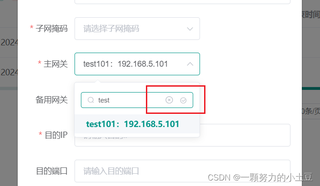
代码展示
下面是这个弹出表单对应的代码内容
 <el-form-item label="主网关" prop="gateway">
          <search-select :interfaceData="interfaceData" :value="form.gateway" @selectValue="selectValue" placeholder="请选择主网关IP" @dataArray="dataArray"/>
        </el-form-item>
下面是search-select这个组件的代码
<template>
  <div>
    <el-row type="flex" justify="center">
      <el-select v-model="valueMeta" :collapse-tags='false'  @visible-change='clearDrop($event)' :placeholder="placeholder">
          <div class="search-input">
              <el-input placeholder="请输入内容" ref="searchHasData" size="mini" prefix-icon="el-icon-search" v-model="dropDownValue" @input="dropDownSearch" clearable></el-input>
              <!-- <input type="text" placeholder="请输入" class="el-input__inner" v-model="dropDownValue" @keyup="dropDownSearch" clearable> -->
          </div>
          <div slot="empty"  class="search-input" >
              <el-input  placeholder="请输入内容" ref="searchNoData" size="mini" prefix-icon="el-icon-search" v-model="dropDownValue" @input="dropDownSearch" clearable></el-input>
              <p>无搜索内容</p>
          </div>
          <el-option v-for="item in optionsMetaShow" :key="item.value" :label="item.label" :value="item.value"></el-option>
      </el-select>
    </el-row>
  </div>
</template>
<script>
  import request from '@/utils/request'
  export default {
      props: {
          // 后端接口数据
          /*
              例子:
              interfaceData {
                  address: "/dynamicDict/groupNetworkEquipment", // 接口地址
                  type: "post", // 接口类型
                  params: null // 接口参数
              }
          */
          interfaceData: {
              type: Object,
              default: () => {},
              required: true
          },
          // 默认回显数据
          value: {
          },
          placeholder: {
              type: String,
              default: "请选择标签"
          }
      },
      watch: {
          interfaceData: {
              handler(val) {
                  this.queryList(val)
              },
              deep: true
          },
          valueMeta: {
              handler(val) {
                  this.$emit('selectValue', val)
              },
              deep: true
          },
          value(val) {
              this.valueMeta = val;
          }

      },
      data () {
          return {
              dropDownValue: '',
              optionsMetaAll: [],
              optionsMetaShow: [],
              valueMeta: this.value
          }
      },
      mounted() {
          this.queryList(this.interfaceData);
      },
      methods: {
          dropDownSearch () {
              var _this = this;
              _this.optionsMetaShow = _this.optionsMetaAll.filter(_this.filterSearch);
              _this.$nextTick(() => {
                if( _this.$refs.searchNoData !== undefined){
            _this.$refs.searchNoData.focus();
          }
          if(  _this.$refs.searchHasData !== undefined){
            _this.$refs.searchHasData.focus();
          }
              })
          },
          filterSearch (item) {
              return item.label.includes(this.dropDownValue);
          },
          clearDrop($event ){ //此处的clearDrop用于解决搜索内容不存在时,所有内容无法显示的bug
              if($event){
                  this.dropDownValue = ''
                  this.optionsMetaShow = this.optionsMetaAll
              }
          },
          queryList(interfaceData) {
              const type =  {
                  "get": "params",
                  "post": "data",
                  "put": "data"
              }
              request({
                  url: interfaceData.address,
                  method: interfaceData.type,
                  [type[`${interfaceData.type}`]]: interfaceData.params
              }).then(res => {
                  // 将返回的数组放入dataArray中
                  const dataArray = Object.values(res);
                  this.$emit('dataArray', dataArray)
                  this.optionsMetaAll = this.optionsMetaShow = res.map((item) => {
                      return {
                          label: item.dictLabel,
                          value: item.dictValue
                      }
                  })
              })
          }
      }
  }
</script>
<style>
.search-input {
  width:90%;
  margin-left:5%;
  margin-top:5%;
  margin-bottom: 5%;
}
p {
  font-size: 14px;
  color: #606266;
}
</style>


