
project 4:HTML表单的应用
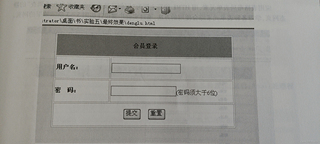
web前端制作HTML表单,编写一个会员登录页面

project 4:HTML表单的应用
web前端制作HTML表单,编写一个会员登录页面
 分享
分享
html
<!DOCTYPE html>
<html lang="zh">
<head>
    <meta charset="UTF-8">
    <meta name="viewport" content="width=device-width, initial-scale=1.0">
    <title>会员登录</title>
    <style>
        body {
            font-family: Arial, sans-serif;
            background-color: #f4f4f4;
            margin: 0;
            padding: 0;
        }

        .container {
            width: 400px;
            margin: 100px auto;
            background-color: white;
            padding: 20px;
            border-radius: 8px;
            box-shadow: 0 0 10px rgba(0, 0, 0, 0.1);
        }

        h2 {
            text-align: center;
            margin-bottom: 20px;
        }

        label {
            display: block;
            margin-bottom: 8px;
        }

        input[type="text"],
        input[type="password"] {
            width: 100%;
            padding: 8px;
            margin: 10px 0;
            border: 1px solid #ddd;
            border-radius: 4px;
            box-sizing: border-box;
        }

        input[type="submit"],
        input[type="reset"] {
            width: 48%;
            padding: 10px;
            border: none;
            border-radius: 4px;
            background-color: #4CAF50;
            color: white;
            cursor: pointer;
            font-size: 16px;
        }

        input[type="reset"] {
            background-color: #f44336;
        }

        input[type="submit"]:hover,
        input[type="reset"]:hover {
            opacity: 0.8;
        }

        .form-footer {
            text-align: center;
            margin-top: 20px;
        }
    </style>
</head>
<body>

<div class="container">
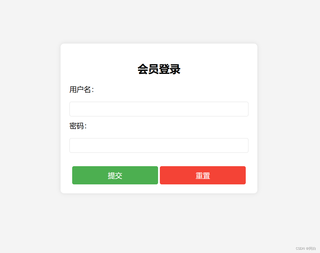
    <h2>会员登录</h2>
    <form action="login.php" method="POST" onsubmit="return validateForm()">
        <label for="username">用户名:</label>
        <input type="text" id="username" name="username" required>

        <label for="password">密码:</label>
        <input type="password" id="password" name="password" required minlength="6">

        <div class="form-footer">
            <input type="submit" value="提交">
            <input type="reset" value="重置">
        </div>
    </form>
</div>

<script>
    function validateForm() {
        var username = document.getElementById("username").value;
        var password = document.getElementById("password").value;

        // 确保密码大于6个字符
        if (password.length < 6) {
            alert("密码长度必须大于6个字符");
            return false;
        }

        // 可根据需求添加其他验证

        return true;
    }
</script>

</body>
</html>
分享 已结题
(查看结题原因) 11月14日
已采纳回答
11月14日
修改了问题
11月13日
创建了问题
11月13日
已结题
(查看结题原因) 11月14日
已采纳回答
11月14日
修改了问题
11月13日
创建了问题
11月13日


