
<template>
  <div>
    <div class="page">
      <div v-if="search" class="topSearchBar">
        <el-select v-model="comprehensiveId" size="mini" placeholder="自评文件" @change="setLevel">
          <el-option v-for="item in selfFileList" :key="item.id" :label="item.name" :value="item.id" />
        </el-select>
        <el-cascader v-model="classIds" size="mini" placeholder="班级选择" :options="classOptions" :props="cascaderProps" />
        <!-- <el-cascader v-model="classIds" size="mini" placeholder="班级选择" :options="classOptions" :props="cascaderProps" @change="getFiles" /> -->
        <el-select v-model="fliterForm.auditStatus" size="mini" placeholder="审核状态" clearable>
          <el-option label="待审核" :value="1" />
          <el-option label="通过" :value="2" />
          <el-option label="未通过" :value="3" />
        </el-select>
        <el-input v-model="fliterForm.nameOrCode" placeholder="请输入学生姓名/学号搜索" size="mini" clearable />
        <div>
          <el-button size="mini" type="primary" icon="el-icon-search" @click="initData">搜索</el-button>
          <el-button size="mini" icon="el-icon-refresh-left" @click="reset">重置</el-button>
        </div>
      </div>
      <div class="upTableArea">
        <div>
          <el-button size="mini" type="warning" @click="exportData">导出</el-button>
        </div>
        <div>
          <el-button-group>
            <!-- <el-button v-if="searchShow" size="mini" icon="el-icon-search" title="搜索" @click="search = !search" /> -->
            <el-button size="mini" title="刷新" icon="el-icon-refresh" @click="initData()" />
            <el-popover placement="bottom-end" popper-class="popper-check" width="60" trigger="click">
              <el-button slot="reference" size="mini" title="选择性展示" icon="el-icon-s-grid" />
              <el-checkbox v-model="checkAll" class="popper-check" :indeterminate="indeterminate" @change="handleCheckAllChange">全选</el-checkbox>
              <el-checkbox v-for="item in tableColumns" :key="item.id" v-model="item.visible" class="popper-check" @change="handleCheckSingleChange(item)">{{ item.showName }}</el-checkbox>
            </el-popover>
          </el-button-group>
        </div>
      </div>
      <el-table ref="table" v-loading="loading" height="250"  :data="tableData" :span-method="objectSpanMethod" border style="width: 100%; margin: 20px 0; flex: 1;">
        <el-table-column v-for="(item, index) in tableColumnItem" :key="index" :sortable="['name', 'workId', 'username'].includes(item.tableColumnName)" :show-overflow-tooltip="true" :prop="item.tableColumnName" :label="item.showName" :min-width="item.width" />
        <el-table-column label="相关材料" prop="auditStatus">
          <template slot-scope="scope">
            <div style="display: flex;">
              <div class="viewclick" @click="viewclick(scope.row['auditStatus'], scope.row.realData|| scope.row)">查看</div>
              <div class="viewclick" :style="{color: scope.row['auditStatus'] === 1 ? '#0E3CFA' : scope.row['auditStatus'] === 2 ? '#0E3CFA' : '#D9001B' }" @click="checkclick(scope.row['auditStatus'], scope.row.realData || scope.row)">{{ scope.row['auditStatus'] === 1 ? '待审核' : scope.row['auditStatus'] === 2 ? '通过' : scope.row['auditStatus'] === 3 ? '未通过' : '未提交' }}</div>
            </div>
          </template>
        </el-table-column>
      </el-table>
      <div style="display: flex; justify-content: center;">
        <el-pagination background :current-page="currentPage" :page-sizes="[15, 25, 35, 45]" :page-size="currentSize" layout="total, sizes, prev, pager, next, jumper" :total="total" @size-change="handleSizeChange" @current-change="handleCurrentChange" />
      </div>
    </div>
    <DlgAuditPage v-if="dialog.show" ref="auditPage" :dialog="dialog" :source="source" :form="currentData" :check-level="checkLevel" @close-page="closeDlg" />
  </div>
</template>

<script>
import _ from 'lodash'
// import treeAPI from '@/api/tree'
import evaAPI from '@/api/evaluate'
import DlgAuditPage from './components/DlgAuditPage'

export default {
  name: 'ScoreManage',
  components: { DlgAuditPage },
  data() {
    return {
      dialog: { title: '', show: false, option: '' },
      isCheck: false,
      search: true,
      loading: false,
      tableData: [],
      selfFileList: [],
      comprehensiveId: '',
      classIds: '',
      fliterForm: {},
      checkAll: true,
      indeterminate: false,
      classOptions: [],
      currentPage: 1,
      checkLevel: 2,
      currentSize: 15,
      currentData: {},
      mergeArr: ['workId','className','name','userName','score','totalScore','auditStatus'],
      total: 0,
      source: 2,
      cascaderProps: { children: 'childList', leaf: 'isLeaf', checkStrictly: false, label: 'name', value: 'id', emitPath: false },
      tableColumnItem: [],
      mergeObj: {}, // 用来记录需要合并行的下标
      tableColumns: [
        { id: 1, visible: true, showName: '学生姓名', tableColumnName: 'userName' },
        { id: 2, visible: true, showName: '学号', tableColumnName: 'workId' },
        { id: 3, visible: true, showName: '专业班级', tableColumnName: 'className' },
        { id: 4, visible: true, showName: '测评指标', tableColumnName: 'name' },
        { id: 5, visible: true, showName: '加分项目', tableColumnName: 'addName' },
        { id: 6, visible: true, showName: '加分', tableColumnName: 'addScore' },
        { id: 7, visible: true, showName: '小计', tableColumnName: 'score' },
        { id: 8, visible: true, showName: '总计', tableColumnName: 'totalScore' }
      ]
    }
  },
  created() {
    this.tableColumnItem = this.tableColumns.filter(e => e.visible)
    this.getFiles()
  },
  methods: {
    setLevel() {
      this.checkLevel = this.selfFileList.find(e => { return e.id === this.comprehensiveId })?.auditNum
      this.getClass()
    },
    // 默认接受四个值 { 当前行的值, 当前列的值, 行的下标, 列的下标 }
    objectSpanMethod({ row, column, rowIndex, columnIndex }) {
      /* 相关材料 */
      // 判断列的属性
        if(this.mergeArr.indexOf(column.property) !== -1) {
            // 判断其值是不是为0
            if(this.mergeObj[column.property][rowIndex]) {
                return [this.mergeObj[column.property][rowIndex], 1]
            } else {
                // 如果为0则为需要合并的行
                return [0, 0];
            }
        }
    },

        /* 记录行 */
   getSpanArr(data) {
    this.mergeArr.forEach((key, index1) => {
        let count = 0; // 用来记录需要合并行的起始位置
        this.mergeObj[key] = []; // 记录每一列的合并信息
        data.forEach((item, index) => {
            // index == 0表示数据为第一行,直接 push 一个 1
            if(index === 0) {
                this.mergeObj[key].push(1);
            } else {
              /* 小计单独计算 */
              if(key === 'score'){
                if( data[index].name === data[index - 1].name){
                  this.mergeObj[key][count] += 1;
                  this.mergeObj[key].push(0);
                } else {
                  count = index; // 记录当前位置
                  this.mergeObj[key].push(1); // 重新push 一个
                }
              }
                // 判断当前行是否与上一行其值相等与是否信息属于同一个人 如果相等 在 count 记录的位置其值 +1 表示当前行需要合并 并push 一个 0 作为占位
                else if(item[key] === data[index - 1][key] && data[index].workId === data[index - 1].workId ) {
                    this.mergeObj[key][count] += 1;
                    this.mergeObj[key].push(0);
                } else {
                    // 如果当前行和上一行其值不相等
                    count = index; // 记录当前位置
                    this.mergeObj[key].push(1); // 重新push 一个
                }
            }
        })
    })
},
    dataSort(val) {
      let returnData = []
      val.forEach((item, index) => {
        if (item.evaluationItemVOS) {
          let count = 0 // 一共总计加分数目
          const { evaluationItemVOS, ...data } = item
          // 加分项目
          let arrayGroup = [] // 要插入的加分项目、加分、小计、总计等对象数据
          evaluationItemVOS.forEach((sitem, sindex) => {
            let scount = 0 // 加分项目下的加分详细数目
            let insertData = {}
            const { childList, ...sdata } = sitem
            // 加分
            if (childList.length > 0) {
              insertData = childList.map(e => {
                return { ...e, ...sdata, ...data, addName: e.name, addScore: data.auditStatus === 1 || data.auditStatus === 4 ? '' : e.score, score: data.auditStatus === 1 || data.auditStatus === 4 ? '' : sitem.score, totalScore: data.auditStatus === 1 || data.auditStatus === 4 ? '' : data.totalScore }
              })
              insertData[0]['sRowSpan'] = childList.length
              scount = childList.length
            } else {
              insertData = { ...sdata, ...data, sRowSpan: 1, addScore: data.auditStatus === 1 || data.auditStatus === 4 ? '' : sitem.score, score: data.auditStatus === 1 || data.auditStatus === 4 ? '' : sitem.score, totalScore: data.auditStatus === 1 || data.auditStatus === 4 ? '' : data.totalScore }
              scount = 1
            }
            count += scount
            arrayGroup = arrayGroup.concat(insertData)
          })
          arrayGroup[0]['rowspan'] = count
          arrayGroup[0]['realData'] = item
          returnData = returnData.concat(arrayGroup)
          return
        } else {
          returnData = returnData.concat(item)
        }
      })
      return returnData
    },

    async initData() {
      this.loading = true
      try {
        const resp = await evaAPI.getEvaluateScore({ pageNum: this.currentPage, pageSize: this.currentSize, comprehensiveId: this.comprehensiveId, ...this.fliterForm, departmentId: this.classIds, monitor: false })
        this.tableData = this.dataSort(resp.data.content)
        this.getSpanArr(this.tableData);
        this.total = resp.data.totalElements
        this.loading = false
      } catch (error) {
        this.loading = false
      }
    },
    viewclick(type, val) {
      // if (type !== 4) {
      this.currentData = _.cloneDeep(val)
      this.dialog = { title: '查看', show: true, option: 'view', auditStage: 2 }
      // }
    },
    checkclick(type, val) {
      if (type !== 4) {
        this.currentData = _.cloneDeep(val)
        if (type === 1) {
          this.dialog = { title: '审核', show: true, option: 'check', auditStage: 2 }
        } else {
          this.dialog = { title: '查看', show: true, option: 'view', auditStage: 2 }
        }
      }
    },


  }
}
</script>
正常情况下点击查看是
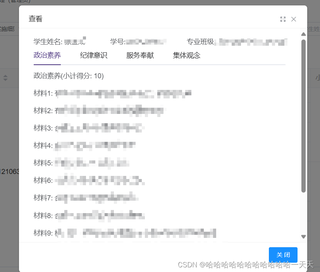
但是倒叙的话就是

主要是排序问题,不知道为什么倒叙排序的时候点击最后一列的查看数据并没有合并,求解决方式


