shoukeibunn 2024-11-26 15:46 采纳率: 50%
浏览 50
已结题

uni-app动态修改推荐页内容时报错

需要动态修改推荐页的内容,跟着教学视频里的代码写的,如下:
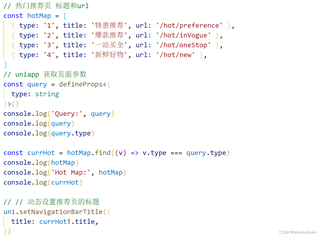
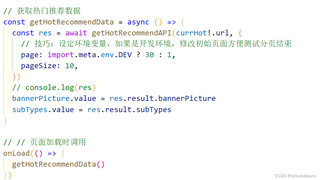
img

img

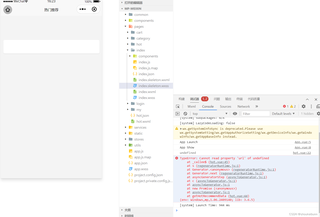
但是小程序页面编译后推荐页没有任何数据,而且控制台出现如下报错(TypeError: Cannot read property 'title' of undefined 以及 TypeError: Cannot read property 'url' of undefined):
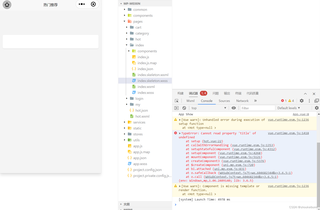
img

img

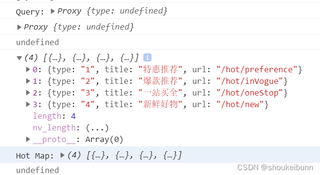
依次console.log('Query:', query)、console.log(query)、console.log(query.type)、console.log(hotMap)、console.log('Hot Map:', hotMap)、console.log(currHot),控制台得到的结果如下图:
img

导航页面传参如下:

img

不知道是页面传参出了问题还是哪里写错了,百度尝试了几种方法,但还是得不到解决,有没有哪位厉害的兄弟帮忙看看,不然项目后面没法进行,谢谢!

  • 写回答

22条回答 默认 最新

  • M_try的小尾巴 2024-11-26 17:26
    关注

    提示: 本回答参考 AIGC,由本人审核整理提供。若问题解决,望采纳;如仍有疑问,请评论回复。

    问题分析

    根据你提供的信息,问题出在动态修改微信小程序推荐页的标题时,控制台报错 TypeError: Cannot read property 'title' of undefinedTypeError: Cannot read property 'url' of undefined。通过 console.log(currHot) 的结果是 undefined,可以推断出 currHot 变量在某些情况下没有被正确赋值。

    问题原因

    1. currHot 变量未定义

      • 代码中 const currHot = hotMap.find((v) => v.type === query.type) 这一行,query.type 可能没有匹配到 hotMap 中的任何项,导致 currHotundefined
    2. uni.setNavigationBarTitle 调用错误

      • 代码中 uni.setNavigationBarTitle 的调用方式有误,应该是 uni.setNavigationBarTitle({ title: currHot.title }),而不是 uni.setNavigationBarTitle { title: currHot1.title,

    解决方案

    1. 检查 query.type 的值

      • 确保 query.type 的值是 hotMap 数组中存在的 type 值之一。
      • 可以在 onLoad 生命周期函数中打印 query 对象,确认 query.type 的值是否正确。
      onLoad((query) => {
        console.log('Query:', query);
        const currHot = hotMap.find((v) => v.type === query.type);
        console.log('currHot:', currHot);
        if (currHot) {
          uni.setNavigationBarTitle({
            title: currHot.title
          });
        } else {
          console.error('No matching type found in hotMap');
        }
      });
      
    2. 修正 uni.setNavigationBarTitle 的调用方式

      • 确保 uni.setNavigationBarTitle 的调用方式正确,使用对象参数。
      if (currHot) {
        uni.setNavigationBarTitle({
          title: currHot.title
        });
      }
      
    3. 添加默认值处理

      • 为了避免 currHotundefined 时报错,可以在找不到匹配项时设置一个默认标题。
      const defaultTitle = '推荐页';
      const currHot = hotMap.find((v) => v.type === query.type) || { title: defaultTitle };
      uni.setNavigationBarTitle({
        title: currHot.title
      });
      

    总结

    通过以上步骤,你应该能够解决 currHotundefined 的问题,并正确设置推荐页的标题。确保 query.type 的值在 hotMap 中存在,并且在调用 uni.setNavigationBarTitle 时使用正确的语法。

    评论

报告相同问题?

问题事件

  • 已结题 (查看结题原因) 12月2日
  • 已采纳回答 11月27日
  • 修改了问题 11月26日
  • 修改了问题 11月26日
  • 展开全部