使用QCt reator打开Qt项目,提示No suitable kits found.Add a kit in the options or via the maintenance tool of the SDK.无法正常加载项目。请问如何解决?
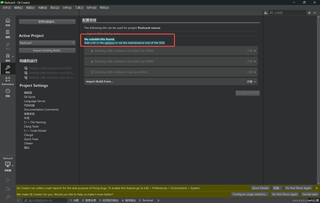

使用QCt reator打开Qt项目,提示No suitable kits found.Add a kit in the options or via the maintenance tool of the SDK.无法正常加载项目。请问如何解决?
 分享
分享
 关注
关注让道友老李来帮你解答,本回答参考通义千问qwen-plus编写提供,如果还有疑问可以评论或留言### 问题描述 在使用 Qt Creator 打开 Qt 项目时,出现错误提示 "No suitable kits found. Add a kit in the options or via the maintenance tool of the SDK.",导致项目无法正常加载。
确保你已经安装了合适的 Qt 版本和编译器。你可以通过以下步骤检查:
Tools -> Options(或者 Preferences 在 macOS 上)。Kits 选项卡。Qt Versions 和 Compilers 部分是否有合适的版本和编译器。如果缺少合适的 Kit,需要手动添加:
Tools -> Options(或者 Preferences 在 macOS 上)。Kits 选项卡。Add 按钮,创建一个新的 Kit。Name 中输入一个名称,例如 Desktop Qt 5.15.2 (MSVC 2019 64bit)。Qt Version 下拉菜单中选择合适的 Qt 版本。Compiler 下拉菜单中选择合适的编译器。Device Type 为 Desktop。Apply 和 OK 保存设置。确保项目的 .pro 文件中没有错误配置:
.pro 文件。QT += 行中的模块是否正确。CONFIG += 行中的配置是否正确。重新加载项目以应用新的 Kit 设置:
假设你安装了 Qt 5.15.2 和 MSVC 2019 64-bit 编译器,以下是具体步骤:
检查 Qt 版本和编译器:
Tools -> Options。Kits 选项卡。Qt Versions 中有 Qt 5.15.2 (msvc2019_64)。Compilers 中有 Microsoft Visual C++ Compiler 16.0 (x86) 和 Microsoft Visual C++ Compiler 16.0 (amd64)。添加 Kit:
Add 按钮。Desktop Qt 5.15.2 (MSVC 2019 64bit)。Qt Version 为 Qt 5.15.2 (msvc2019_64)。Compiler 为 Microsoft Visual C++ Compiler 16.0 (amd64)。Device Type 为 Desktop。Apply 和 OK。检查项目配置:
.pro 文件。QT += core gui。CONFIG += c++11。重新加载项目:
假设你的项目是一个简单的 Qt Widgets 应用程序,.pro 文件内容如下:
QT += core gui

greaterThan(QT_MAJOR_VERSION, 4): QT += widgets

CONFIG += c++11

# The following define makes your compiler emit warnings if you use
# any feature of Qt which as been marked deprecated (the exact warnings
# depend on your compiler). Please consult the documentation of the
# deprecated API in order to know how to port your code away from it.
DEFINES += QT_DEPRECATED_WARNINGS

# You can also make your code fail to compile if you use deprecated APIs.
# In order to do so, uncomment the following line.
# You can also select to disable deprecated APIs only up to a certain version of Qt.
#DEFINES += QT_DISABLE_DEPRECATED_BEFORE=0x060000    # disables all the APIs deprecated before Qt 6.0.0

SOURCES += \
        main.cpp \
        mainwindow.cpp

HEADERS += \
        mainwindow.h

FORMS += \
        mainwindow.ui

# Default rules for deployment.
qnx: target.path = /tmp/$${TARGET}/bin
else: unix:!android: target.path = /opt/$${TARGET}/bin
!isEmpty(target.path): INSTALLS += target
通过以上步骤,你应该能够解决 "No suitable kits found" 的问题,并成功加载和运行你的 Qt 项目。如果问题仍然存在,请检查 Qt 安装是否完整,或者尝试重新安装 Qt 和 Qt Creator。
分享 创建了问题
12月9日
创建了问题
12月9日


