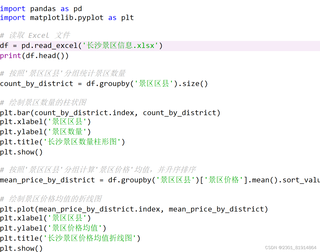
运行结果显示No such file or directory
路径到底怎么写啊

 分享
分享
 关注
关注让道友老李来帮你解答,本回答参考通义千问qwen-plus编写提供,如果还有疑问可以评论或留言### 问题描述 在尝试读取文件时,遇到 `No such file or directory` 错误。这通常是因为文件路径不正确或文件不存在。
检查文件是否存在
ls 或 dir)检查文件是否存在。检查路径是否正确
\ 或双反斜杠 \\/使用绝对路径
检查文件权限
假设你有一个 Python 脚本,需要读取一个名为 example.txt 的文件。
在命令行中运行以下命令:
# 在 Linux/Mac 上
ls /path/to/example.txt

# 在 Windows 上
dir C:\path\to\example.txt
修改你的 Python 脚本,使用绝对路径:
# 使用绝对路径
file_path = '/path/to/example.txt'

try:
    with open(file_path, 'r') as file:
        content = file.read()
        print(content)
except FileNotFoundError:
    print(f"No such file or directory: {file_path}")
确保路径分隔符正确:
import os

# 使用 os.path.join 来生成跨平台的路径
file_path = os.path.join('path', 'to', 'example.txt')

try:
    with open(file_path, 'r') as file:
        content = file.read()
        print(content)
except FileNotFoundError:
    print(f"No such file or directory: {file_path}")
import os

# 使用绝对路径
file_path = '/path/to/example.txt'

# 或者使用 os.path.join 生成跨平台的路径
# file_path = os.path.join('path', 'to', 'example.txt')

try:
    with open(file_path, 'r') as file:
        content = file.read()
        print(content)
except FileNotFoundError:
    print(f"No such file or directory: {file_path}")
通过以上步骤,你可以逐步排查并解决 No such file or directory 错误。确保文件存在、路径正确、使用绝对路径、检查路径分隔符和文件权限,这些方法可以帮助你找到问题的根源。
分享 创建了问题
12月10日
创建了问题
12月10日

