

最近在进行Onvif设备端开发,通过Onvif devcies manager能够扫描到设备,但是会报错,如下截图所示,请问下这个可能是什么原因。
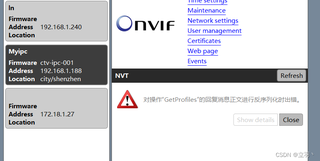
摄像头端GetProfiles应答信息如下:
HTTP/1.1 200 OK
Server: gSOAP/2.8
X-Frame-Options: SAMEORIGIN
Content-Type: application/soap+xml; charset=utf-8
Content-Length: 5054
Connection: close

<?xml version="1.0" encoding="UTF-8"?>
<SOAP-ENV:Envelope xmlns:SOAP-ENV="http://www.w3.org/2003/05/soap-envelope" xmlns:SOAP-ENC="http://www.w3.org/2003/05/soap-encoding" xmlns:xsi="http://www.w3.org/2001/XMLSchema-instance" xmlns:xsd="http://www.w3.org/2001/XMLSchema" xmlns:wsa="http://schemas.xmlsoap.org/ws/2004/08/addressing" xmlns:wsdd="http://schemas.xmlsoap.org/ws/2005/04/discovery" xmlns:c14n="http://www.w3.org/2001/10/xml-exc-c14n#" xmlns:ds="http://www.w3.org/2000/09/xmldsig#" xmlns:saml1="urn:oasis:names:tc:SAML:1.0:assertion" xmlns:saml2="urn:oasis:names:tc:SAML:2.0:assertion" xmlns:wsu="http://docs.oasis-open.org/wss/2004/01/oasis-200401-wss-wssecurity-utility-1.0.xsd" xmlns:xenc="http://www.w3.org/2001/04/xmlenc#" xmlns:wsc="http://docs.oasis-open.org/ws-sx/ws-secureconversation/200512" xmlns:wsse="http://docs.oasis-open.org/wss/2004/01/oasis-200401-wss-wssecurity-secext-1.0.xsd" xmlns:ns3="http://www.w3.org/2005/08/addressing" xmlns:ns1="http://schemas.xmlsoap.org/ws/2005/04/discovery" xmlns:xmime="http://www.w3.org/2005/05/xmlmime" xmlns:w3xop="http://www.w3.org/2004/08/xop/include" xmlns:tt="http://www.onvif.org/ver10/schema" xmlns:wsrfbf="http://docs.oasis-open.org/wsrf/bf-2" xmlns:wstop="http://docs.oasis-open.org/wsn/t-1" xmlns:ns2="http://schemas.xmlsoap.org/ws/2004/08/addressing" xmlns:wsrfr="http://docs.oasis-open.org/wsrf/r-2" xmlns:tdn="http://www.onvif.org/ver10/network/wsdl" xmlns:tds="http://www.onvif.org/ver10/device/wsdl" xmlns:tev="http://www.onvif.org/ver10/events/wsdl" xmlns:wsnt="http://docs.oasis-open.org/wsn/b-2" xmlns:timg="http://www.onvif.org/ver20/imaging/wsdl" xmlns:tmd="http://www.onvif.org/ver10/deviceIO/wsdl" xmlns:tptz="http://www.onvif.org/ver20/ptz/wsdl" xmlns:trt="http://www.onvif.org/ver10/media/wsdl">
  <SOAP-ENV:Body>
    <trt:GetProfilesResponse>
      <trt:Profiles token="MainProfileToken" fixed="true">
        <tt:Name>MainProfile</tt:Name>
        <tt:VideoSourceConfiguration token="VideoSourceCfgToken_0">
          <tt:Name>VideoSourceCfg0</tt:Name>
          <tt:UseCount>1</tt:UseCount>
          <tt:SourceToken>VideoSourceToken_0</tt:SourceToken>
          <tt:Bounds x="0" y="0" width="1280" height="720">
          </tt:Bounds>
        </tt:VideoSourceConfiguration>
        <tt:AudioSourceConfiguration token="AudioSourceCfgToken_0">
          <tt:Name>AudioSourceCfg0</tt:Name>
          <tt:UseCount>1</tt:UseCount>
          <tt:SourceToken>AudioSourceToken_0</tt:SourceToken>
        </tt:AudioSourceConfiguration>
        <tt:VideoEncoderConfiguration token="VideoEncoderCfgToken_0">
          <tt:Name>VideoEncoderCfg0</tt:Name>
          <tt:UseCount>1</tt:UseCount>
          <tt:Encoding>H264</tt:Encoding>
          <tt:Resolution>
            <tt:Width>1280</tt:Width>
            <tt:Height>720</tt:Height>
          </tt:Resolution>
          <tt:Quality>70</tt:Quality>
          <tt:RateControl>
            <tt:FrameRateLimit>25</tt:FrameRateLimit>
            <tt:EncodingInterval>1</tt:EncodingInterval>
            <tt:BitrateLimit>4096</tt:BitrateLimit>
          </tt:RateControl>
          <tt:H264>
            <tt:GovLength>25</tt:GovLength>
            <tt:H264Profile>Main</tt:H264Profile>
          </tt:H264>
          <tt:Multicast />
          <tt:SessionTimeout />
        </tt:VideoEncoderConfiguration>
        <tt:AudioEncoderConfiguration token="AudioEncoderCfgToken_0">
          <tt:Name>AudioEncoderCfg0</tt:Name>
          <tt:UseCount>1</tt:UseCount>
          <tt:Encoding>G711</tt:Encoding>
          <tt:Bitrate>64</tt:Bitrate>
          <tt:SampleRate>48</tt:SampleRate>
          <tt:Multicast />
          <tt:SessionTimeout />
        </tt:AudioEncoderConfiguration>
        <tt:PTZConfiguration token="PTZCfgToken_0">
          <tt:Name>PTZConfigurations_0</tt:Name>
          <tt:UseCount>1</tt:UseCount>
          <tt:NodeToken>ptznode_token_0</tt:NodeToken>
          <tt:DefaultAbsolutePantTiltPositionSpace>http://www.onvif.org/ver10/tptz/PanTiltSpaces/DigitalPositionSpace</tt:DefaultAbsolutePantTiltPositionSpace>
          <tt:DefaultAbsoluteZoomPositionSpace>http://www.onvif.org/ver10/tptz/ZoomSpaces/PositionGenericSpace</tt:DefaultAbsoluteZoomPositionSpace>
          <tt:DefaultRelativePanTiltTranslationSpace>http://www.onvif.org/ver10/tptz/PanTiltSpaces/DigitalTranslationSpace</tt:DefaultRelativePanTiltTranslationSpace>
          <tt:DefaultRelativeZoomTranslationSpace>http://www.onvif.org/ver10/tptz/ZoomSpaces/TranslationGenericSpace</tt:DefaultRelativeZoomTranslationSpace>
          <tt:DefaultContinuousPanTiltVelocitySpace>http://www.onvif.org/ver10/tptz/PanTiltSpaces/VelocityGenericSpace</tt:DefaultContinuousPanTiltVelocitySpace>
          <tt:DefaultContinuousZoomVelocitySpace>http://www.onvif.org/ver10/tptz/ZoomSpaces/VelocityGenericSpace</tt:DefaultContinuousZoomVelocitySpace>
          <tt:DefaultPTZSpeed>
            <tt:PanTilt x="0.5" y="0.5" space="http://www.onvif.org/ver10/tptz/PanTiltSpaces/GenericSpeedSpace">
            </tt:PanTilt>
            <tt:Zoom x="0.5" space="http://www.onvif.org/ver10/tptz/ZoomSpaces/ZoomGenericSpeedSpace">
            </tt:Zoom>
          </tt:DefaultPTZSpeed>
          <tt:DefaultPTZTimeout>100</tt:DefaultPTZTimeout>
          <tt:PanTiltLimits>
            <tt:Range>
              <tt:URI>http://www.onvif.org/ver20/ptz/wsdl</tt:URI>
              <tt:XRange>
                <tt:Min>-1</tt:Min>
                <tt:Max>1</tt:Max>
              </tt:XRange>
              <tt:YRange>
                <tt:Min>-1</tt:Min>
                <tt:Max>3</tt:Max>
              </tt:YRange>
            </tt:Range>
          </tt:PanTiltLimits>
          <tt:ZoomLimits>
            <tt:Range>
              <tt:URI>http://www.onvif.org/ver20/ptz/wsdl</tt:URI>
              <tt:XRange>
                <tt:Min>0</tt:Min>
                <tt:Max>1</tt:Max>
              </tt:XRange>
            </tt:Range>
          </tt:ZoomLimits>
        </tt:PTZConfiguration>
      </trt:Profiles>
    </trt:GetProfilesResponse>
  </SOAP-ENV:Body>
</SOAP-ENV:Envelope>


