??????712 2024-12-16 10:22 采纳率: 70%
浏览 5

农历转换(标签-ar)

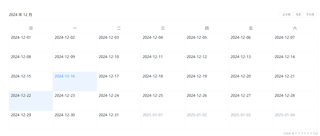
我使用lunar-calendar来获取当前的农历,但是显示失败,请各位帮我修改代码,使其可以正常显示对应的农历日期,下面是对应的过程,我想在对应的格子里面显示当前的日而不显示年月,然后再下面在显示对应的农历日期

下面是我获取公历日期的代码,

<template>
  <div class="lunar-calendar">
    <el-calendar v-model="currentDate">
      <template #date-cell="{ data }">
        <div>

          {{ data.day }}
        </div>
      </template>
    </el-calendar>
  </div>
</template>

<script setup>
import { ref } from 'vue';

const currentDate = ref(new Date());
</script>

<style scoped>
.lunar-calendar {
  margin: 20px;
}
</style>


下面是显示的图片
img

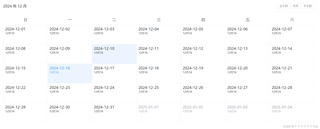
然后我在公历下面添加了农历显示,但是其只显示12月16一个日子,下面是对应的代码

<template>
  <div class="lunar-calendar">
    <el-calendar v-model="currentDate">
      <template #date-cell="{ data }">
        <div>
          <!-- 只显示日期,不显示年份和月份 -->
          {{ data.day }}
          <!-- 显示农历日期 -->
          <div class="lunar-date" v-if="lunarDate">
            {{ lunarDate.month }}{{ lunarDate.day }}
          </div>
        </div>
      </template>
    </el-calendar>
  </div>
</template>

<script setup>
import {ref, computed} from 'vue';
import chineseLunar from 'chinese-lunar';

const currentDate = ref(new Date());

const lunarDate = computed(() => {
  const solarDate = new Date(currentDate.value.getFullYear(), currentDate.value.getMonth(), currentDate.value.getDate());
  const lunar = chineseLunar.solarToLunar(solarDate);
  return {
    month: lunar.month + 1, // 农历月份是从0开始的,所以需要加1
    day: lunar.day
  };
});
</script>

<style scoped>
.lunar-calendar {
  margin: 20px;
}

.lunar-date {
  font-size: 12px;
}
</style>现在所有的农历都显示为12月16了


下面是对应的截图
img

  • 写回答

2条回答 默认 最新

  • 道友老李 JWE233286一种基于机器视觉的水表指针读数识别及修正的方法 专利发明者 2024-12-16 10:24
    关注
    让【道友老李】来帮你解答,本回答参考通义千问qwen-plus编写,并整理提供,如果还有疑问可以点击头像关注,评论或留言
    要解决你遇到的问题,我们需要确保每个日期单元格都能正确计算并显示对应的农历日期。当前的问题在于 `lunarDate` 是一个计算属性,它只会在 `currentDate` 发生变化时重新计算,而不会为每个日期单元格单独计算。

    我们可以将农历日期的计算移到 date-cell 模板中,这样每个日期单元格都会独立计算其对应的农历日期。以下是修改后的代码:

    修改后的代码

    <template>
      <div class="lunar-calendar">
        <el-calendar v-model="currentDate">
          <template #date-cell="{ data }">
            <div>
              <!-- 只显示日期,不显示年份和月份 -->
              {{ data.day }}
              <!-- 显示农历日期 -->
              <div class="lunar-date" v-if="getLunarDate(data)">
                {{ getLunarDate(data).month }}月{{ getLunarDate(data).day }}
              </div>
            </div>
          </template>
        </el-calendar>
      </div>
    </template>
    
    <script setup>
    import { ref } from 'vue';
    import chineseLunar from 'chinese-lunar';
    
    const currentDate = ref(new Date());
    
    // 定义一个方法来计算农历日期
    const getLunarDate = (data) => {
      const solarDate = new Date(data.year, data.month - 1, data.day);
      const lunar = chineseLunar.solarToLunar(solarDate);
      return {
        month: lunar.month + 1, // 农历月份是从0开始的,所以需要加1
        day: lunar.day
      };
    };
    </script>
    
    <style scoped>
    .lunar-calendar {
      margin: 20px;
    }
    .lunar-date {
      font-size: 12px;
    }
    </style>
    

    解释

    1. 模板部分

      • date-cell 模板中,我们使用 v-if="getLunarDate(data)" 来确保只有当 getLunarDate 返回有效值时才显示农历日期。
      • {{ getLunarDate(data).month }}月{{ getLunarDate(data).day }} 用于显示农历日期。
    2. 脚本部分

      • 定义了一个 getLunarDate 方法,该方法接受 data 对象作为参数,并返回对应的农历日期。
      • solarDate 是根据 data 对象中的年、月、日创建的公历日期对象。
      • 使用 chineseLunar.solarToLunar(solarDate) 将公历日期转换为农历日期。
      • 返回一个包含农历月份和日期的对象。
    3. 样式部分

      • 保持原有的样式不变,确保日历和农历日期的显示效果。

    通过这种方式,每个日期单元格都会独立计算并显示其对应的农历日期,从而避免了所有日期显示相同农历日期的问题。

    评论

报告相同问题?

问题事件

  • 创建了问题 12月16日