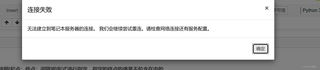

jupyter的文件不能连接到服务器,我自己也不能运行代码,怎么办?

 分享
分享
 关注
关注让【道友老李】来帮你解答,本回答参考通义千问qwen-plus编写,并整理提供,如果还有疑问可以点击头像关注,评论或留言### 问题描述 在使用 Jupyter Notebook 时,文件无法连接到服务器,导致无法运行代码。
确保 Jupyter Notebook 服务已经启动。可以在命令行中运行以下命令来启动 Jupyter Notebook:
jupyter notebook
如果服务已经启动,你会看到类似以下的输出:
[I 12:34:56.789 NotebookApp] Serving notebooks from local directory: /path/to/your/directory
[I 12:34:56.789 NotebookApp] The Jupyter Notebook is running at:
[I 12:34:56.789 NotebookApp] http://localhost:8888/?token=your_token
[I 12:34:56.789 NotebookApp] Use Control-C to stop this server and shut down all kernels (twice to skip confirmation).
确保你的浏览器能够访问 Jupyter Notebook 的 URL。通常情况下,URL 是 http://localhost:8888。如果无法访问,尝试以下步骤: - 确保没有防火墙或安全软件阻止访问。 - 尝试在不同的浏览器中打开 Jupyter Notebook。
Jupyter Notebook 默认使用 8888 端口。如果该端口被其他服务占用,可以尝试更改端口:
jupyter notebook --port 8889
如果上述方法都无法解决问题,可以尝试重新安装 Jupyter:
pip uninstall jupyter
pip install jupyter
Jupyter 配置文件可能存在问题。可以删除配置文件并重新生成:
jupyter notebook --generate-config
配置文件路径通常为 ~/.jupyter/jupyter_notebook_config.py。你可以编辑该文件以进行进一步的配置。
确保 Jupyter 内核正常运行。可以在 Jupyter Notebook 中打开一个新笔记本,尝试运行简单的代码(如 print("Hello, World!"))来检查内核是否正常工作。
假设你在启动 Jupyter Notebook 时遇到以下错误:
[I 12:34:56.789 NotebookApp] Kernel started: 12345678-9abc-def0-1234-56789abcdef0
[I 12:34:58.789 NotebookApp] KernelRestarter: restarting kernel (1/5), new random ports
这表明内核启动失败。可以尝试以下步骤: 1. 重启内核:在 Jupyter Notebook 界面中,选择 Kernel -> Restart。 2. 检查内核配置:确保 Python 环境正确安装且路径正确。 3. 查看日志:查看 Jupyter 启动时的日志输出,查找具体的错误信息。
以下是一个简单的 Python 代码示例,用于测试 Jupyter 内核是否正常工作:
# 测试代码
print("Hello, World!")
通过以上步骤,你应该能够解决 Jupyter Notebook 无法连接到服务器的问题。如果问题仍然存在,请提供更多的错误信息以便进一步诊断。
分享 创建了问题
12月16日
创建了问题
12月16日


