
图片上传功能,成功发送请求并获得响应,但是:on-success="handleUploadSuccess"没有触发,handleUploadSuccess也没有执行,控制台没有任何输出。
图片上传部分代码块:
          <el-form-item label="商品图片" :label-width="'80px'">
            <!-- 使用el-upload上传图片 -->
            <el-upload
              action="http://localhost:8080/upload"
              :headers="uploadHeaders"
              :on-success="handleUploadSuccess"
              :on-error="handleUploadError"
              :file-list="fileList"
              accept="image/*"
              ref="upload"
              :auto-upload="true"
              name="image"
            >
              <el-button type="primary">选择图片</el-button>
            </el-upload>
          </el-form-item>

。。。。。。。。。。。

  methods: {
    // 处理图片上传成功
    handleUploadSuccess(response, file, fileList) {
      console.log('response :>> ', response);
      if (response.code === 1) { // 判断上传是否成功
        this.modalProduct.image = response.data; // 设置图片 URL
        this.$message.success('图片上传成功');
        console.log('上传成功:', response.data);
      } else {
        this.$message.error('上传失败,请重试');
      }
    },
    handleUploadError(err, file, fileList) {
      console.error('上传失败:', err); // 输出错误信息
      this.$message.error('上传失败,请检查接口或网络连接');
    },

    // 处理表单提交
     handleSubmit() {
      if (!this.modalProduct.image) {
        this.$message.error('请先上传图片');
        return;
      }

      // 提交表单
      this.$refs.productForm.submit();
    },
  },
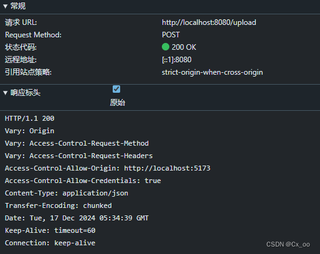

理论上请求成功后handleUploadSucces执行,对image赋值。this.modalProduct.image = response.data;
但是handleUploadSucces没有执行,之后在修改商品信息请求上传后,后端的得到的信息如下:
Product(productId=5, name=洗发水, number=10, price=49.0, dis=0.9, image=5.jpg)
这里image应该是上文中提到的响应数据data那段url
完整代码如下:
<template>
  <Layout>
    <div id="app" class="app-container">
      <!-- 查询商品功能 -->
      <div class="query-container">
        <div class="search-controls">
          <el-input v-model="searchName" placeholder="请输入商品名称" class="search-input"/>
          <el-button type="primary" @click="searchProducts" class="search-button">查询商品</el-button>
          <el-button type="primary" @click="openAddProductModal" class="add-button" round>新增商品</el-button>
        </div>
      </div>

      <!-- 商品列表 -->
      <el-table :data="products" style="width: 100%" border>
        <el-table-column label="商品名称" prop="name"></el-table-column>
        <el-table-column label="价格" prop="price"></el-table-column>
        <el-table-column label="库存" prop="number"></el-table-column>
        <el-table-column label="折扣" prop="dis"></el-table-column>
        <el-table-column label="图片">
          <template #default="{ row }">
            <img :src="row.image" alt="商品图片" style="width: 50px; height: 50px; object-fit: cover;">
          </template>
        </el-table-column>
        <el-table-column label="操作">
          <template #default="{ row }">
            <button @click="editProduct(row)" class="edit-button">编辑</button>
            <button @click="deleteProduct(row.productId)" class="delete-button">删除</button>
          </template>
        </el-table-column>
      </el-table>

      <!-- 商品查询弹窗 -->
      <el-dialog
          v-model="showSearchModal"
          title="查询结果"
          width="60%"
          :before-close="closeSearchModal"
      >
        <el-table :data="searchResults" style="width: 100%">
          <el-table-column prop="productId" label="商品序号" width="180"></el-table-column>
          <el-table-column prop="name" label="商品名称" width="180"></el-table-column>
          <el-table-column prop="price" label="商品价格" width="180"></el-table-column>
          <el-table-column prop="number" label="库存" width="180"></el-table-column>
          <el-table-column prop="dis" label="折扣" width="180"></el-table-column>
        </el-table>

        <template #footer>
          <div class="dialog-footer">
            <el-button @click="showSearchModal = false" class="close-button">关闭</el-button>
          </div>
        </template>
      </el-dialog>

      <!-- 新增/修改商品弹窗 -->
      <el-dialog
          v-model="showModal"
          :title="isEdit ? '修改商品' : '新增商品'"
          width="50%"
          :before-close="closeModal"
      >
        <el-form @submit.prevent="isEdit ? updateProduct() : addProduct()" ref="productForm">
          <el-form-item label="商品名称" :label-width="'80px'">
            <el-input v-model="modalProduct.name" placeholder="请输入商品名称" required></el-input>
          </el-form-item>
          <el-form-item label="价格" :label-width="'80px'">
            <el-input v-model="modalProduct.price" type="number" placeholder="请输入商品价格" required></el-input>
          </el-form-item>
          <el-form-item label="库存" :label-width="'80px'">
            <el-input v-model="modalProduct.number" type="number" placeholder="请输入商品库存" required></el-input>
          </el-form-item>
          <el-form-item label="折扣" :label-width="'80px'">
            <el-input
                v-model="modalProduct.dis"
                type="number"
                placeholder="请输入商品折扣"
                min="0"
                max="1"
                step="0.01"
            ></el-input>
          </el-form-item>

          <el-form-item label="商品图片" :label-width="'80px'">
            <!-- 使用el-upload上传图片 -->
            <el-upload
              action="http://localhost:8080/upload"
              :headers="uploadHeaders"
              :on-success="handleUploadSuccess"
              :on-error="handleUploadError"
              :file-list="fileList"
              accept="image/*"
              ref="upload"
              :auto-upload="true"
              name="image"
            >
              <el-button type="primary">选择图片</el-button>
            </el-upload>
          </el-form-item>

        </el-form>

        <template #footer>
          <div class="dialog-footer">
            <el-button @click="closeModal" class="close-button">关闭</el-button>
            <el-button type="primary" @click="isEdit ? updateProduct() : addProduct()" class="add-button">
              {{ isEdit ? '保存修改' : '新增商品' }}
            </el-button>
          </div>
        </template>
      </el-dialog>
    </div>
  </Layout>
</template>

<script>
import Layout from '../../components/Layout.vue'; // 引入布局组件
import '../../assets/style.css';
import { ElMessage } from "element-plus";
import axios from '@/utils/axios';

export default {
  data() {
    return {
      selectedFile: null, // 用于存储用户选择的文件
      fileList: [], // 存储文件列表
    };
  },
  computed: {
    // 获取 token
    uploadHeaders() {
      return {
        'token': localStorage.getItem('token') // 获取 token
      };
    }
  },
  methods: {
    // 处理图片上传成功
    handleUploadSuccess(response, file, fileList) {
      console.log('response :>> ', response);
      if (response.code === 1) { // 判断上传是否成功
        this.modalProduct.image = response.data; // 设置图片 URL
        this.$message.success('图片上传成功');
        console.log('上传成功:', response.data);
      } else {
        this.$message.error('上传失败,请重试');
      }
    },
    handleUploadError(err, file, fileList) {
      console.error('上传失败:', err); // 输出错误信息
      this.$message.error('上传失败,请检查接口或网络连接');
    },

    // 处理表单提交
     handleSubmit() {
      if (!this.modalProduct.image) {
        this.$message.error('请先上传图片');
        return;
      }

      // 提交表单
      this.$refs.productForm.submit();
    },
  },

  name: 'ProductManagement',
  components: {
    Layout // 注册 Layout 组件
  },
  data() {
    return {
      searchName: '', // 查询商品的名字
      products: [], // 商品列表
      searchResults: [], // 查询结果
      modalProduct: {
        productId: null, // 商品ID
        name: '', // 商品名称
        price: 0, // 商品价格
        number: 0, // 商品数量
        dis: 0, // 折扣信息
        image: '' // 商品图片
      },
      showModal: false, // 控制弹窗的显示
      showSearchModal: false, // 控制查询结果弹窗的显示
      isEdit: false, // 判断是否是编辑模式
    };
  },
  mounted() {
    this.getProducts(); // 加载商品列表
  },
  methods: {
    // 获取商品列表
    getProducts() {
      axios.get(`http://localhost:8080/product?page=${this.currentPage}&size=${this.pageSize}`)
        .then(response => {
          this.products = response.data.data; // 假设接口返回的字段是 data
          this.totalProducts = response.data.total; // 假设接口返回总商品数
        })
        .catch(error => {
          console.error('There was an error!', error);
        });
    },

    // 查询商品
    searchProducts() {
      if (!this.searchName) {
        alert('请输入商品名称');
        return;
      }
      axios.get(`http://localhost:8080/product?name=${this.searchName}`)
        .then(response => {
          this.searchResults = response.data.data; // 假设接口返回的字段是 data
          if (this.searchResults.length === 0) {
            alert('未找到该商品');
            this.showSearchModal = false; // 未查询到商品时不显示弹窗
          } else {
            this.showSearchModal = true; // 查询到商品时才显示弹窗
          }
        })
        .catch(error => {
          console.error('There was an error during search!', error);
        });
    },

    // 关闭查询结果弹窗
    closeSearchModal() {
      this.showSearchModal = false;
    },

    // 打开新增商品的弹窗
    openAddProductModal() {
      this.modalProduct = {
        productId: null,
        name: '',
        price: 0,
        number: 0,
        dis: 0,
        image: ''
      };
      this.isEdit = false; // 设置为新增模式
      this.showModal = true; // 显示弹窗
    },

    // 关闭弹窗
    closeModal() {
      this.showModal = false;
    },

    // 新增商品
    addProduct() {
      if (this.modalProduct.dis < 0 || this.modalProduct.dis > 1) {
        alert('折扣必须在0到1之间');
        return;
      }

      if (!this.modalProduct.image) {
        this.$message.error('请上传商品图片');
        return;
      }

      axios.post('http://localhost:8080/product', this.modalProduct)
        .then(response => {
          this.getProducts();
          this.closeModal();
          ElMessage.success('新增成功');
        })
        .catch(error => {
          console.error('Error adding product', error);
          this.$message.error('新增失败,请重试');
        });
    },

    // 编辑商品
    editProduct(product) {
      this.modalProduct = {
        ...product, // 解构赋值,确保其他字段正常
        image: product.image || '' // 确保 image 字段为 URL
      };
      this.isEdit = true;
      this.showModal = true;
    },

    // 更新商品
    updateProduct() {
      if (!this.modalProduct.image) {
        this.$message.error('请上传商品图片');
        return;
      }

      axios.put('http://localhost:8080/product', this.modalProduct)
        .then(response => {
          this.getProducts();
          this.closeModal();
          ElMessage.success('修改成功');
        })
        .catch(error => {
          console.error('Error updating product', error);
          this.$message.error('修改失败,请重试');
        });
    },

    // 删除商品
    deleteProduct(id) {
      axios.delete(`http://localhost:8080/product/${id}`)
        .then(response => {
          this.getProducts(); // 更新商品列表
          ElMessage.success('删除成功');
        })
        .catch(error => {
          console.error('Error deleting product', error);
        });
    }
  }
};
</script>


