添加qcustomplot到vs qt中编译失败
qt版本6.2.4
customplot版本2.1.1 报错如下:(工程是新建的)
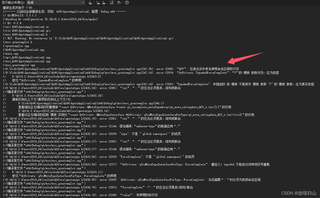
相同的文件,使用QtCreator新建一个工程,再添加customplot.h、customplot.cpp正常编译运行。请问是否有遇过相似问题的朋友

添加qcustomplot到vs qt中编译失败
qt版本6.2.4
customplot版本2.1.1 报错如下:(工程是新建的)
相同的文件,使用QtCreator新建一个工程,再添加customplot.h、customplot.cpp正常编译运行。请问是否有遇过相似问题的朋友
 分享
分享
 关注
关注让【道友老李】来帮你解答,本回答参考通义千问大模型编写,并整理提供,如果还有疑问可以点击头像关注私信或评论。
如果答案让您满意,请采纳、关注,非常感谢!### 问题分析与解决方案
根据你提供的信息,你在使用 Visual Studio (VS) 和 Qt 6.2.4 的组合时遇到了编译失败的问题,而同样的代码在 Qt Creator 中可以正常编译运行。这表明问题可能与 VS 的项目配置或 Qt 环境设置有关。
qcustomplot.h 和 qcustomplot.cpp 添加到项目中。Core, Gui, Widgets)已正确选择。qcustomplot.h 中的宏定义(如 Q_OBJECT)能够被 MOC 正确处理。假设你已经正确添加了 QCustomPlot 文件,下面是一个简单的示例代码,用于测试 QCustomPlot 是否正常工作:
// mainwindow.h
#ifndef MAINWINDOW_H
#define MAINWINDOW_H

#include <QMainWindow>
#include "qcustomplot.h"

QT_BEGIN_NAMESPACE
namespace Ui { class MainWindow; }
QT_END_NAMESPACE

class MainWindow : public QMainWindow
{
    Q_OBJECT

public:
    MainWindow(QWidget *parent = nullptr);
    ~MainWindow();

private:
    Ui::MainWindow *ui;
    QCustomPlot *customPlot;
};

#endif // MAINWINDOW_H
// mainwindow.cpp
#include "mainwindow.h"
#include "ui_mainwindow.h"

MainWindow::MainWindow(QWidget *parent)
    : QMainWindow(parent)
    , ui(new Ui::MainWindow)
{
    ui->setupUi(this);

    customPlot = new QCustomPlot(this);
    customPlot->setGeometry(10, 10, 400, 300);

    // Add a graph and set its color to blue
    customPlot->addGraph();
    customPlot->graph(0)->setPen(QPen(Qt::blue));

    // Generate some data:
    QVector<double> x(101), y(101);
    for (int i=0; i<101; ++i)
    {
        x[i] = i/50.0 - 1;
        y[i] = x[i]*x[i];
    }

    // Pass data points to graphs:
    customPlot->graph(0)->setData(x, y);

    // Let the ranges scale themselves so graph 0 fits perfectly in the visible range:
    customPlot->graph(0)->rescaleAxes();
    customPlot->replot();
}

MainWindow::~MainWindow()
{
    delete ui;
}
命名空间冲突:如果你在代码中使用了其他第三方库,可能会导致命名空间冲突。确保你没有在全局命名空间中定义与 QCustomPlot 冲突的类或函数。
MOC 问题:如果 QCustomPlot 中有 Q_OBJECT 宏定义,确保 VS 的 MOC 工具能够正确处理这些宏。可以通过手动运行 MOC 来生成 .moc 文件并将其添加到项目中。
依赖项缺失:确保所有依赖项(如 Qt 模块、QCustomPlot 库等)都已正确添加到项目中。
希望以上步骤能帮助你解决问题!如果有更多详细错误信息或其他问题,请随时提供更多信息。
分享 已结题
(查看结题原因) 1月9日
已采纳回答
1月9日
创建了问题
12月20日
已结题
(查看结题原因) 1月9日
已采纳回答
1月9日
创建了问题
12月20日


