
图上是代码,为什么运行flask后,跳转网站显示空白。
app.py中没有任何标黄,index.html中check_login标黄,并显示cannot resolve the file‘check_login"
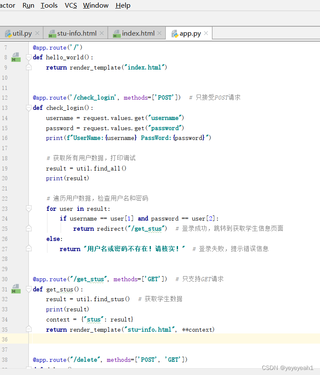

@app.route('/')
def hello_world():
    return render_template("index.html")


@app.route('/check_login', methods=['POST'])  # 只接受POST请求
def check_login():
    username = request.values.get("username")
    password = request.values.get("password")
    print(f"UserName:{username} PassWord:{password}")

    # 获取所有用户数据,打印调试
    result = util.find_all()
    print(result)

    # 遍历用户数据,检查用户名和密码
    for user in result:
        if username == user[1] and password == user[2]:
            return redirect("/get_stus")  # 登录成功,跳转到获取学生信息页面
    else:
        return "用户名或密码不存在!请核实!"  # 登录失败,提示错误信息


@app.route("/get_stus", methods=['GET'])  # 只支持GET请求
def get_stus():
    result = util.find_stus()  # 获取学生数据
    print(result)
    context = {"stus": result}
    return render_template("stu-info.html", **context)


@app.route("/delete", methods=['POST', 'GET'])
def delete():
    id = request.values.get("id")  # 获取要删除的学生ID
    util.delete_info(id)  # 删除学生信息
    return redirect("/get_stus")  # 删除后返回学生信息页面


if __name__ == '__main__':
    app.run(debug=True, port=5001)
```html
<!DOCTYPE html>
<html lang="en">
<head>
    <meta charset="UTF-8">
    <title>主页</title>
    <!-- 这里如果你不使用JS,可以去掉script标签 -->
    <script type="text/javascript" src=""></script>

    <style>
        #box {
            width: 600px;
            height: 400px;
            border: 5px solid red;
        }
    </style>
</head>
<body>

    <h1>欢迎登陆</h1>

    <!-- 登录表单 -->
    <form action="/check_login" method="post">
        <!-- 用户名输入框 -->
        <label for="username">用户名:</label>
        <input type="text" id="username" name="username" placeholder="请输入用户名" required><br>

        <!-- 密码输入框 -->
        <label for="password">密码:</label>
        <input type="password" id="password" name="password" placeholder="请输入密码" required><br>

        <!-- 提交按钮 -->
        <input type="submit" value="提交">
    </form>

</body>
</html>


