项目所实现的功能,如使用telnetlib下发网络、使用paramiko实现网络设备自动化巡检、使用netmiko发现网络、使用PySNMP获取网络数据等;
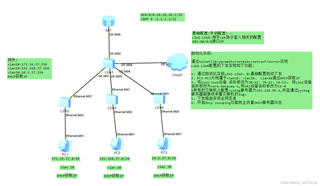

项目所实现的功能,如使用telnetlib下发网络、使用paramiko实现网络设备自动化巡检、使用netmiko发现网络、使用PySNMP获取网络数据等;
 分享
分享
晚上好🌙🌙🌙
本答案参考通义千问
要实现上述网络自动化运维项目,我们需要编写一系列脚本来完成各个任务。我们将使用telnetlib, paramiko, netmiko, 和 nornir3 库来完成这些任务。以下是完整的代码示例:
telnetlib实现Telnet登录和命令下发import telnetlib
def telnet_login(ip, username, password):
tn = telnetlib.Telnet(ip)
tn.read_until(b"Username: ")
tn.write(username.encode('ascii') + b"\n")
tn.read_until(b"Password: ")
tn.write(password.encode('ascii') + b"\n")
return tn
def send_command(tn, command):
tn.write(command.encode('ascii') + b"\n")
def telnet_example():
ip = "10.10.10.1"
username = "admin"
password = "password"
tn = telnet_login(ip, username, password)
send_command(tn, "enable")
send_command(tn, "configure terminal")
send_command(tn, "interface GigabitEthernet0/0/0")
send_command(tn, "ip address 10.10.10.1 255.255.255.0")
send_command(tn, "no shutdown")
send_command(tn, "exit")
tn.close()
telnet_example()
paramiko实现SSH登录和命令下发import paramiko
def ssh_login(ip, username, password):
client = paramiko.SSHClient()
client.set_missing_host_key_policy(paramiko.AutoAddPolicy())
client.connect(ip, username=username, password=password)
return client
def send_ssh_command(client, command):
stdin, stdout, stderr = client.exec_command(command)
print(stdout.read().decode())
print(stderr.read().decode())
def paramiko_example():
ip = "10.10.10.1"
username = "admin"
password = "password"
client = ssh_login(ip, username, password)
send_ssh_command(client, "show version")
client.close()
paramiko_example()
netmiko实现网络设备自动化巡检from netmiko import ConnectHandler
def netmiko_example():
device = {
'device_type': 'cisco_ios',
'ip': '10.10.10.1',
'username': 'admin',
'password': 'password',
}
connection = ConnectHandler(**device)
output = connection.send_command("show version")
print(output)
connection.disconnect()
netmiko_example()
pysnmp获取网络数据from pysnmp.hlapi import *
def snmp_example():
iterator = getCmd(
SnmpEngine(),
CommunityData('public', mpModel=0),
UdpTransportTarget(('demo.snmplabs.com', 161)),
ContextData(),
ObjectType(ObjectIdentity('SNMPv2-MIB', 'sysDescr', 0))
)
errorIndication, errorStatus, errorIndex, varBinds = next(iterator)
if errorIndication:
print(errorIndication)
elif errorStatus:
print('%s at %s' % (errorStatus.prettyPrint(),
errorIndex and varBinds[int(errorIndex) - 1][0] or '?'))
else:
for varBind in varBinds:
print(' = '.join([x.prettyPrint() for x in varBind]))
snmp_example()
nornir3批量配置网络设备from nornir import InitNornir
from nornir.core.filter import F
from nornir.plugins.tasks.networking import netmiko_send_config
def configure_devices(task):
config_commands = [
"hostname core-Gateway-s",
"logging 192.168.56.1",
"interface GigabitEthernet0/0/4",
"ip address dhcp",
"exit",
"vlan 10",
"exit",
"vlan 20",
"exit",
"vlan 30",
"exit",
"router ospf 1",
"network 172.16.37.0 0.0.0.255 area 0",
"network 192.168.37.0 0.0.0.255 area 0",
"network 10.1.37.0 0.0.0.255 area 0",
"exit",
"ip dhcp snooping vlan 10,20,30",
]
task.run(task=netmiko_send_config, config_commands=config_commands)
def nornir_example():
nr = InitNornir(config_file="config.yaml")
nr_filtered = nr.filter(F(groups__contains="cisco_ios"))
result = nr_filtered.run(task=configure_devices)
nornir_example()
config.yaml)inventory:
plugin: NornirInventory
options:
host_file: hosts.yaml
group_file: groups.yaml
run:
num_workers: 20
hosts.yaml 和 groups.yaml)hosts.yaml
LSW1:
  hostname: 10.10.10.1
  groups:
    - cisco_ios
  platform: ios
  port: 22
  username: admin
  password: password
LSW2:
  hostname: 10.10.10.2
  groups:
    - cisco_ios
  platform: ios
  port: 22
  username: admin
  password: password
LSW3:
  hostname: 10.10.10.3
  groups:
    - cisco_ios
  platform: ios
  port: 22
  username: admin
  password: password
LSW4:
  hostname: 10.10.10.4
  groups:
    - cisco_ios
  platform: ios
  port: 22
  username: admin
  password: password
groups.yaml
cisco_ios:
  data:
    vendor: cisco
    os: ios
以上代码展示了如何使用不同的库实现网络自动化运维项目中的各项功能。你可以根据具体需求调整配置文件和命令。
分享 创建了问题
1月5日
创建了问题
1月5日

