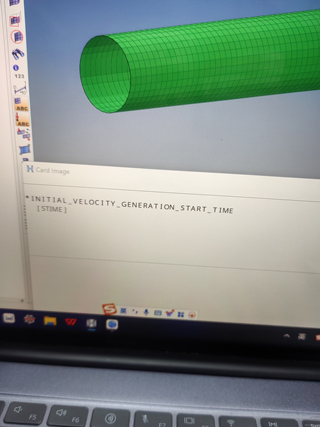
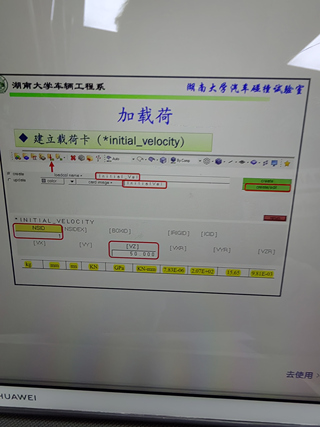
应该是图一的为什么我这里是图二哇,要甚至一个初速度,但是没有设置页面怎么办

 分享
分享
 关注
关注让【道友老李】来帮你解答,本回答参考gpt编写,并整理提供,如果还有疑问可以点击头像关注私信或评论(小黑屋了,无法评论,请私信)。
如果答案让您满意,请采纳、关注,非常感谢!问题分析: 根据图一和图二的图片来看,图一显示了一个网页加载的过程,其中包含了加载完成前和加载完成后的状态;而图二只显示了加载完成后的状态。根据你的描述,应该是想要实现一个网页加载的动态效果,即展示网页加载过程中的各个状态。 解决方案:
<!DOCTYPE html>
<html lang="en">
<head>
<meta charset="UTF-8">
<meta name="viewport" content="width=device-width, initial-scale=1.0">
<title>Loading Animation</title>
<style>
    .loading {
        width: 100px;
        height: 100px;
        background-color: #333;
        display: none;
    }
    .loaded {
        display: block;
        width: 100px;
        height: 100px;
        background-color: #333;
    }
    @keyframes loadingAnimation {
        0% {width: 0;}
        100% {width: 100px;}
    }
</style>
</head>
<body>
<div class="loading"></div>
<script>
    const loading = document.querySelector('.loading');
    loading.style.display = 'block';
    loading.style.animation = 'loadingAnimation 1s forwards';
    setTimeout(() => {
        loading.style.display = 'none';
        const loaded = document.querySelector('.loaded');
        loaded.style.display = 'block';
    }, 2000);
</script>
<div class="loaded"></div>
</body>
</html>
 创建了问题
1月15日
创建了问题
1月15日

