阿琰a_ 2025-01-20 17:42 采纳率: 25%
浏览 86

vite单独打包组件,会把其他组件也打包进来。

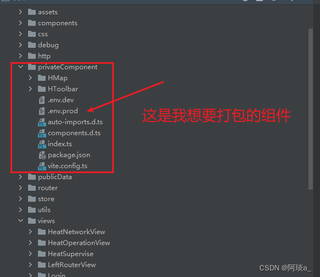
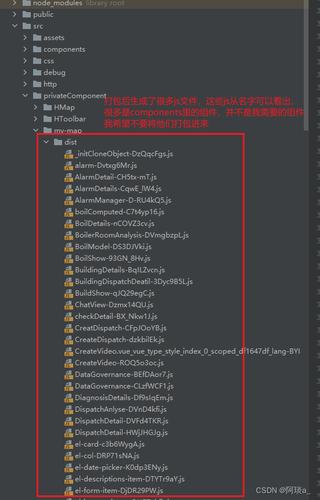
在vite搭建的vue项目中,目前我单独对项目中的一个组件进行打包,这个组件用了element-plus;打包后发现生成了很多js文件;最后找到了原因,似乎是其他组件中也用了element-plus,组件共用了element-plus依赖,导致自动把其他组件也打包进来了;但是目前我只希望打包我当前这个组件,不要把其他的组件也打包进来,有没有解决办法。
img

img

这是我的vite.config文件

import { defineConfig } from 'vite'
import vue from '@vitejs/plugin-vue'
import { resolve } from 'path';
import AutoImport from 'unplugin-auto-import/vite'
import Components from 'unplugin-vue-components/vite'
import { ElementPlusResolver } from 'unplugin-vue-components/resolvers'

const pathResolve = (dir: string) => {
    return resolve(__dirname, '.', dir);
};
const alias: Record<string, string> = {
    '@': pathResolve('./src'),
};

// https://vitejs.dev/config/
export default defineConfig({
    base:'./',
    build:{
        outDir: 'my-map/dist', //输出文件名称
        lib:{
            entry: resolve(__dirname, './index.ts'), //指定组件编译入口文件
            name: 'MyMap',
            fileName: 'my-map'
        },//库编译模式配置
        rollupOptions: {
            external: ['vue','zrender','pinia','element-plus'],
            output: {
                // format: 'es', // 默认es,可选 'amd' 'cjs' 'es' 'iife' 'umd' 'system'
                exports: 'named',
                globals: {
                    vue:'Vue',
                    zrender:'zrender',
                    pinia:'pinia',
                    'element-plus': 'ElementPlus',
                },
            }
        },
        minify: 'terser', // Vite 2.6.x 以上需要配置 minify: "terser", terserOptions 才能生效
        terserOptions: { // 在打包代码时移除 console、debugger 和 注释
            compress: {
                drop_console: true, // 生产环境时移除console
                drop_debugger: true // 生产环境时移除debugger
            },
            format: {
                comments: false // 删除注释comments
            }
        }
    },
    plugins: [
        vue(),
        AutoImport({
            resolvers: [ElementPlusResolver()],
        }),
        Components({
            resolvers: [ElementPlusResolver()],
        }),
    ],
    resolve: {
        alias,
    },
})


  • 写回答

5条回答 默认 最新

  • GISer Liu 2025-01-20 22:56
    关注

    该回答引用自GPT-deepseek, 由博主 GISer Liu 编写:

    问题分析

    用户在Vite搭建的Vue项目中,尝试单独打包一个使用了element-plus的组件时,发现打包结果中包含了其他组件的代码。原因是其他组件也使用了element-plus,导致Vite将这些依赖打包在了一起。用户希望只打包当前组件,而不包含其他组件的代码。

    关键点

    1. 依赖共享element-plus被多个组件共享,导致打包时无法分离。
    2. Vite配置:当前的Vite配置中,rollupOptions.external已经将element-plus标记为外部依赖,但打包结果仍然包含了其他组件的代码。

    解决方案

    要解决这个问题,我们需要确保在打包时只包含当前组件的代码,而不包含其他组件的代码。可以通过以下步骤实现:

    1. 分离组件:将需要单独打包的组件放在一个独立的入口文件中。
    2. 调整Vite配置:确保Vite只打包指定的入口文件,并且不包含其他组件的代码。
    3. **使用manualChunks**:通过rollupOptions.manualChunks手动控制代码分割,确保element-plus等依赖被单独打包。

    具体步骤

    1. 分离组件

    首先,确保需要单独打包的组件在一个独立的入口文件中。例如,假设你的组件是MyMap.vue,你可以创建一个index.ts文件作为入口文件:

    // index.ts
    import MyMap from './components/MyMap.vue';
    
    export default MyMap;
    

    2. 调整Vite配置

    vite.config.ts中,确保build.lib.entry指向正确的入口文件,并且rollupOptions.external中已经将element-plus标记为外部依赖。

    import { defineConfig } from 'vite';
    import vue from '@vitejs/plugin-vue';
    import { resolve } from 'path';
    import AutoImport from 'unplugin-auto-import/vite';
    import Components from 'unplugin-vue-components/vite';
    import { ElementPlusResolver } from 'unplugin-vue-components/resolvers';
    
    const pathResolve = (dir: string) => {
        return resolve(__dirname, '.', dir);
    };
    const alias: Record<string, string> = {
        '@': pathResolve('./src'),
    };
    
    export default defineConfig({
        base: './',
        build: {
            outDir: 'my-map/dist', // 输出文件名称
            lib: {
                entry: resolve(__dirname, './index.ts'), // 指定组件编译入口文件
                name: 'MyMap',
                fileName: 'my-map',
            }, // 库编译模式配置
            rollupOptions: {
                external: ['vue', 'zrender', 'pinia', 'element-plus'],
                output: {
                    exports: 'named',
                    globals: {
                        vue: 'Vue',
                        zrender: 'zrender',
                        pinia: 'pinia',
                        'element-plus': 'ElementPlus',
                    },
                    manualChunks: {
                        'element-plus': ['element-plus'], // 手动分割element-plus
                    },
                },
            },
            minify: 'terser', // Vite 2.6.x 以上需要配置 minify: "terser", terserOptions 才能生效
            terserOptions: {
                compress: {
                    drop_console: true, // 生产环境时移除console
                    drop_debugger: true, // 生产环境时移除debugger
                },
                format: {
                    comments: false, // 删除注释comments
                },
            },
        },
        plugins: [
            vue(),
            AutoImport({
                resolvers: [ElementPlusResolver()],
            }),
            Components({
                resolvers: [ElementPlusResolver()],
            }),
        ],
        resolve: {
            alias,
        },
    });
    

    3. 使用manualChunks手动控制代码分割

    rollupOptions.output中添加manualChunks配置,确保element-plus被单独打包,避免与其他组件的代码混在一起。

    rollupOptions: {
        external: ['vue', 'zrender', 'pinia', 'element-plus'],
        output: {
            exports: 'named',
            globals: {
                vue: 'Vue',
                zrender: 'zrender',
                pinia: 'pinia',
                'element-plus': 'ElementPlus',
            },
            manualChunks: {
                'element-plus': ['element-plus'], // 手动分割element-plus
            },
        },
    },
    

    总结

    通过以上步骤,你可以确保在打包时只包含当前组件的代码,而不包含其他组件的代码。manualChunks配置可以帮助你手动控制代码分割,确保element-plus等依赖被单独打包,从而避免不必要的代码混入。

    最终效果

    执行vite build后,生成的打包文件中将只包含当前组件的代码,element-plus等依赖会被单独打包,不会包含其他组件的代码。

    希望这个解决方案能帮助你解决问题!如果有其他疑问,欢迎继续提问。

    如果该回答解决了您的问题,请采纳!如果没有,请私信联系或评论您的疑惑

    评论

报告相同问题?

问题事件

  • 创建了问题 1月20日