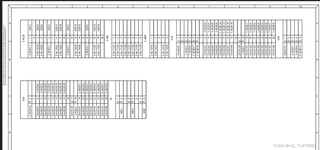
想用winform+Tesseract-OCR识别上面的图片,现在只能识别图中的一部分内容,准确度还不是很高,训练了几张照片,然后在识别准确度还是不高,想问问大家有什么好的思路吗

想用winform+Tesseract-OCR识别上面的图片,现在只能识别图中的一部分内容,准确度还不是很高,训练了几张照片,然后在识别准确度还是不高,想问问大家有什么好的思路吗
 分享
分享
中午好🌞🌞🌞
本答案参考通义千问
使用WinForms和Tesseract OCR进行图像识别时,如果遇到识别不完全或准确率低的问题,可以尝试以下几种方法来提高识别效果:
优化图像预处理:
调整Tesseract配置参数:
数据集训练:
使用自定义字典:
区域分割:
结合其他图像处理库:
using System.Drawing;
using System.Drawing.Imaging;

public static Bitmap PreprocessImage(Bitmap originalImage)
{
    // 转换为灰度图像
    var grayScaleBitmap = new Bitmap(originalImage.Width, originalImage.Height);
    using (var g = Graphics.FromImage(grayScaleBitmap))
    {
        var colorMatrix = new ColorMatrix(
            new float[][] {
                new float[] {0.3f, 0.3f, 0.3f, 0, 0},
                new float[] {0.59f, 0.59f, 0.59f, 0, 0},
                new float[] {0.11f, 0.11f, 0.11f, 0, 0},
                new float[] {0, 0, 0, 1, 0},
                new float[] {0, 0, 0, 0, 1}
            });
        var imageAttributes = new ImageAttributes();
        imageAttributes.SetColorMatrix(colorMatrix);
        g.DrawImage(originalImage, new Rectangle(0, 0, originalImage.Width, originalImage.Height),
                    0, 0, originalImage.Width, originalImage.Height, GraphicsUnit.Pixel, imageAttributes);
    }

    // 二值化处理
    for (int x = 0; x < grayScaleBitmap.Width; x++)
    {
        for (int y = 0; y < grayScaleBitmap.Height; y++)
        {
            Color pixelColor = grayScaleBitmap.GetPixel(x, y);
            int grayScaleValue = (pixelColor.R + pixelColor.G + pixelColor.B) / 3;
            if (grayScaleValue > 128)
                grayScaleBitmap.SetPixel(x, y, Color.White);
            else
                grayScaleBitmap.SetPixel(x, y, Color.Black);
        }
    }

    return grayScaleBitmap;
}
using Tesseract;

public static string PerformOCR(Bitmap processedImage)
{
    using (var engine = new TesseractEngine(@"./tessdata", "eng", EngineMode.Default))
    {
        using (var page = engine.Process(processedImage))
        {
            return page.GetText();
        }
    }
}
private void RecognizeTextButton_Click(object sender, EventArgs e)
{
    // 加载图像
    Bitmap originalImage = new Bitmap("path_to_your_image.png");

    // 预处理图像
    Bitmap processedImage = PreprocessImage(originalImage);

    // 执行OCR
    string recognizedText = PerformOCR(processedImage);

    // 显示结果
    MessageBox.Show(recognizedText);
}
eng.traineddata)。using (var engine = new TesseractEngine(@"./tessdata", "eng", EngineMode.Default))
{
engine.SetVariable("tessedit_char_whitelist", "0123456789ABCDEFGHIJKLMNOPQRSTUVWXYZabcdefghijklmnopqrstuvwxyz"); // 限制字符集
engine.SetVariable("debug_file", "output.txt"); // 输出调试信息到文件
engine.SetVariable("tessedit_pageseg_mode", "7"); // 设置页面分割模式
using (var page = engine.Process(processedImage))
{
return page.GetText();
}
}
通过这些方法,你可以显著提高OCR识别的准确性和完整性。
分享 创建了问题
1月23日
创建了问题
1月23日


