
问题遇到的现象和发生背景
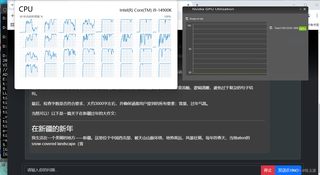
ollama使用的时候,可以认到gpu卡,但是在使用过程中国,一直在跑cpu,是怎么回事?
操作环境、软件版本等信息
OS
设备名称  computer-i914900
处理器    Intel(R) Core(TM) i9-14900K   3.20 GHz
机带 RAM    64.0 GB (63.7 GB 可用)
系统类型    64 位操作系统, 基于 x64 的处理器
笔和触控    没有可用于此显示器的笔或触控输入
nvidia-smi
C:\Users\Administrator>nvidia-smi
Thu Feb  6 15:45:58 2025
+-----------------------------------------------------------------------------------------+
| NVIDIA-SMI 572.13                 Driver Version: 572.13         CUDA Version: 12.8     |
|-----------------------------------------+------------------------+----------------------+
| GPU  Name                  Driver-Model | Bus-Id          Disp.A | Volatile Uncorr. ECC |
| Fan  Temp   Perf          Pwr:Usage/Cap |           Memory-Usage | GPU-Util  Compute M. |
|                                         |                        |               MIG M. |
|=========================================+========================+======================|
|   0  Tesla V100-SXM2-16GB         TCC   |   00000000:01:00.0 Off |                    0 |
| N/A   32C    P0             23W /  300W |      10MiB /  16384MiB |      0%      Default |
|                                         |                        |                  N/A |
+-----------------------------------------+------------------------+----------------------+

+-----------------------------------------------------------------------------------------+
| Processes:                                                                              |
|  GPU   GI   CI              PID   Type   Process name                        GPU Memory |
|        ID   ID                                                               Usage      |
|=========================================================================================|
|  No running processes found                                                             |
+-----------------------------------------------------------------------------------------+
ollama serva
D:\Ollama>ollama serve
2025/02/06 15:39:50 routes.go:1125: INFO server config env="map[CUDA_VISIBLE_DEVICES: GPU_DEVICE_ORDINAL: HIP_VISIBLE_DEVICES: HSA_OVERRIDE_GFX_VERSION: OLLAMA_DEBUG:false OLLAMA_FLASH_ATTENTION:false OLLAMA_GPU_OVERHEAD:0 OLLAMA_HOST:http://0.0.0.0:11434 OLLAMA_INTEL_GPU:false OLLAMA_KEEP_ALIVE:5m0s OLLAMA_LLM_LIBRARY: OLLAMA_LOAD_TIMEOUT:5m0s OLLAMA_MAX_LOADED_MODELS:2 OLLAMA_MAX_QUEUE:512 OLLAMA_MODELS:D:\\runingProject\\Ollama\\modules OLLAMA_NOHISTORY:false OLLAMA_NOPRUNE:false OLLAMA_NUM_PARALLEL:200 OLLAMA_ORIGINS:[* http://localhost https://localhost http://localhost:* https://localhost:* http://127.0.0.1 https://127.0.0.1 http://127.0.0.1:* https://127.0.0.1:* http://0.0.0.0 https://0.0.0.0 http://0.0.0.0:* https://0.0.0.0:* app://* file://* tauri://*] OLLAMA_RUNNERS_DIR:D:\\runingProject\\Ollama\\lib\\ollama\\runners OLLAMA_SCHED_SPREAD:false OLLAMA_TMPDIR: ROCR_VISIBLE_DEVICES:]"
time=2025-02-06T15:39:50.722+08:00 level=INFO source=images.go:753 msg="total blobs: 11"
time=2025-02-06T15:39:50.723+08:00 level=INFO source=images.go:760 msg="total unused blobs removed: 0"
time=2025-02-06T15:39:50.723+08:00 level=INFO source=routes.go:1172 msg="Listening on [::]:11434 (version 0.3.10)"
time=2025-02-06T15:39:50.724+08:00 level=INFO source=payload.go:44 msg="Dynamic LLM libraries [cpu cpu_avx cpu_avx2 cuda_v11 cuda_v12 rocm_v6.1]"
time=2025-02-06T15:39:50.724+08:00 level=INFO source=gpu.go:200 msg="looking for compatible GPUs"
time=2025-02-06T15:39:50.837+08:00 level=INFO source=gpu.go:292 msg="detected OS VRAM overhead" id=GPU-ae01e93c-a4e3-8b2e-29ec-ac0cc6065dac library=cuda compute=7.0 driver=12.8 name="Tesla V100-SXM2-16GB" overhead="306.7 MiB"
time=2025-02-06T15:39:50.838+08:00 level=INFO source=types.go:107 msg="inference compute" id=GPU-ae01e93c-a4e3-8b2e-29ec-ac0cc6065dac library=cuda variant=v12 compute=7.0 driver=12.8 name="Tesla V100-SXM2-16GB" total="15.9 GiB" available="15.6 GiB"
######## 运行情况
尝试过的解决方法
安装了历史多个版本驱动都不行
我想要达到的结果
大模型在运行的时候使用gpu进行运算


