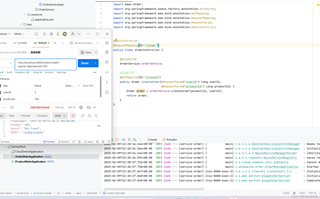
昨晚在b站上跟着尚硅谷新发的springcloud视频学微服务然后一开始自己打的也是一直报这个404错误之后跟他又打了一遍还是这个错误为什么啊,url也没错啊get的方式啊,端口号也是8000为什么老是报这个错?有人帮我解答下吗?

 分享
分享
晚上好🌙🌙🌙
本答案参考通义千问
遇到HTTP 404错误通常意味着请求的资源无法找到。以下是一些可能的原因和相应的解决方案:
检查URL路径是否正确:
确认控制器类和方法被Spring正确扫描到:
OrderController类被Spring正确扫描到。这通常通过在主应用程序类上使用@SpringBootApplication注解来实现,该注解包含了@ComponentScan注解。@SpringBootApplication或@ComponentScan中明确指定包。检查方法签名是否正确:
@GetMapping注解应该正确地映射到请求路径。检查是否有拼写错误:
确认服务器是否启动成功:
以下是基于你的代码的一些具体建议和修改:
import bean.Order;
import org.springframework.beans.factory.annotation.Autowired;
import org.springframework.web.bind.annotation.GetMapping;
import org.springframework.web.bind.annotation.RequestMapping;
import org.springframework.web.bind.annotation.RequestParam;
import org.springframework.web.bind.annotation.RestController;

@RestController
@RequestMapping("/order")
public class OrderController {

    @Autowired
    private OrderService orderService;

    @GetMapping("/create")
    public Order createOrder(@RequestParam("userId") Long userId, @RequestParam("productId") Long productId) {
        return orderService.createOrder(productId, userId);
    }
}
确保Spring Boot应用能够扫描到你的控制器:
@SpringBootApplication注解。检查日志输出:
检查端口号配置:
application.yml或application.properties中正确配置了端口号为8000。server:
port: 8000
通过以上步骤,你应该能够找到导致404错误的具体原因,并解决它。如果问题仍然存在,请检查是否有其他配置或环境问题。
分享 系统已结题
2月17日
系统已结题
2月17日 已采纳回答
2月9日
创建了问题
2月9日
已采纳回答
2月9日
创建了问题
2月9日

