
1我用caliper测试fabric区块链性能,所有环境,包括链码都部署好了,链码也都测试过了。
在用caliper压力测试时出现以下问题。
我的环境为:
centOS7.9,
fabricV2.2.9,
nodejs:18.15,
npm:10.7
caliper:0.50.
报错如下:
[root@localhost caliper-test]# caliper launch manager     --caliper-workspace .     --caliper-networkconfig networks/fabric-network.yaml     --caliper-benchconfig benchmarks/accessBenchmark.yaml     --caliper-flow-only-test
2025.02.05-07:17:43.728 info  [caliper] [cli-launch-manager]    Set workspace path: /root/go/src/hrinfo/caliper-test
2025.02.05-07:17:43.734 info  [caliper] [cli-launch-manager]    Set benchmark configuration path: /root/go/src/hrinfo/caliper-test/benchmarks/accessBenchmark.yaml
2025.02.05-07:17:43.735 info  [caliper] [cli-launch-manager]    Set network configuration path: /root/go/src/hrinfo/caliper-test/networks/fabric-network.yaml
2025.02.05-07:17:43.735 info  [caliper] [cli-launch-manager]    Set SUT type: fabric
2025.02.05-07:17:43.744 info  [caliper] [benchmark-validator]   No observer specified, will default to `none`
2025.02.05-07:17:43.744 info  [caliper] [caliper-engine]        Starting benchmark flow
2025.02.05-07:17:43.746 info  [caliper] [caliper-engine]        Skipping start commands due to benchmark flow conditioning
2025.02.05-07:17:43.746 info  [caliper] [caliper-engine]        Skipping initialization phase due to benchmark flow conditioning
2025.02.05-07:17:43.747 info  [caliper] [caliper-engine]        Skipping install smart contract phase due to benchmark flow conditioning
2025.02.05-07:17:43.803 error [caliper] [caliper-engine]        Error while performing "test" step: Error: Unknown network configuration version 2.2 specified
    at CaliperEngine.connectorFactory [as adapterFactory] (/opt/node-v18.20/lib/node_modules/@hyperledger/caliper-cli/node_modules/@hyperledger/caliper-fabric/lib/FabricConnectorFactory.js:129:15)
    at CaliperEngine.run (/opt/node-v18.20/lib/node_modules/@hyperledger/caliper-cli/node_modules/@hyperledger/caliper-core/lib/manager/caliper-engine.js:149:64)
    at LaunchManager.handler (/opt/node-v18.20/lib/node_modules/@hyperledger/caliper-cli/lib/launch/lib/launchManager.js:62:43)
    at module.exports.handler (/opt/node-v18.20/lib/node_modules/@hyperledger/caliper-cli/lib/launch/launchManagerCommand.js:46:44)
    at Object.runCommand (/opt/node-v18.20/lib/node_modules/@hyperledger/caliper-cli/node_modules/yargs/lib/command.js:240:40)
    at Object.parseArgs [as _parseArgs] (/opt/node-v18.20/lib/node_modules/@hyperledger/caliper-cli/node_modules/yargs/yargs.js:1154:41)
    at Object.runCommand (/opt/node-v18.20/lib/node_modules/@hyperledger/caliper-cli/node_modules/yargs/lib/command.js:198:30)
    at Object.parseArgs [as _parseArgs] (/opt/node-v18.20/lib/node_modules/@hyperledger/caliper-cli/node_modules/yargs/yargs.js:1154:41)
    at Object.get [as argv] (/opt/node-v18.20/lib/node_modules/@hyperledger/caliper-cli/node_modules/yargs/yargs.js:1088:21)
    at Object.<anonymous> (/opt/node-v18.20/lib/node_modules/@hyperledger/caliper-cli/caliper.js:39:5)
2025.02.05-07:17:43.804 info  [caliper] [caliper-engine]        Skipping end command due to benchmark flow conditioning
2025.02.05-07:17:43.805 error [caliper] [cli-launch-manager]    Benchmark failed with error code 6
Usage:
 caliper launch manager --caliper-bind-sut fabric:2.2 [other options]

Options:
  --help, -h           Show usage information  [布尔]
  --version            Show version information  [布尔]
  --caliper-bind-sut   The name and version of the platform to bind to  [字符串]
  --caliper-bind-cwd   The working directory for performing the SDK install  [字符串]
  --caliper-bind-args  Additional arguments to pass to "npm install". Use the "=" notation when setting this parameter  [字符串]
  --caliper-bind-file  Yaml file to override default (supported) package versions when binding an SDK  [字符串]

Error: Benchmark failed with error code 6
    at LaunchManager.handler (/opt/node-v18.20/lib/node_modules/@hyperledger/caliper-cli/lib/launch/lib/launchManager.js:70:23)
    at process.processTicksAndRejections (node:internal/process/task_queues:95:5)
报错如下。
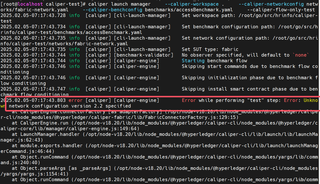
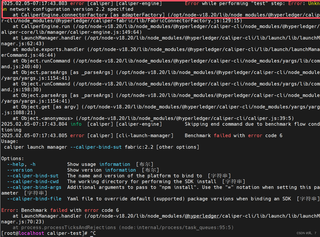
我查了一下,是这个配置文件的问题,我把version=2.2,2.0,2.2.9全都试了一遍,Error while performing "test" step: Error: Unknown network configuration version 2.2 specified都是这个类似的错误说没有指定。
与之相关的networkConfig.yaml文件如下
name: Fabric test
version: "2.2"

caliper:
  blockchain: fabric

channels:
  - channelName: mychannel
    contracts:
    - id: hrinfoCC
      contractID: hrinfoCC
      language: golang

organizations:
  - mspid: Org1MSP
    identities:
      certificates:
      - name: 'User1'
        clientPrivateKey:
          path: '/root/go/src/hrinfo/fixtures/organizations/peerOrganizations/org1.example.com/users/User1@org1.example.com/msp/keystore/priv_sk'
        clientSignedCert:
          path: '/root/go/src/hrinfo/fixtures/organizations/peerOrganizations/org1.example.com/users/User1@org1.example.com/msp/signcerts/User1@org1.example.com-cert.pem'
    connectionProfile:
      path: '/root/go/src/hrinfo/fixtures/organizations/peerOrganizations/org1.example.com/connection-org1.yaml'
      discover: true

peers:
  - peer0.org1.example.com:
      url: grpcs://localhost:7051
      tlsCACerts:
        path: /root/go/src/hrinfo/fixtures/organizations/peerOrganizations/org1.example.com/peers/peer0.org1.example.com/tls/ca.crt
      grpcOptions:
        ssl-target-name-override: peer0.org1.example.com
        hostnameOverride: peer0.org1.example.com

orderers:
  - orderer.example.com:
      url: grpcs://localhost:7050
      tlsCACerts:
        path: /root/go/src/hrinfo/fixtures/organizations/ordererOrganizations/example.com/orderers/orderer.example.com/tls/ca.crt
      grpcOptions:
        ssl-target-name-override: orderer.example.com
        hostnameOverride: orderer.example.com
我也不知道哪里有问题,查了网上所有的资料,也没有解决。


