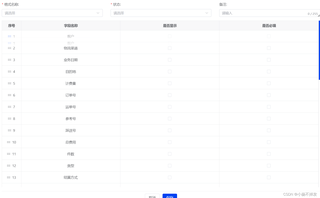
vxe-table行拖拽无效 有拖拽动画但是数据没有变化
const rowConfig = {
  useKey: true,
  drag: true,
};

vxe-table行拖拽无效 有拖拽动画但是数据没有变化
const rowConfig = {
useKey: true,
drag: true,
};
 分享
分享
阿里嘎多学长整理AIGC生成,因移动端显示问题导致当前答案未能完全显示,请使用PC端查看更加详细的解答过程
Vxe-table 的行拖拽功能需要在 row-config 中配置 useKey 和 drag 选项,并且需要在 table 组件中使用 row-config 选项。
在你的代码中,你已经配置了 rowConfig 选项,但是你还需要在 table 组件中使用这个选项。
以下是一个示例代码:
<template>
  <vxe-table
    :data="tableData"
    :row-config="rowConfig"
  >
    <!-- 表格内容 -->
  </vxe-table>
</template>

<script>
export default {
  data() {
    return {
      tableData: [...], // 表格数据
      rowConfig: {
        useKey: true,
        drag: true,
      },
    };
  },
};
</script>
在上面的代码中,我们将 rowConfig 选项传递给 vxe-table 组件,并且在 table 组件中使用 rowConfig 选项。
如果你已经在 table 组件中使用了 rowConfig 选项,但是仍然无法拖拽行,那么可能是因为你没有在 table 组件中使用 row-key 选项。row-key 选项用于指定表格行的唯一键。
以下是一个示例代码:
<template>
  <vxe-table
    :data="tableData"
    :row-config="rowConfig"
    :row-key="rowKey"
  >
    <!-- 表格内容 -->
  </vxe-table>
</template>

<script>
export default {
  data() {
    return {
      tableData: [...], // 表格数据
      rowConfig: {
        useKey: true,
        drag: true,
      },
      rowKey: 'id', // 指定表格行的唯一键
    };
  },
};
</script>
在上面的代码中,我们将 rowKey 选项设置为 'id',这将指定表格行的唯一键为 id。
如果你仍然无法拖拽行,那么可能是因为你没有在 table 组件中使用 on-row-drop 事件处理函数。on-row-drop 事件处理函数用于处理行拖拽完成时的事件。
以下是一个示例代码:
<template>
  <vxe-table
    :data="tableData"
    :row-config="rowConfig"
    :row-key="rowKey"
    @row-drop="handleRowDrop"
  >
    <!-- 表格内容 -->
  </vxe-table>
</template>

<script>
export default {
  data() {
    return {
      tableData: [...], // 表格数据
      rowConfig: {
        useKey: true,
        drag: true,
      },
      rowKey: 'id', // 指定表格行的唯一键
    };
  },
  methods: {
    handleRowDrop({ row, dropRow }) {
      // 处理行拖拽完成时的事件
      console.log(row, dropRow);
    },
  },
};
</script>
在上面的代码中,我们将 on-row-drop 事件处理函数设置为 handleRowDrop 方法,这将在行拖拽完成时触发该方法。
希望这些解决方案能够帮助你解决问题。如果你仍然无法解决问题,请提供更多的代码和详细的错误信息,我将尽力帮助你解决问题。
分享 创建了问题
2月26日
创建了问题
2月26日


