JinsnHS 2025-03-02 14:16 采纳率: 53.8%
浏览 15

安卓底部导航间距问题

各位佬,我遇到了一个问题,这个默认的BottomNavigationView底部莫名其妙多了个间距,我以为是主题问题,我换了其他主题也依旧如此,这是什么问题呢?

这是我的main_activity代码:


<?xml version="1.0" encoding="utf-8"?>
<androidx.constraintlayout.widget.ConstraintLayout xmlns:android="http://schemas.android.com/apk/res/android"
    xmlns:app="http://schemas.android.com/apk/res-auto"
    xmlns:tools="http://schemas.android.com/tools"
    android:id="@+id/main"
    android:layout_width="match_parent"
    android:layout_height="match_parent"
    tools:context=".MainActivity">

    <com.google.android.material.bottomnavigation.BottomNavigationView
        android:id="@+id/nav_view"
        android:layout_width="0dp"
        android:layout_height="wrap_content"
        android:layout_marginStart="0dp"
        android:layout_marginEnd="0dp"
        app:layout_constraintBottom_toBottomOf="parent"
        app:layout_constraintLeft_toLeftOf="parent"
        app:layout_constraintRight_toRightOf="parent"
        app:menu="@menu/bottom_nav_menu" />

</androidx.constraintlayout.widget.ConstraintLayout>
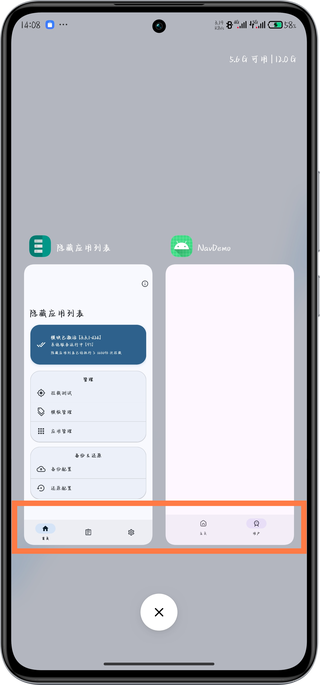
img

  • 写回答

5条回答 默认 最新

  • 码农阿豪@新空间 新星创作者: 前端开发技术领域 2025-03-02 14:23
    关注
    让阿豪来帮你解答,本回答参考chatgpt3.5编写提供,如果还有疑问可以评论或留言
    这个问题可能是由于BottomNavigationView的布局属性设置引起的。您可以尝试修改布局中的一些属性来解决这个问题,例如修改android:layout_height为固定数值或修改约束属性。 以下是修改后的示例代码:
    <?xml version="1.0" encoding="utf-8"?>
    <androidx.constraintlayout.widget.ConstraintLayout 
    xmlns:android="http://schemas.android.com/apk/res/android"    
    xmlns:app="http://schemas.android.com/apk/res-auto"    
    xmlns:tools="http://schemas.android.com/tools"    
    android:id="@+id/main"    
    android:layout_width="match_parent"    
    android:layout_height="match_parent"    
    tools:context=".MainActivity">
    <com.google.android.material.bottomnavigation.BottomNavigationView        
    android:id="@+id/nav_view"        
    android:layout_width="0dp"        
    android:layout_height="wrap_content"
            android:layout_marginTop="0dp"
            app:layout_constraintBottom_toBottomOf="parent"
            app:layout_constraintStart_toStartOf="parent"
            app:layout_constraintEnd_toEndOf="parent"
            app:menu="@menu/bottom_nav_menu" />
            
    </androidx.constraintlayout.widget.ConstraintLayout>
    

    您可以尝试修改上述代码中的android:layout_height或约束属性,看看是否能够解决底部间距的问题。希望这能帮助到您解决这个问题。

    评论

报告相同问题?

问题事件

  • 创建了问题 3月2日