
这是我Controller层的代码
package cn.edu.sdpt.mybatis_select.controller;
import cn.edu.sdpt.mybatis_select.entity.User;
import cn.edu.sdpt.mybatis_select.service.UserService;
import org.springframework.beans.factory.annotation.Autowired;
import org.springframework.web.bind.annotation.*;

import java.util.List;


@RestController
@RequestMapping("/user")
public class UserController {
    @Autowired
    //Controller层要调用service层的方法 注入一个userservice对象
    UserService userService;
//    private List<User> user;

    @RequestMapping(value = "/query", method = RequestMethod.GET)

    public User query(@RequestParam("id") Long id) {
    //User user = userService.queryById(id);
        User user = userService.queryByIdNew(id);
        return user;
    }


    // todo post方法,实现增、删、改 传参都是User
    //增加一个用户
    @RequestMapping(value = "/add", method = RequestMethod.POST)
    public Boolean addUser(@RequestBody User user) {
    //System.out.println("aaa");
        Boolean add = userService.addUser(user);
        return add;

    }

    //删除一个用户
    @RequestMapping(value = "/delete",method = RequestMethod.POST)
    public Boolean deleteUser(@RequestBody User user) {
    //测试
    //System.out.println("ajsshsd");
    //return Boolean.TRUE;
        Boolean del = userService.deleteUser(user);
        return del;
    }

    //更新一个用户数据
    @RequestMapping(value = "/update",method = RequestMethod.POST)
    public Boolean updateUser(@RequestBody User user) {
    //测试
    //return Boolean.TRUE;
        Boolean up = userService.updateUser(user);
        return up;
    }

//    //查询所有用户信息以列表形式返回
//    @RequestMapping(value = "/select",method = RequestMethod.POST)
//    public List<User> selectUser(@RequestBody List<User> user) {
//        this.user = user;
//        List<User> sel = userService.selectAllUser();
//        return sel;
//
//    }


//    //查询数据 指定id-----还没写完
//    @RequestMapping(value = "/selectbyid",method = RequestMethod.POST)
//    public User selectUserById(@RequestBody Long id) {
//        User u = userService.selectUserById(id);
//        return u;
//    }

}
这是我的实体类
package cn.edu.sdpt.mybatis_select.entity;


import com.baomidou.mybatisplus.annotation.TableField;
import com.baomidou.mybatisplus.annotation.TableId;
import com.baomidou.mybatisplus.annotation.TableName;
import lombok.Data;
import lombok.Getter;
import lombok.Setter;

@Data
@TableName(value = "user")
//lombok 在编译阶段,为实体类自动生成setter、getter方法 eg:toString
//引入lombok需要在pom文件中引入依赖 还需要在实体类上添加注解
//添加完毕记得刷新一下maven
//@Data是lombok提供的注解

public class User {
    private static final long serialVersionUID = 1L;
    @TableId
    @TableField

    private Long id;
    private String name;
    private Integer age;
    private String address;
    private String sex;
    private String phone;
    private String createTime;
    private String role;
    private String password;
    private String email;


}
这是我的UserMapper
package cn.edu.sdpt.mybatis_select.mapper;

import cn.edu.sdpt.mybatis_select.entity.User;
import com.baomidou.mybatisplus.core.mapper.BaseMapper;
import org.apache.ibatis.annotations.*;

import java.util.List;


@Mapper
public interface UserMapper {
//    @Select("select * from user")
//    List<User> queryAll();

    /**
     * 带参数查询
     * 使用@Param注解来指定参数名,然后在@Select注解中引用参数名
     * @param
     * @return
     */
    @Select("SELECT * FROM user WHERE id = #{userId}")
    User getUserById(@Param("userId") Long userId);
//    一般情况下@Param引号中的名称与int定义的保持一致

    /**
     * 增加一条数据(通过post方法)
     */
    @Insert("insert into user(name,age,address,phone,create_time,sex,role,password,email) " +
            "values (#{name},#{age},#{address},#{phone},#{createTime},#{sex},#{role},#{password},#{email})")
    Integer insert(User user);

    /**
     * 删除一条数据(通过post方法)
     *
     */
    @Delete("delete from user where name = #{name}")
    Integer delete(User user);


    /**
     * 更新一条数据
     */
    @Update("update user set address=#{address},phone=#{phone} where id = 3")
    Integer update(User user);


    /**
     * 查询所有语句
     */
    @Select("select * from user")
    List<User> selectAll();
}
这是我的Service层
package cn.edu.sdpt.mybatis_select.service;

import cn.edu.sdpt.mybatis_select.entity.User;
import cn.edu.sdpt.mybatis_select.mapper.UserMapper;

import org.springframework.beans.factory.annotation.Autowired;
import org.springframework.stereotype.Service;

import java.util.List;

@Service
public class UserService {
    @Autowired
    UserMapper userMapper;
//调用Mapper层对应的方法执行SQL查询 所以要注入Mapper

//    public User queryById(Long id) {
//        List<User> res =  userMapper.queryAll();
//        for (User user : res) {
//            if (user.getId().equals(id)) {
//                return user;
//            }
//        }
//        return null;
//    }

    public User queryByIdNew(Long id) {
        User res = userMapper.getUserById(id);
        return res;
    }


    public Boolean addUser(User user) {
        Integer result = userMapper.insert(user);
        if(result.equals(1)) {
            return true;
        }
        else{
            return false;
        }
    }
    public Boolean deleteUser(User user) {
        Integer result = userMapper.delete(user);
        if (result.equals(1)) {
            return true;
        }
        else{
            return false;
        }

    }
    public Boolean updateUser(User user) {
        Integer result = userMapper.update(user);
        if (result.equals(1)) {
            return true;
        }
        else{
            return false;
        }

    }
    public List<User> selectAllUser() {
        List<User> userList = userMapper.selectAll();
        if(userList.isEmpty()){
            System.out.println("no user");
        }
        return userList;
    }

//    public User selectUserById(Long id) {
//
//    }
}


//那些可以更新 id不能 age name address更新
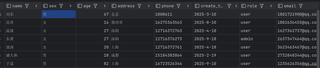
这是我的数据库
这是postman的测试结果

数据没有插进去为什么


