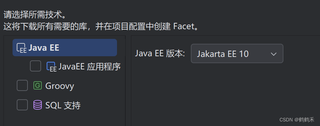
为什么找不到Web应用啊,是需要下载还是什么,然后创建web后,包的情况也不对劲,WEB-INF没有上级包WEB,究竟是啥原因啊
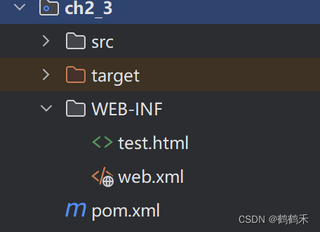

为什么找不到Web应用啊,是需要下载还是什么,然后创建web后,包的情况也不对劲,WEB-INF没有上级包WEB,究竟是啥原因啊
 分享
分享
阿里嘎多学长整理AIGC生成,因移动端显示问题导致当前答案未能完全显示,请使用PC端查看更加详细的解答过程
Idea添加框架支持类目没有Web Application,可能是因为以下原因:
WEB-INF文件夹,包含web.xml文件。解决方法:
WEB-INF文件夹,包含web.xml文件。web.xml文件中配置Web应用的基本信息,例如Context Path、Servlet Mapping等。例如:
<?xml version="1.0" encoding="UTF-8"?>
<web-app version="3.1" xmlns="http://xmlns.jcp.org/xml/ns/javaee"
         xmlns:xsi="http://www.w3.org/2001/XMLSchema-instance"
         xsi:schemaLocation="http://xmlns.jcp.org/xml/ns/javaee
         http://xmlns.jcp.org/xml/ns/javaee/web-app_3_1.xsd">
    <context-param>
        <param-name>contextConfigLocation</param-name>
        <param-value>classpath*:spring/*.xml</param-value>
    </context-param>
    <servlet>
        <servlet-name>spring</servlet-name>
        <servlet-class>org.springframework.web.servlet.DispatcherServlet</servlet-class>
        <load-on-startup>1</load-on-startup>
    </servlet>
    <servlet-mapping>
        <servlet-name>spring</servlet-name>
        <url-pattern>/</url-pattern>
    </servlet-mapping>
</web-app>
如果问题仍然存在,可以尝试删除项目的.iml文件,重新创建项目。
分享 创建了问题
3月13日
创建了问题
3月13日

