
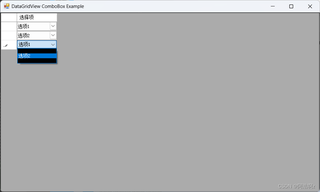
DataGridView控件使用了DataGridViewComboBoxColumn后出现下拉框背景为黑色
using System;
using System.Collections.Generic;
using System.ComponentModel;
using System.Data;
using System.Drawing;
using System.Linq;
using System.Text;
using System.Threading.Tasks;
using System.Windows.Forms;

namespace dataGridview
{
    public partial class Form1 : Form
    {
        private DataGridView dataGridView1;

        public Form1()
        {
            InitializeComponent();
            Init();
            SetupDataGridView();
        }

        private void Init()
        {
            this.dataGridView1 = new DataGridView();
            ((System.ComponentModel.ISupportInitialize)(this.dataGridView1)).BeginInit();
            this.SuspendLayout();

            // 设置 DataGridView
            this.dataGridView1.Dock = DockStyle.Fill;
            this.dataGridView1.EditingControlShowing += new DataGridViewEditingControlShowingEventHandler(dataGridView1_EditingControlShowing);
            this.Controls.Add(this.dataGridView1);

            // 设置窗体
            this.ClientSize = new Size(800, 450);
            this.Text = "DataGridView ComboBox Example";
            ((System.ComponentModel.ISupportInitialize)(this.dataGridView1)).EndInit();
            this.ResumeLayout(false);
        }

        private void SetupDataGridView()
        {
            // 添加一列 DataGridViewComboBoxColumn
            var comboBoxColumn = new DataGridViewComboBoxColumn
            {
                Name = "ComboBoxColumn",
                HeaderText = "选择项",
                DataPropertyName = "Name", // 绑定到实际值
                DisplayMember = "DisplayName",  // 显示名称
                ValueMember = "Name",     // 实际值
                DataSource = GetInitialDataSource() // 初始数据源
            };

            // 添加列到 DataGridView
            dataGridView1.Columns.Add(comboBoxColumn);

            // 添加一些示例数据
            List<data> source = new List<data>
            {
                new data{Name = "Value1" },
                new data{Name = "Value2" },
                new data{Name = "Value3" }
            };
            dataGridView1.DataSource = source;
        }

        private List<ComboBoxItem> GetInitialDataSource()
        {
            return new List<ComboBoxItem>
        {
            new ComboBoxItem { DisplayName = "选项1", Name = "Value1" },
            new ComboBoxItem { DisplayName = "选项2", Name = "Value2" },
            new ComboBoxItem { DisplayName = "选项3", Name = "Value3" },
            new ComboBoxItem { DisplayName = "选项4", Name = "Value4" }

        };
        }

        private List<ComboBoxItem> GetUpdatedDataSource()
        {
            return new List<ComboBoxItem>
        {
             new ComboBoxItem { DisplayName = "选项1", Name = "Value1" },
            new ComboBoxItem { DisplayName = "选项2", Name = "Value2" },
            new ComboBoxItem { DisplayName = "选项4", Name = "Value4" }

        };
        }

        private void dataGridView1_EditingControlShowing(object sender, DataGridViewEditingControlShowingEventArgs e)
        {
            if (dataGridView1.CurrentCell.OwningColumn.Name == "ComboBoxColumn" && e.Control is ComboBox comboBox)
            {
                //
                var curDis = dataGridView1.CurrentCell.FormattedValue?.ToString();


                var newSource = GetUpdatedDataSource();
                // 修改数据源
                comboBox.DataSource = newSource;
                comboBox.DisplayMember = "DisplayName";
                comboBox.ValueMember = "Name";
                comboBox.BackColor = SystemColors.Window;
            }
        }


    }

    // ComboBox 数据项类
    public class ComboBoxItem
    {
        public string DisplayName { get; set; }
        public string Name { get; set; }
    }

    public class data
    {
        public string Name { get; set; }
    }
}
如上述代码所示,当我使用 var curDis = dataGridView1.CurrentCell.FormattedValue?.ToString();后,就会出现以下图片所示问题
寻求友友解惑


