vue2 iview Table组件使用时候,如果我想用到移动段,在不设置column的列宽会出现以下图,列挤在一起的情况,由于这个是通用组件,不确定表格大小,每列宽度,是否能在不设置column的width或者minWidth,以及不改动js,仅从css/less,让表格根据内容自适应列宽。不是根据浏览器自适应宽度
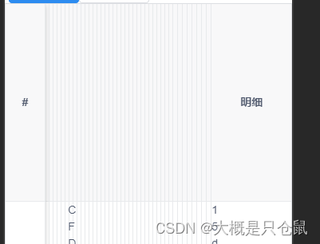
补充,有想过重写,但是麻烦,还需render搞定点击展开插入子表格的情况。

vue2 iview Table组件使用时候,如果我想用到移动段,在不设置column的列宽会出现以下图,列挤在一起的情况,由于这个是通用组件,不确定表格大小,每列宽度,是否能在不设置column的width或者minWidth,以及不改动js,仅从css/less,让表格根据内容自适应列宽。不是根据浏览器自适应宽度
补充,有想过重写,但是麻烦,还需render搞定点击展开插入子表格的情况。
 分享
分享
阿里嘎多学长整理AIGC生成,因移动端显示问题导致当前答案未能完全显示,请使用PC端查看更加详细的解答过程
Iview Table组件提供了一个 resizable 属性,可以使表格列宽自适应。可以在 Table 组件中添加 resizable 属性,并设置为 true。
例如:
<i-table :columns="columns" :data="data" resizable></i-table>
如果你想要在移动端上自适应列宽,可以在 i-table 组件中添加 :width 属性,并设置为 auto。
例如:
<i-table :columns="columns" :data="data" :width="auto" resizable></i-table>
这样,在移动端上,表格列宽将根据内容自动调整。
如果你想要在桌面端上固定列宽,可以在 i-table 组件中添加 :width 属性,并设置为固定值。
例如:
<i-table :columns="columns" :data="data" :width="800" resizable></i-table>
这样,在桌面端上,表格列宽将固定为 800px。
<template>
  <i-table :columns="columns" :data="data" resizable>
    <template slot="header" slot-scope="{ column }">
      {{ column.title }}
    </template>
  </i-table>
</template>

<script>
export default {
  data() {
    return {
      columns: [
        {
          title: 'Name',
          key: 'name'
        },
        {
          title: 'Age',
          key: 'age'
        },
        {
          title: 'Address',
          key: 'address'
        }
      ],
      data: [
        {
          name: 'John',
          age: 20,
          address: 'New York'
        },
        {
          name: 'Mary',
          age: 25,
          address: 'Los Angeles'
        },
        {
          name: 'David',
          age: 30,
          address: 'Chicago'
        }
      ]
    }
  }
}
</script>
在上面的示例中,我们使用 resizable 属性使表格列宽自适应,并使用 :width 属性固定列宽。
分享 已结题
(查看结题原因) 3月21日
修改了问题
3月14日
创建了问题
3月14日
已结题
(查看结题原因) 3月21日
修改了问题
3月14日
创建了问题
3月14日

