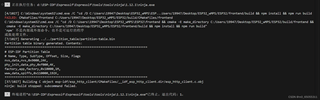
网上找了很多没解决,希望大家帮忙解答,为什么呀……,这个是dronebridge for esp32项目git上的

 分享
分享
阿里嘎多学长整理AIGC生成,因移动端显示问题导致当前答案未能完全显示,请使用PC端查看更加详细的解答过程
Ninja build stopped with a subcommand failed error is a common issue in the ESP32 project. The error usually occurs when the build process fails to compile the code or when there are issues with the dependencies.
Since you've tried many solutions online and still can't resolve the issue, let's try to troubleshoot it further.
Here are a few potential solutions you can try:
--verbose flag to get more detailed logs. This might help you identify the specific error or issue causing the build to fail.ninja --verbose
git submodule update --init --recursive
git submodule foreach git pull origin master
ninja clean
platformio.ini file. Make sure the board type, frequency, and other settings are correct.xtensa-esp32-elf toolchain instead of the default gcc toolchain.If none of these solutions work, please provide more details about your project, including the platformio.ini file and the error messages you're seeing. I'll be happy to help you troubleshoot the issue further.
分享 创建了问题
3月14日
创建了问题
3月14日

