运行docker的时候报错 怎么解决 感谢
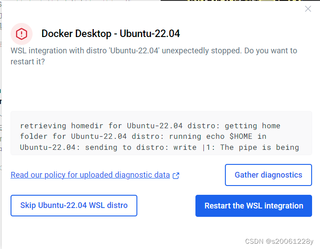
retrieving homedir for Ubuntu-22.04 distro: getting home folder for Ubuntu-22.04 distro: running echo $HOME in Ubuntu-22.04: sending to distro: write |1: The pipe is being closed.

运行docker的时候报错 怎么解决 感谢
retrieving homedir for Ubuntu-22.04 distro: getting home folder for Ubuntu-22.04 distro: running echo $HOME in Ubuntu-22.04: sending to distro: write |1: The pipe is being closed.
 分享
分享
阿里嘎多学长整理AIGC生成,因移动端显示问题导致当前答案未能完全显示,请使用PC端查看更加详细的解答过程
你遇到的报错是 getting home folder for Ubuntu-22.0,这可能是由于 Docker 在启动时无法获取 Ubuntu-22.04 的 home 目录导致的。
解决方案:
sudo docker run -it ubuntu:22.04 /bin/bash
sudo docker run -it --rm ubuntu:22.04 bash -c "echo $HOME"
这将输出 Ubuntu-22.04 的 home 目录。
sudo docker run -it --rm ubuntu:22.04 bash -c "apt-get update && apt-get install -y ubuntu-desktop"
这将重新安装 Ubuntu-22.04 的桌面环境。
sudo systemctl restart docker
这将重新启动 Docker 服务。
如果你遇到了其他问题,请提供更多的错误信息,我将尽力帮助你解决问题。
分享 创建了问题
3月17日
创建了问题
3月17日
