
在ros中我想通过编程在rviz中添加不同颜色的障碍物并控制机械臂运动,但是最终执行时只能添加出障碍物且颜色统一,机械臂也不能动。也就是说除了障碍物的添加有效,障碍物的颜色和机械臂运动都没有成功。以下是我的代码:#include <ros/ros.h>
#include <ros/ros.h>
#include <moveit/move_group_interface/move_group_interface.h>
#include <moveit/planning_scene_interface/planning_scene_interface.h>
#include <moveit_msgs/PlanningScene.h>
#include <moveit_msgs/ObjectColor.h>
#include <geometry_msgs/PoseStamped.h>
#include <shape_msgs/SolidPrimitive.h>
#include <geometry_msgs/Pose.h>

int main(int argc, char **argv)
{
    ros::init(argc, argv, "path_collision");
    ros::NodeHandle nh;

    // 初始化 PlanningSceneInterface
    moveit::planning_interface::MoveGroupInterface arm("arm"); // "arm" 是你机械臂的规划组名称
    moveit::planning_interface::PlanningSceneInterface planning_scene_interface;

    // 获取末端执行器连接
    std::string end_effector_link = arm.getEndEffectorLink();

    // 创建第一个立方体
    moveit_msgs::CollisionObject cube1;
    cube1.id = "cube1";
    cube1.header.frame_id = "base_link";  // 设置参考坐标系

    // 设置立方体的几何形状
    shape_msgs::SolidPrimitive cube_shape1;
    cube_shape1.type = cube_shape1.BOX; // 设置为立方体
    cube_shape1.dimensions.resize(3);
    cube_shape1.dimensions[0] = 0.2;  // X轴尺寸
    cube_shape1.dimensions[1] = 0.7;  // Y轴尺寸
    cube_shape1.dimensions[2] = 0.01;  // Z轴尺寸

    // 设置立方体的位置
    geometry_msgs::Pose cube_pose1;
    cube_pose1.position.x = 0.26;
    cube_pose1.position.y = 0.0;
    cube_pose1.position.z = 0.3;
    cube_pose1.orientation.w = 1.0;

    cube1.primitives.push_back(cube_shape1);
    cube1.primitive_poses.push_back(cube_pose1);
    cube1.operation = cube1.ADD;

    moveit_msgs::ObjectColor cube1_color;
    cube1_color.id = "cube1";
    cube1_color.color.r = 1.0; // Red
    cube1_color.color.g = 0.0; // Green
    cube1_color.color.b = 0.0; // Blue
    cube1_color.color.a = 1.0; // Alpha

    // 创建第二个立方体
    moveit_msgs::CollisionObject cube2;
    cube2.id = "cube2";
    cube2.header.frame_id = "base_link";

    shape_msgs::SolidPrimitive cube_shape2;
    cube_shape2.type = cube_shape2.BOX;
    cube_shape2.dimensions.resize(3);
    cube_shape2.dimensions[0] = 0.1;
    cube_shape2.dimensions[1] = 0.05;
    cube_shape2.dimensions[2] = 0.05;

    geometry_msgs::Pose cube_pose2;
    cube_pose2.position.x = 0.21;
    cube_pose2.position.y = -0.1;
    cube_pose2.position.z = 0.335;
    cube_pose2.orientation.w = 1.0;

    cube2.primitives.push_back(cube_shape2);
    cube2.primitive_poses.push_back(cube_pose2);
    cube2.operation = cube2.ADD;

    moveit_msgs::ObjectColor cube2_color;
    cube2_color.id = "cube2";
    cube2_color.color.r = 0.0; // Red
    cube2_color.color.g = 1.0; // Green
    cube2_color.color.b = 0.0; // Blue
    cube2_color.color.a = 1.0; // Alpha

    // 创建第三个立方体
    moveit_msgs::CollisionObject cube3;
    cube3.id = "cube3";
    cube3.header.frame_id = "base_link";

    shape_msgs::SolidPrimitive cube_shape3;
    cube_shape3.type = cube_shape3.BOX;
    cube_shape3.dimensions.resize(3);
    cube_shape3.dimensions[0] = 0.05;
    cube_shape3.dimensions[1] = 0.05;
    cube_shape3.dimensions[2] = 0.15;

    geometry_msgs::Pose cube_pose3;
    cube_pose3.position.x = 0.21;
    cube_pose3.position.y = 0.1;
    cube_pose3.position.z = 0.385;
    cube_pose3.orientation.w = 1.0;

    cube3.primitives.push_back(cube_shape3);
    cube3.primitive_poses.push_back(cube_pose3);
    cube3.operation = cube3.ADD;


    moveit_msgs::ObjectColor cube3_color;
    cube3_color.id = "cube3";
    cube3_color.color.r = 0.0; // Red
    cube3_color.color.g = 0.0; // Green
    cube3_color.color.b = 1.0; // Blue
    cube3_color.color.a = 1.0; // Alpha

    // 将所有物体添加到场景中
    std::vector<moveit_msgs::CollisionObject> collision_objects;
    collision_objects.push_back(cube1);
    collision_objects.push_back(cube2);
    collision_objects.push_back(cube3);

    moveit_msgs::PlanningScene planning_scene;
    planning_scene.is_diff = true;
    planning_scene.object_colors.push_back(cube1_color);
    planning_scene.object_colors.push_back(cube2_color);
    planning_scene.object_colors.push_back(cube3_color);

    ros::Publisher planning_scene_publisher = nh.advertise<moveit_msgs::PlanningScene>("planning_scene", 1);
    planning_scene_publisher.publish(planning_scene);


    planning_scene_interface.applyCollisionObjects(collision_objects);


    ROS_INFO("Three cubes have been added to the scene");

    arm.setGoalPositionTolerance(0.01);
    arm.setGoalOrientationTolerance(0.05);
    arm.allowReplanning(true);
    arm.setPlanningTime(5);

    // 控制机械臂回到初始化位置
    arm.setNamedTarget("home");
    moveit::core::MoveItErrorCode result = arm.move();
    if (result == moveit::core::MoveItErrorCode::SUCCESS) {
        ROS_INFO("Move to home position succeeded!");
    } else {
        ROS_ERROR("Move to home position failed! Error code: %d", result.val);
        ros::shutdown();
        return -1;
    }
    ros::Duration(2).sleep();

    // 设置机械臂的运动目标位置,位于桌面之上两个盒子之间
    geometry_msgs::PoseStamped target_pose;
    target_pose.header.frame_id = "base_link";
    target_pose.pose.position.x = 0.2;
    target_pose.pose.position.y = 0.0;
    target_pose.pose.position.z = 0.3;
    target_pose.pose.orientation.w = 1.0;

    arm.setStartStateToCurrentState();

    // 控制机械臂运动到目标位置
    arm.setPoseTarget(target_pose, end_effector_link);
    result = arm.move();
    if (result == moveit::core::MoveItErrorCode::SUCCESS) {
        ROS_INFO("Move to target_pose succeeded!");
    } else {
        ROS_ERROR("Move to target_pose failed! Error code: %d", result.val);
        ros::shutdown();
        return -1;
    }
    ros::Duration(1).sleep();

    // 设置机械臂的运动目标位置,进行避障规划
    geometry_msgs::PoseStamped target_pose2;
    target_pose2.header.frame_id = "base_link";
    target_pose2.pose.position.x = 0.2;
    target_pose2.pose.position.y = -0.25;
    target_pose2.pose.position.z = 0.3;
    target_pose2.pose.orientation.w = 1.0;

    arm.setPoseTarget(target_pose2, end_effector_link);
    result = arm.move();
    if (result == moveit::core::MoveItErrorCode::SUCCESS) {
        ROS_INFO("Move to target_pose2 succeeded!");
    } else {
        ROS_ERROR("Move to target_pose2 failed! Error code: %d", result.val);
        ros::shutdown();
        return -1;
    }

    // 控制机械臂回到初始化位置
    arm.setNamedTarget("home");
    result = arm.move();
    if (result == moveit::core::MoveItErrorCode::SUCCESS) {
        ROS_INFO("Move back to home position succeeded!");
    } else {
        ROS_ERROR("Move back to home position failed! Error code: %d", result.val);
        ros::shutdown();
        return -1;
    }

    ROS_INFO("Motion planning succeeded!");
    ros::shutdown();
    return 0;
}
终端如图所示:不知什么原因只运行到Three cubes have been added to the scene这一步:
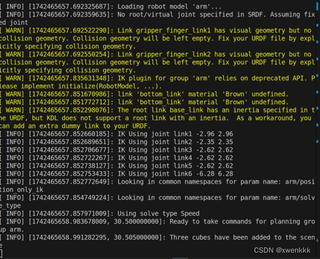
查看rostopic list有planning_scene但是查看却没有内容。


