Xzz_47 2025-03-21 14:36 采纳率: 0%
浏览 24

(标签-Stable Diffusion|关键词-File)

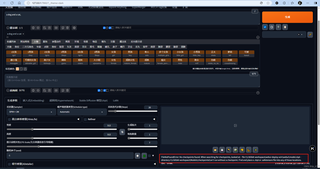
在用Stable Diffusion 生成图片时,底部出现以下报错:
FileNotFoundError: No checkpoints found. When searching for checkpoints, looked at: - file I:\LiblibAI-workspace\webui-deploy-win\webui\model.ckpt - directory I:\LiblibAI-workspace\Models\checkpointsCan't run without a checkpoint. Find and place a .ckpt or .safetensors file into any of those locations.
img

这没辙了,这两天看了好多文章装了这个模型,最后眼看着快成功了这样子了,第一次提问,讲的不清晰请原谅

  • 写回答

4条回答 默认 最新

  • 道友老李 JWE233286一种基于机器视觉的水表指针读数识别及修正的方法 专利发明者 2025-03-21 14:37
    关注
    让【道友老李】来帮你解答,本回答参考gpt编写,并整理提供,如果还有疑问可以点击头像关注私信或评论。
    如果答案让您满意,请采纳、关注,非常感谢!
    这个报错提示找不到checkpoint文件,建议您确认一下文件路径是否正确,确保模型的checkpoint文件(.ckpt或.safetensors)在指定的路径下。如果文件路径正确但依然报错,可以尝试手动下载模型的checkpoint文件,并放置在正确的路径下。 以下是一种可能的实现代码:
    # 导入必要的库
    import os
    import shutil
    # 指定模型的checkpoint文件路径
    checkpoint_path = "I:\LiblibAI-workspace\webui-deploy-win\webui\model.ckpt"
    # 下载模型的checkpoint文件
    # 下载代码写在这里
    # 确认文件存在
    if os.path.exists(checkpoint_path):
        print("Found checkpoint file successfully.")
    else:
        # 如果文件不存在,将文件移动到正确路径下
        shutil.move("downloaded_checkpoint_path", checkpoint_path)
        print("Moved checkpoint file to the correct path.")
    

    以上代码演示了检查和移动checkpoint文件的过程,确保文件在正确的路径下即可避免报错。

    评论

报告相同问题?

问题事件

  • 创建了问题 3月21日