
在编写按键时,elemen-plus的按键编写SysDialog,为啥自己写的样式没有实现?出现的是组件自带的样式?
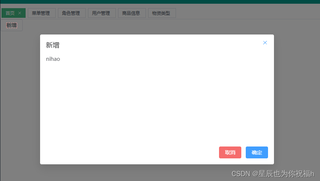
首先看看我的代码
(1)SysDialog.vue
<template>
  <el-dialog
    :model-value="props.visible"
    :title="props.title"
    :width="props.width+'px'"
    :before-close="onClose"
    append-to-body
  >
  <!-- 展示内容 -->
    <div :style="{height:props.height + 'px'}">
        <slot name="content"></slot>
    </div>
    <template #footer>
      <div class="dialog-footer">
        <el-button type="danger" @click="onClose">取消</el-button>
        <el-button type="primary" @click="onConfirm">确定</el-button>
      </div>
    </template>
  </el-dialog>

</template>

<script setup lang="ts">
//定义参数类型
interface DialogProps{
    title?:string,
    visible:boolean,
    width?:number,
    height?:number
}
//接受父组件传递的数据,withDefaults设置默认值,defineProps接受值
const props = withDefaults(defineProps<DialogProps>(),{
      title:'标题',
      visible:false,
      width:630,
      height:230
})
//注册事件
const emit = defineEmits(["onClose","onConfirm"])
//关闭弹框
const onClose = () =>{
    emit('onClose')
}
const onConfirm = () =>{
    emit('onConfirm')
}
</script>

<style lang="scss" scoped>
:deep(.el-dialog) {
  border-radius: 7px !important;

  .el-dialog__header {
    margin-right: 0;
    border-top-left-radius: 7px !important;
    border-top-right-radius: 7px !important;
    background-color: #009688 !important;

    .el-dialog__title {
      color: #fff !important;
      font-size: 16px !important;
      font-weight: 600 !important;
    }
  }

  .el-dialog__headerbtn {
    .el-dialog__close {
      color: #fff !important;
    }
  }

  .el-dialog__body {
    padding: 10px !important;
  }

  .el-dialog__footer {
    border-top: 1px solid #e8eaec !important;
    padding: 10px !important;
  }
}

</style>
我本人认为没有任何问题,然后下面是我使用的代码
<template>
    <div>
        <el-button tye="primary" size="default" @click="addBtn">新增</el-button>
        <SysDialog
        :visible="dialog.visible"
        :title="dialog.title"
        :width="dialog.width"
        :height="dialog.height"
        @on-close="onClose"
        @on-confirm="onConfirm"
        >
        <!-- 弹框内容 -->
        <template v-slot:content>
         <div>nihao</div>
        </template>
        </SysDialog>
    </div>
</template>

<script setup lang="ts">
import SysDialog from '../../components/SysDialog.vue';
import { reactive } from 'vue';
const dialog = reactive({
      title:'新增',
      visible:false,
      width:630,
      height:230
})
const addBtn = () =>{
    dialog.visible=true
}
const onClose = () =>{
    dialog.visible=false
}
const onConfirm = () =>{
    dialog.visible=false
}

</script>
但是样式如图一一样,我的.el-dialog__header等样式都是组件写好的,在想为啥他优先级这么高啊,然后f12

发现元素样式中没有我写的.el-dialog__header一系列的东西,是为啥?


