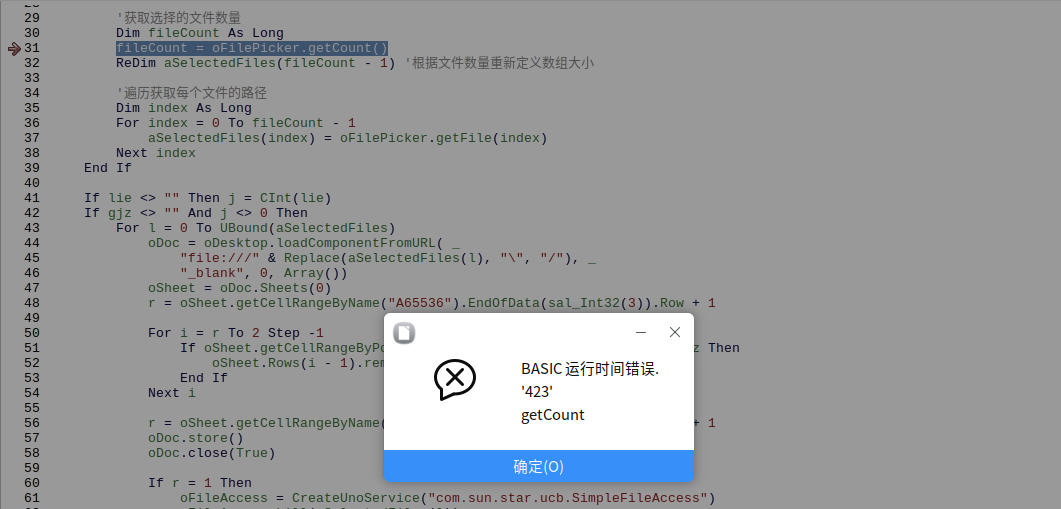
以前在windows系统里能用WPS运行的宏工具,在麒麟系统的WPS中无法运行,但能通过libreoffice运行。在libreoffice内做几次调试修改后,仍在最后阶段跳出“423getCount错误”,错误语句为“fileCount = oFilePicker.getCount()”。求问,如何解决该问题?(快被单位的国产电脑整崩溃了)
最初代码:
Rem Attribute VBA_ModuleType=VBADocumentModule
Option VBASupport 1
Private Sub CommandButton1_Click()
    Dim l As Long
    Dim gjz, lie As String
    Dim j As Integer
    Application.ScreenUpdating = False
    Application.DisplayAlerts = False
    Set afd = Application.FileDialog(msoFileDialogFilePicker)
    With afd
        .Title = "请选择需要处理的EXCEL表格文件"
        .AllowMultiSelect = True   '单选择
        .Filters.Clear     '清除文件过滤器
        .Filters.Add "Excel Files", "*.xlsx;*.xls;*.csv"
        'FileDialog 对象的 Show 方法显示对话框,并且返回 -1(如果您按 OK)和 0(如果您按 Cancel)。
        If .Show = -1 Then
            gjz = InputBox("请输入要保留的关键字信息!如需保留县溪镇,则输入:县溪镇")
            lie = InputBox("请输入表格中要保留的关键字在所在列数!如关键字县溪镇在第4列,则输入:4")
        End If
        If lie <> "" Then j = lie
        If gjz <> "" And j <> 0 Then

            For l = 1 To .SelectedItems.Count
                Workbooks.Open Filename:=.SelectedItems(l)


                r = ActiveWorkbook.Worksheets(1).Range("a65536").End(xlUp).Row

                For i = r To 2 Step -1
                    If ActiveWorkbook.Worksheets(1).Cells(i, j) <> gjz Then
                        ActiveWorkbook.Worksheets(1).Rows(i).Delete
                    End If
                Next
                r = ActiveWorkbook.Worksheets(1).Range("a65536").End(xlUp).Row
                ActiveWorkbook.Save
                ActiveWorkbook.Close
                If r = 1 Then
                    Kill .SelectedItems(l)
                End If

            Next
            MsgBox ("恭喜!删除保留" & gjz & "问题数据完毕")

        End If
    End With


    Application.ScreenUpdating = True
    Application.DisplayAlerts = True
End Sub
经调试后的代码:
Sub CommandButton1_Click()
    Dim l As Long
    Dim gjz As String
    Dim lie As String
    Dim j As Integer
    Dim oFilePicker As Object
    Dim oDesktop As Object
    Dim oDoc As Object
    Dim oSheet As Object
    Dim r As Long
    Dim i As Long
    Dim oFileAccess As Object
    Dim aSelectedFiles() As String '用于存储选择的文件路径序列,定义为字符串数组

    oDesktop = CreateUnoService("com.sun.star.frame.Desktop")
    oFilePicker = CreateUnoService("com.sun.star.ui.dialogs.FilePicker")
    If oFilePicker Is Nothing Then
        MsgBox "无法创建文件选择器对象,请检查服务名称和权限。"
        Exit Sub
    End If
    oFilePicker.Title = "请选择需要处理的EXCEL表格文件"
    oFilePicker.AppendFilter("Excel Files", "*.xlsx;*.xls;*.csv")
    oFilePicker.MultiSelectionMode = True

    If oFilePicker.Execute() = 1 Then
        gjz = InputBox("请输入要保留的关键字信息!如需保留县溪镇,则输入:县溪镇")
        lie = InputBox("请输入表格中要保留的关键字在所在列数!如关键字县溪镇在第4列,则输入:4")

        '获取选择的文件数量
        Dim fileCount As Long
        fileCount = oFilePicker.getCount()
        ReDim aSelectedFiles(fileCount - 1) '根据文件数量重新定义数组大小

        '遍历获取每个文件的路径
        Dim index As Long
        For index = 0 To fileCount - 1
            aSelectedFiles(index) = oFilePicker.getFile(index)
        Next index
    End If

    If lie <> "" Then j = CInt(lie)
    If gjz <> "" And j <> 0 Then
        For l = 0 To UBound(aSelectedFiles)
            oDoc = oDesktop.loadComponentFromURL( _
                "file:///" & Replace(aSelectedFiles(l), "\", "/"), _
                "_blank", 0, Array())
            oSheet = oDoc.Sheets(0)
            r = oSheet.getCellRangeByName("A65536").EndOfData(sal_Int32(3)).Row + 1

            For i = r To 2 Step -1
                If oSheet.getCellRangeByPosition(j - 1, i - 1).getString() <> gjz Then
                    oSheet.Rows(i - 1).remove()
                End If
            Next i

            r = oSheet.getCellRangeByName("A65536").EndOfData(sal_Int32(3)).Row + 1
            oDoc.store()
            oDoc.close(True)

            If r = 1 Then
                oFileAccess = CreateUnoService("com.sun.star.ucb.SimpleFileAccess")
                oFileAccess.kill(aSelectedFiles(l))
            End If
        Next l
        MsgBox ("恭喜!删除保留" & gjz & "问题数据完毕")
    End If
End Sub
调试后的代码仍跳出的错误: