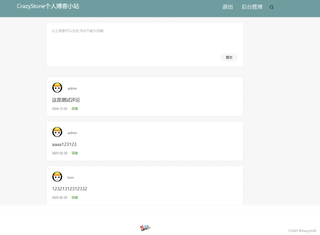
有没有,好哥们有这个个人博客的完整代码呀,有偿想要这个,这个真的好难啊,网页一跳转就是404和500,

 分享
分享
阿里嘎多学长整理AIGC生成,因移动端显示问题导致当前答案未能完全显示,请使用PC端查看更加详细的解答过程
你想问的是关于基于 Spring Boot 完成一个个人博客的设计与开发,特别是你想要完整的代码和解决一些常见的问题。
首先,创建一个个人博客需要考虑的几个方面:数据库设计、用户认证、文章管理、评论系统、搜索功能等。Spring Boot 提供了许多有用的依赖项和工具,可以帮助你快速实现这些功能。
关于你的问题,404 和 500 错误可能是由于 URL 映射、请求参数、数据库连接等问题导致的。下面是一些可能的解决方案:
application.properties 文件中添加 spring.mvc.servlet.path=/blog。@RequestParam 注解。application.properties 文件中添加 spring.datasource.url=jdbc:mysql://localhost:3306/blog。如果你需要完整的代码,我可以提供一些基本的示例代码,例如使用 Spring Boot 和 Thymeleaf 创建一个简单的博客系统。
// BlogController.java
@RestController
@RequestMapping("/blog")
public class BlogController {
    @Autowired
    private BlogService blogService;

    @GetMapping
    public String index(Model model) {
        List<Blog> blogs = blogService.getBlogs();
        model.addAttribute("blogs", blogs);
        return "blog/index";
    }

    @GetMapping("/{id}")
    public String detail(@PathVariable Long id, Model model) {
        Blog blog = blogService.getBlog(id);
        model.addAttribute("blog", blog);
        return "blog/detail";
    }
}
<!-- blog/index.html -->
<!DOCTYPE html>
<html xmlns:th="http://www.thymeleaf.org">
<head>
    <title>Blog</title>
</head>
<body>
    <h1>Blog</h1>
    <ul>
        <li th:each="blog : ${blogs}">
            <a th:href="@{/blog/{id}(id=${blog.id})}" th:text="${blog.title}">查看</a>
        </li>
    </ul>
</body>
</html>
这些代码只是一个简单的示例,实际实现中你需要添加更多的功能和配置。
希望这些信息能够帮助你解决问题。如果你需要更多帮助,请提供更多的信息和代码。
分享 创建了问题
4月9日
创建了问题
4月9日


