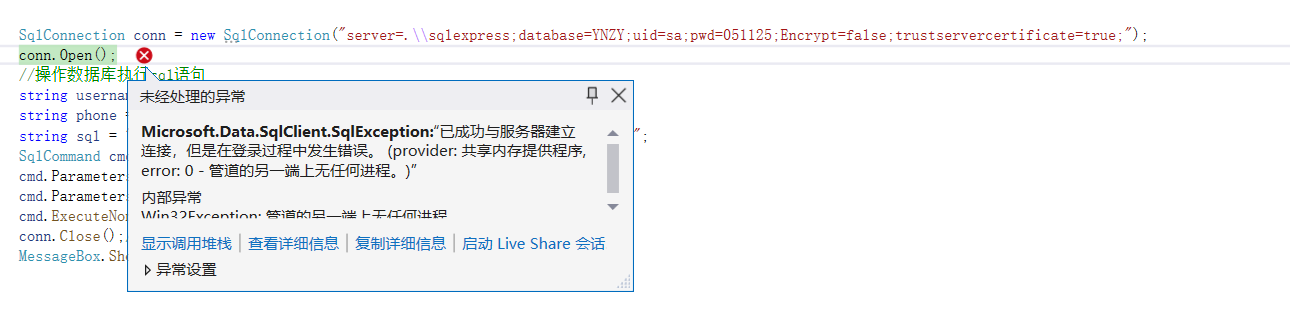
做C#的wpf项目,连接数据库时出现了这个问题,请各位帮帮忙

 分享
分享
阿里嘎多学长整理AIGC生成,因移动端显示问题导致当前答案未能完全显示,请使用PC端查看更加详细的解答过程
你遇到的问题是WPF项目中连接SQL Server数据库的问题。下面是一些可能有用的解决方案:
using System.Data.SqlClient;

// 连接字符串
string connectionString = "Server=myServerAddress;Database=myDataBase;User Id=myUsername;Password=myPassword;";

// 创建连接对象
SqlConnection connection = new SqlConnection(connectionString);

// 打开连接
connection.Open();

// 执行SQL语句
SqlCommand command = new SqlCommand("SELECT * FROM myTable", connection);
SqlDataReader reader = command.ExecuteReader();

// 读取数据
while (reader.Read())
{
    // 处理数据
}

// 关闭连接
connection.Close();
using Microsoft.EntityFrameworkCore;
using Microsoft.EntityFrameworkCore.SqlServer;

// 连接字符串
string connectionString = "Server=myServerAddress;Database=myDataBase;User Id=myUsername;Password=myPassword;";

// 创建DbContext
DbContextOptions<MyDbContext> options = new DbContextOptionsBuilder<MyDbContext>()
    .UseSqlServer(connectionString)
    .Options;

// 创建DbContext实例
MyDbContext context = new MyDbContext(options);

// 执行CRUD操作
var data = context.MyTable.ToList();
using System.Data.SqlServerCe;

// 连接字符串
string connectionString = "Data Source=myDatabase.sdf";

// 创建连接对象
SqlCeConnection connection = new SqlCeConnection(connectionString);

// 打开连接
connection.Open();

// 执行SQL语句
SqlCeCommand command = new SqlCeCommand("SELECT * FROM myTable", connection);
SqlCeDataReader reader = command.ExecuteReader();

// 读取数据
while (reader.Read())
{
    // 处理数据
}

// 关闭连接
connection.Close();
这些解决方案都可以帮助你连接到SQL Server数据库并执行CRUD操作。如果你需要更多帮助,请提供更多的信息和代码。
分享 创建了问题
4月18日
创建了问题
4月18日


