

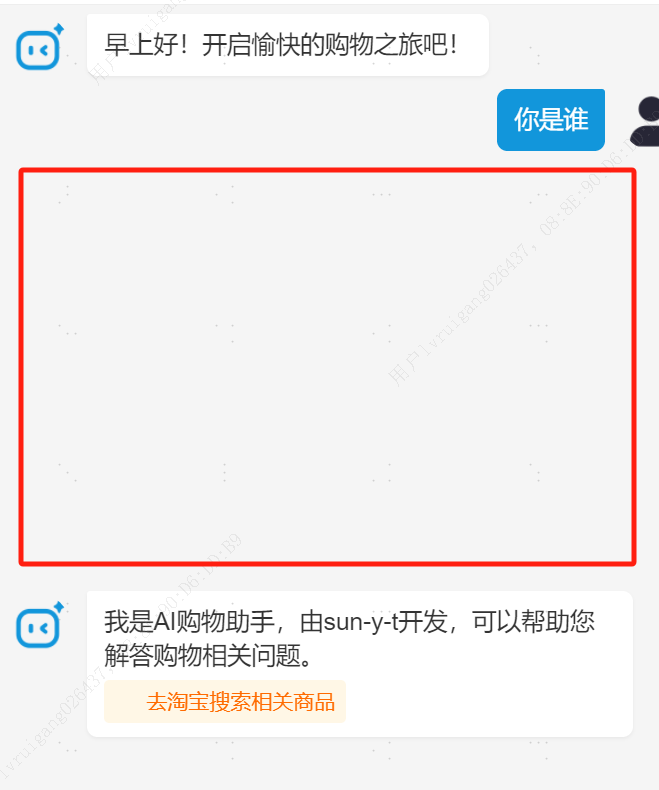
帮忙看看中间这个空白地方, 怎么调整? 总是有空白的, 不是很懂代码 帮忙修改一下~
/* 整体容器 */
.chat-container {
  display: flex;
  flex-direction: column;
  height: 100vh;
  background-color: #f5f5f5;
}

/* 头部区域 */
.header {
  width: 100%;
  background-color: #fff;
  border-bottom: 1rpx solid #eee;
  flex-shrink: 0;
}

.action-bar {
  display: flex;
  justify-content: space-between;
  align-items: center;
  padding: 24rpx 30rpx;
}

.title {
  font-size: 36rpx;
  font-weight: bold;
  color: #333;
}

.clear-btn {
  font-size: 28rpx;
  color: #999;
  background: none;
  padding: 10rpx 20rpx;
  border-radius: 30rpx;
  border: 1rpx solid #ddd;
}

.clear-btn:active {
  background-color: #f5f5f5;
}

/* 主体内容区 */
.main-content {
  flex: 1;
  overflow: hidden;
  position: relative;
  display: flex;
  flex-direction: column;
  background-color: #f5f5f5;
}

/* 示例问题区域 */
.example-questions {
  margin-bottom: 16rpx;
  padding: 16rpx;
  background-color: #fff;
  border-radius: 12rpx;
  box-shadow: 0 2rpx 10rpx rgba(0, 0, 0, 0.05);
}

.example-title {
  font-size: 28rpx;
  color: #666;
  margin-bottom: 16rpx;
}

.example-list {
  display: flex;
  flex-wrap: wrap;
  gap: 16rpx;
}

.example-item {
  background-color: #f0f7ff;
  padding: 12rpx 20rpx;
  border-radius: 30rpx;
  font-size: 26rpx;
  color: #1296db;
  border: 1rpx solid #e6f0fa;
}

.example-item:active {
  background-color: #e6f0fa;
}

/* 聊天历史区域 */
.chat-history {
  flex: 1;
  padding: 10rpx 20rpx;
  overflow-y: scroll;
  -webkit-overflow-scrolling: touch;
  display: flex;
  flex-direction: column;
}

/* 消息样式 */
.message {
  margin-bottom: 4rpx; /* 减少消息之间的间距 */
  animation: fadeIn 0.3s ease;
  position: relative;
}

@keyframes fadeIn {
  from {
    opacity: 0;
    transform: translateY(10rpx);
  }
  to {
    opacity: 1;
    transform: translateY(0);
  }
}

.message-wrapper {
  display: flex;
  max-width: 92%;
  align-items: flex-start;
  padding: 4rpx 0;
}

.user-message .message-wrapper {
  flex-direction: row-reverse;
  margin-left: auto;
}

.avatar {
  width: 64rpx;
  height: 64rpx;
  border-radius: 32rpx;
  overflow: hidden;
  flex-shrink: 0;
  margin: 4rpx 8rpx;
}

.avatar image {
  width: 100%;
  height: 100%;
  border-radius: 32rpx;
}

.content {
  max-width: calc(100% - 88rpx);
  padding: 16rpx 20rpx;
  border-radius: 12rpx;
  position: relative;
  word-wrap: break-word;
  font-size: 28rpx;
  line-height: 1.4;
}

.user-message .content {
  background-color: #1296db;
  color: #fff;
  margin-right: 12rpx;
  border-top-right-radius: 4rpx;
}

.ai-message .content {
  background-color: #fff;
  color: #333;
  margin-left: 12rpx;
  border-top-left-radius: 4rpx;
  box-shadow: 0 2rpx 4rpx rgba(0, 0, 0, 0.05);
}

/* 底部区域 */
.footer {
  width: 100%;
  background-color: #fff;
  border-top: 1rpx solid rgba(0, 0, 0, 0.1);
  flex-shrink: 0;
  padding: 12rpx 20rpx;
  box-sizing: border-box;
  box-shadow: 0 -2rpx 10rpx rgba(0, 0, 0, 0.05);
}

.input-area {
  display: flex;
  align-items: center;
  background-color: #f8f8f8;
  border-radius: 36rpx;
  padding: 8rpx 12rpx;
  gap: 12rpx;
}

.input-type-toggle,
.emoji-button {
  width: 52rpx;
  height: 52rpx;
  display: flex;
  align-items: center;
  justify-content: center;
  flex-shrink: 0;
  border-radius: 26rpx;
  transition: background-color 0.2s;
}

.input-type-toggle:active,
.emoji-button:active {
  background-color: rgba(0, 0, 0, 0.05);
}

.input-type-toggle image,
.emoji-button image {
  width: 36rpx;
  height: 36rpx;
  opacity: 0.7;
}

.input-box {
  flex: 1;
  height: 64rpx;
  padding: 0 16rpx;
  font-size: 28rpx;
  background: transparent;
  border: none;
  color: #333;
}

.voice-input-button {
  flex: 1;
  height: 64rpx;
  line-height: 64rpx;
  text-align: center;
  color: #666;
  font-size: 28rpx;
}

.send-btn {
  min-width: 100rpx;
  height: 64rpx;
  line-height: 64rpx;
  background: linear-gradient(135deg, #1296db, #0f85c2);
  color: #fff;
  border-radius: 32rpx;
  font-size: 28rpx;
  padding: 0 20rpx;
  flex-shrink: 0;
  box-shadow: 0 4rpx 8rpx rgba(18, 150, 219, 0.2);
}

/* 加载状态 */
.typing-indicator {
  display: flex;
  align-items: center;
  justify-content: center;
  padding: 8rpx;
  color: #999;
  font-size: 24rpx;
  margin: 4rpx 0;
}

.typing-dots {
  display: flex;
  margin-right: 10rpx;
}

.dot {
  width: 8rpx;
  height: 8rpx;
  border-radius: 50%;
  background-color: #999;
  margin: 0 4rpx;
  animation: dotBounce 1.4s infinite ease-in-out;
}

.dot:nth-child(1) { animation-delay: 0s; }
.dot:nth-child(2) { animation-delay: 0.2s; }
.dot:nth-child(3) { animation-delay: 0.4s; }

@keyframes dotBounce {
  0%, 80%, 100% { transform: scale(0); }
  40% { transform: scale(1); }
}

/* 淘宝搜索链接样式 */
.taobao-search-link {
  display: flex;
  align-items: center;
  margin-top: 8rpx;
  padding: 8rpx 12rpx;
  background-color: #fff7e6;
  border-radius: 6rpx;
  transition: background-color 0.2s;
}

.taobao-search-link:active {
  background-color: #fff0d9;
}

.taobao-icon {
  width: 28rpx;
  height: 28rpx;
  margin-right: 8rpx;
}

.taobao-search-link text {
  color: #ff6b00;
  font-size: 24rpx;
}

/* AI消息内容样式 */
.ai-message .content {
  display: flex;
  flex-direction: column;
  align-items: flex-start;
}

.ai-message .content text {
  display: inline;
  word-break: break-word;
}

/* API Key 输入区域 */
.api-key-area {
  display: flex;
  padding: 24rpx;
  background-color: #fff;
  border-top: 1rpx solid rgba(0, 0, 0, 0.1);
  width: 100%;
  box-sizing: border-box;
  gap: 16rpx;
}

.api-key-input {
  flex: 1;
  height: 80rpx;
  padding: 0 30rpx;
  background-color: #f8f8f8;
  border-radius: 40rpx;
  font-size: 28rpx;
  border: 1rpx solid rgba(0, 0, 0, 0.1);
}

.api-key-btn {
  width: 140rpx;
  height: 80rpx;
  line-height: 80rpx;
  background: linear-gradient(135deg, #1296db, #0f85c2);
  color: #fff;
  border-radius: 40rpx;
  font-size: 28rpx;
  padding: 0;
  box-shadow: 0 4rpx 8rpx rgba(18, 150, 219, 0.2);
}

.api-key-btn:active {
  opacity: 0.9;
}
<view class="chat-container">
  <!-- 顶部操作栏 -->
  <view class="header">
    <view class="action-bar">
      <text class="title">AI购物助手</text>
      <view class="action-buttons">
        <button class="clear-btn" bindtap="clearHistory">清空历史</button>
      </view>
    </view>
  </view>

  <!-- 主体内容区 -->
  <view class="main-content">
    <!-- 示例问题区域 -->
    <view class="example-questions" wx:if="{{messages.length === 1}}">
      <text class="example-title">您可以这样问我:</text>
      <view class="example-list">
        <view class="example-item"
              wx:for="{{exampleQuestions}}"
              wx:key="*this"
              bindtap="useExampleQuestion"
              data-question="{{item}}">
          {{item}}
        </view>
      </view>
    </view>

    <!-- 对话历史区域 -->
    <scroll-view class="chat-history"
                scroll-y="true"
                scroll-into-view="{{scrollToView}}"
                enhanced="true"
                show-scrollbar="false"
                bounces="true">
      <block wx:for="{{messages}}" wx:key="id">
        <view class="message {{item.type === 'user' ? 'user-message' : 'ai-message'}}"
              id="msg-{{item.id}}">
          <view class="message-wrapper">
            <view class="avatar">
              <image src="{{item.type === 'user' ? '/assets/images/user-avatar.png' : '/assets/images/ai-avatar.png'}}"></image>
            </view>
            <view class="content">
              <text>{{item.content}}</text>
              <!-- 添加淘宝搜索链接 -->
              <view wx:if="{{item.type === 'ai' && item.taobaoSearchUrl}}"
                    class="taobao-search-link"
                    bindtap="handleTaobaoSearch"
                    data-url="{{item.taobaoSearchUrl}}">
                <image src="/assets/images/taobao-icon.png" class="taobao-icon"></image>
                <text>去淘宝搜索相关商品</text>
              </view>
            </view>
          </view>
          <!-- 消息操作按钮 -->
          <view class="message-actions" wx:if="{{item.type === 'user'}}">
            <view class="action-icon" bindtap="recallMessage" data-msgid="{{item.id}}">
              <image src="/assets/images/recall-icon.png"></image>
            </view>
          </view>
        </view>
      </block>

      <!-- 加载状态 -->
      <view class="typing-indicator" wx:if="{{isTyping}}">
        <view class="typing-dots">
          <view class="dot"></view>
          <view class="dot"></view>
          <view class="dot"></view>
        </view>
        <text>AI正在思考...</text>
      </view>
    </scroll-view>
  </view>

  <!-- 底部输入区域 -->
  <view class="footer">
    <view class="input-area">
      <!-- 语音/文字切换按钮 -->
      <view class="input-type-toggle" bindtap="toggleVoiceInput">
        <image src="{{showVoiceInput ? '/assets/images/keyboard.png' : '/assets/images/voice.png'}}"></image>
      </view>

      <!-- 文字输入框 -->
      <block wx:if="{{!showVoiceInput}}">
        <input class="input-box"
               value="{{inputValue}}"
               bindinput="onInput"
               placeholder="请输入您的问题..."
               confirm-type="send"
               bindconfirm="sendMessage"/>
      </block>

      <!-- 语音输入按钮 -->
      <block wx:else>
        <view class="voice-input-button"
              bindtouchstart="startRecording"
              bindtouchend="stopRecording">
          {{isRecording ? '松开发送' : '按住说话'}}
        </view>
      </block>

      <!-- 表情按钮 -->
      <view class="emoji-button" bindtap="toggleEmoji">
        <image src="/assets/images/emoji.png"></image>
      </view>

      <!-- 发送按钮 -->
      <button class="send-btn" bindtap="sendMessage">发送</button>
    </view>
  </view>

  <!-- 表情面板 -->
  <view class="emoji-panel" wx:if="{{showEmoji}}">
    <!-- 这里可以添加表情列表 -->
  </view>

  <!-- API Key 输入区域 -->
  <view class="api-key-area" wx:if="{{!userApiKey}}">
    <input class="api-key-input"
           value="{{userApiKey}}"
           bindinput="onApiKeyInput"
           placeholder="请输入您的 DeepSeek API Key"/>
    <button class="api-key-btn" bindtap="promptForApiKey">确认</button>
  </view>
</view>


