ning_jing_zhi_yuan 2025-04-28 09:18 采纳率: 0%
浏览 12

css中vertical-align为text-bottom和bottom时的问题

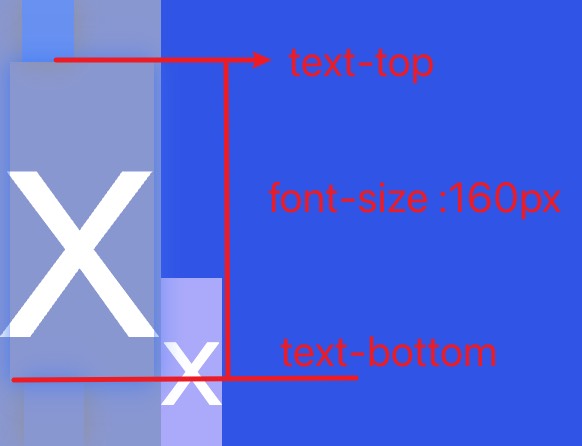
写代码的时候发现css中vertical-align为bottom和text-bottom时候显示效果相同,不太懂是哪里出了漏洞,十分感谢各位指正。


<!DOCTYPE html>
<html lang="zh-CN">

<head>
    <meta charset="UTF-8">
    <meta name="viewport" content="width=device-width, initial-scale=1.0">
    <title>Document</title>
    <style>
        * {
            margin: 0;
            padding: 0;
            color: white;
        }

        div {
            background-color: #25e;
            font-size: 160px;
        }
        span{
            background-color: #aaf;
            font-size: 60px;
            /* 这里的问题 */
            vertical-align: text-bottom;
        }
    </style>
</head>

<body>
    <div>
        x<span>x</span>
    </div>
</body>

</html>

vertical-align为text-bottom和bottom都是如下效果:

img

但是参考MDN文档:
bottom:使元素及其后代元素的底部与整行的底部对齐。
text-bottom:使元素的底部与父元素的字体底部对齐。

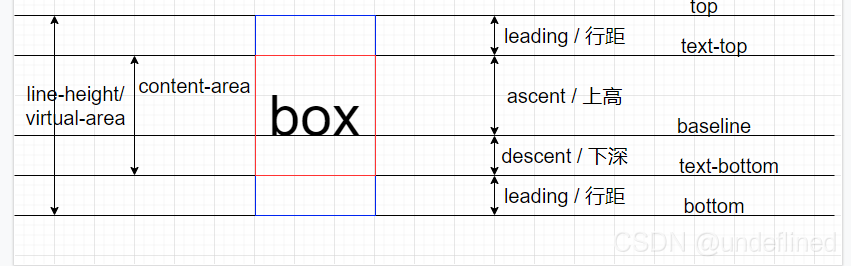
所以说,bottom符合上图,但是text-bottom时应该是span底部和div的x字体底部对齐,根据下图
img

判断出父元素x的text-bottom应该在如下位置:

img

但是span中的x确没有这样排布,不太懂了,请教各位朋友一下,十分感谢!

  • 写回答

5条回答 默认 最新

  • 紫雾凌寒 新星创作者: 人工智能技术领域 2025-04-28 09:50
    关注

    让 “紫雾凌寒” 来帮你回答,本回答结合 DeepSeek

    如果还有问题,请评论或点击头像私信,如果有帮助到您, 请关注、采纳、点赞

    1. 关键点分析:
      - 探究vertical-align属性值为text-bottombottom时显示效果相同的原因。
      - 理解这两个属性值在垂直对齐方面的原理及不同之处。
    2. 解决方案:
      - vertical-align: bottom:这个属性值会将元素的底部与所在行框的底部对齐。它是相对于行框的布局来进行定位的。例如:
      ```html
      <!DOCTYPE html>

    <html></html>

    <head></head>
    <style>
    .parent {
    border: 1px solid black;
    }

    .child1 {
       vertical-align: bottom;
       background-color: lightblue;
     }
    

    </style>

    <body>

    This is a span with vertical-align: bottom

    </body>


    - `vertical-align: text-bottom`:它是将元素的底部与该行内文本的基线对齐。这意味着它与文本的关系更紧密,会根据文本的基线来确定垂直位置。例如:html
    <!DOCTYPE html>

    <html></html>

    <head></head>
    <style>
    .parent {
    border: 1px solid black;
    }

    .child2 {
       vertical-align: text-bottom;
       background-color: lightgreen;
     }
    

    </style>

    <body>

    This is a span with vertical-align: text-bottom

    </body>


    - 通常情况下,在普通文本行中,由于文本基线和行框底部的位置关系(在大多数字体和布局下),两者看起来效果相似。但在一些特殊情况下会有明显区别,比如当行内元素的高度超过字体高度时:html
    <!DOCTYPE html>

    <html></html>

    <head></head>
    <style>
    .parent {
    border: 1px solid black;
    }

    .child3 {
       vertical-align: bottom;
       background-color: lightblue;
       height: 50px;
     }
    
    .child4 {
       vertical-align: text-bottom;
       background-color: lightgreen;
       height: 50px;
     }
    

    </style>

    <body>

    This is a span with vertical-align: bottom, height 50px
    This is a span with vertical-align: text-bottom, height 50px

    </body>


    `` 在这个例子中,可以更清晰地看到两者的区别。vertical-align: bottom会使元素底部与行框底部对齐,而vertical-align: text-bottom会使元素底部与文本基线对齐,由于元素高度较高,所以差异更明显。 3. 两种方案的优缺点: -vertical-align: bottom: - 优点:与行框底部对齐,在一些需要与行框整体布局对齐的场景下很直观,比如与行框内其他元素的底边对齐。 - 缺点:当行内元素内容高度变化时,可能会影响对齐效果,与文本基线没有直接关联。 -vertical-align: text-bottom: - 优点:与文本基线紧密相关,在文本排版中,能更好地保持与文本的相对位置关系,尤其是对于一些需要与文本基线对齐的场景,如一些图标与文本的对齐。 - 缺点:如果行内元素高度过高,可能导致与行框底部距离不一致,影响整体布局的整齐性。 4. 总结: -vertical-align: bottomvertical-align: text-bottom在一般文本行中显示效果相似,但在特殊情况下,如行内元素高度变化时,两者会有明显区别。bottom是与行框底部对齐,text-bottom`是与文本基线对齐,应根据具体的布局需求来选择合适的属性值。

    希望以上解答对您有所帮助。如果您有任何疑问,欢迎在评论区提出。

    评论

报告相同问题?

问题事件

  • 创建了问题 4月28日