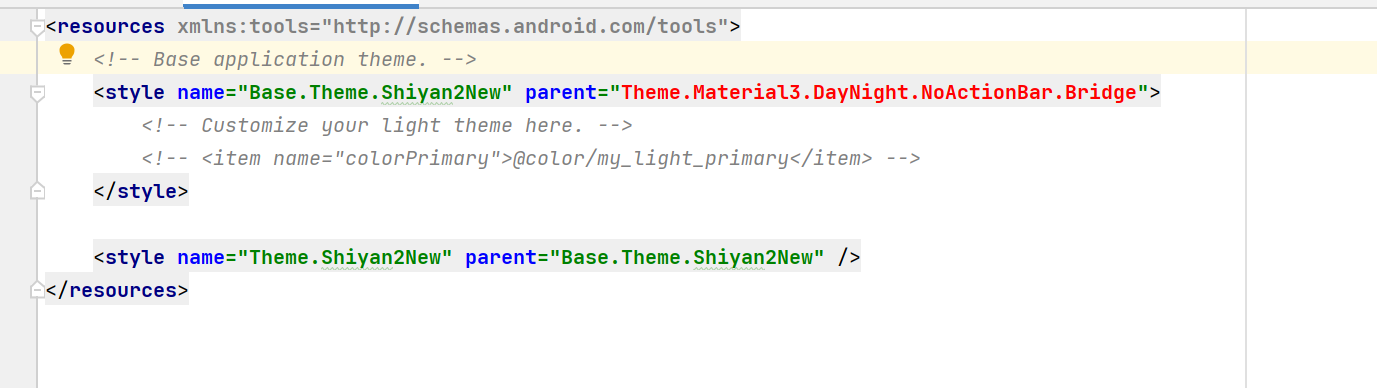
android stduio编写代码,发现按钮的背景颜色一直是紫色无法修改,按照网上的分享,修改了”themes“文件,加了"Bridge"缺标红了。应该怎么修改?

 分享
分享
阿里嘎多学长整理AIGC生成,因移动端显示问题导致当前答案未能完全显示,请使用PC端查看更加详细的解答过程
你遇到的问题是 Android Studio 中修改 Button 背景颜色失败的问题。根据你的描述,修改了 themes 文件,但是添加了 "Bridge" 标签后,编译器报错了。
解决方案是:
styles.xml 文件中添加以下代码:<style name="AppTheme" parent="Theme.AppCompat.Light">
<item name="colorPrimary">@color/your_color</item>
<item name="colorPrimaryDark">@color/your_color_dark</item>
<item name="colorAccent">@color/your_color_accent</item>
</style>
其中,@color/your_color 是你想要的背景颜色。
Button 的布局文件中添加以下代码:<Button
android:layout_width="wrap_content"
android:layout_height="wrap_content"
android:background="@color/your_color"
/>
其中,@color/your_color 是你想要的背景颜色。
AndroidManifest.xml 文件中添加以下代码:<application
...
android:theme="@style/AppTheme">
...
</application>
其中,@style/AppTheme 是你在 styles.xml 文件中定义的主题。
这样,Button 的背景颜色就应该被修改为你想要的颜色了。
分享 创建了问题
5月5日
创建了问题
5月5日


