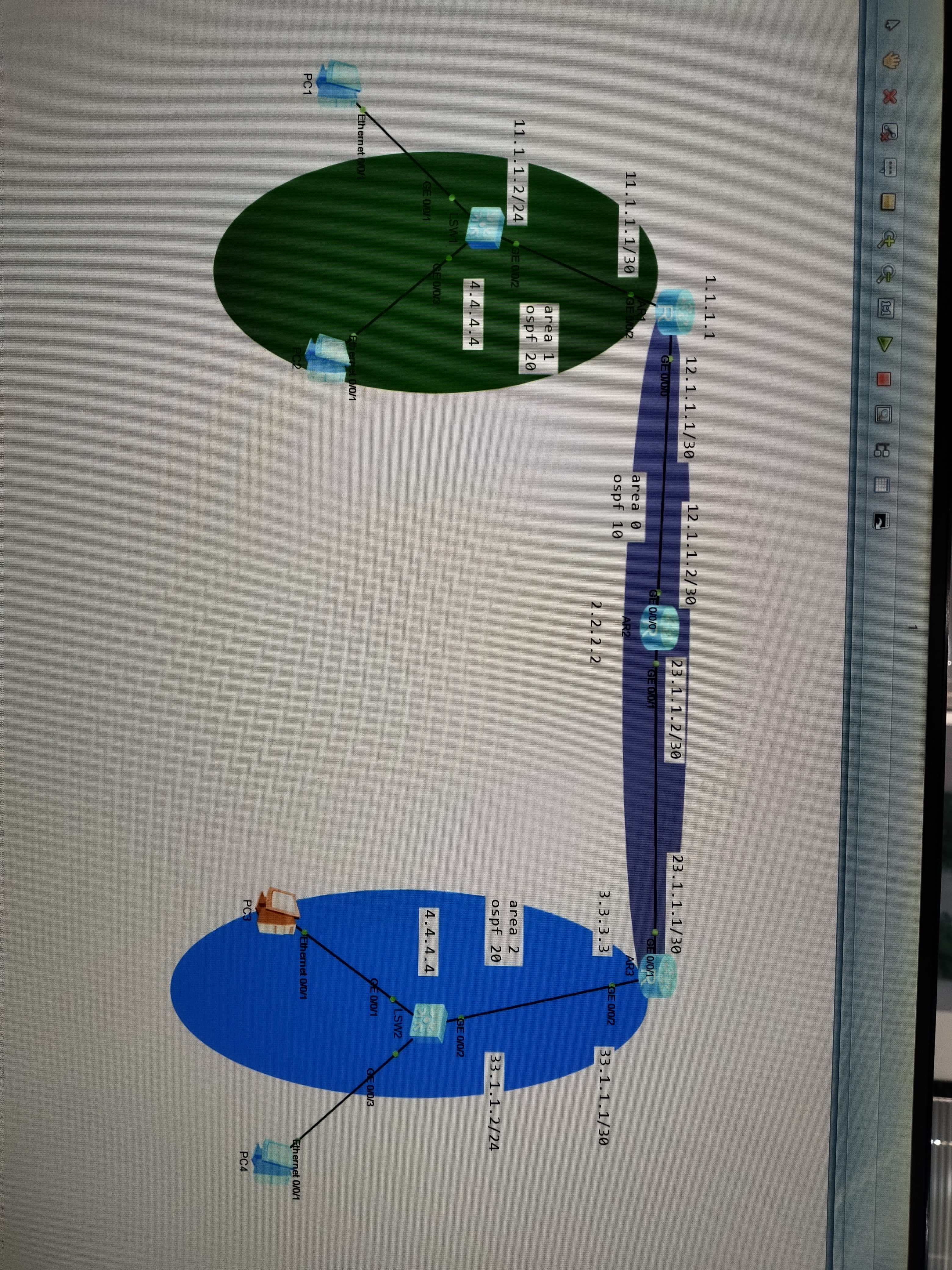
我需要这个拓扑图的基本配置,并做ospf和ospf的认证,还有易错点

我需要这个拓扑图的基本配置,并做ospf和ospf的认证,还有易错点
 分享
分享
 关注
关注让 “紫雾凌寒” 来帮你回答,本回答结合 DeepSeek
如果还有问题,请评论或点击头像私信,如果有帮助到您, 请关注、采纳、点赞
interface GigabitEthernet0/0
 ip address 192.168.1.1 255.255.255.0
!
interface GigabitEthernet0/1
 ip address 192.168.2.1 255.255.255.0
- **路由器R2**:
interface GigabitEthernet0/0
 ip address 192.168.2.2 255.255.255.0
!
interface GigabitEthernet0/1
 ip address 192.168.3.1 255.255.255.0
- **路由器R3**:
interface GigabitEthernet0/0
 ip address 192.168.3.2 255.255.255.0
!
interface GigabitEthernet0/1
 ip address 192.168.4.1 255.255.255.0
router ospf 1
 router-id 1.1.1.1
 network 192.168.1.0 0.0.0.255 area 0
 network 192.168.2.0 0.0.0.255 area 0
- **路由器R2**:
router ospf 1
 router-id 2.2.2.2
 network 192.168.2.0 0.0.0.255 area 0
 network 192.168.3.0 0.0.0.255 area 0
- **路由器R3**:
router ospf 1
 router-id 3.3.3.3
 network 192.168.3.0 0.0.0.255 area 0
 network 192.168.4.0 0.0.0.255 area 0
router ospf 1
 area 0 authentication message-digest
- 在路由器R2上配置区域0的认证:
router ospf 1
 area 0 authentication message-digest
- 在路由器R3上配置区域0的认证:
router ospf 1
 area 0 authentication message-digest
interface GigabitEthernet0/0
 ip ospf authentication message-digest
 ip ospf message-digest-key 1 md5 yourpassword
- 在路由器R1的GigabitEthernet0/1接口配置认证:
interface GigabitEthernet0/1
 ip ospf authentication message-digest
 ip ospf message-digest-key 1 md5 yourpassword
- 其他路由器的对应接口做类似配置。
请注意,以上示例中的IP地址等信息可根据实际拓扑进行调整,认证密钥“yourpassword”需替换为实际的密钥。
希望以上解答对您有所帮助。如果您有任何疑问,欢迎在评论区提出。
分享 创建了问题
5月6日
创建了问题
5月6日

