
thinkphp5.1连接达梦数据库后如何使用model新增数据?
使用php7.3 nginx DM管理工具 V8 (Build 2024.09.18)
使用save方法返回true但是数据库中没有新增数据
输出的$device->getLastSql();如下图
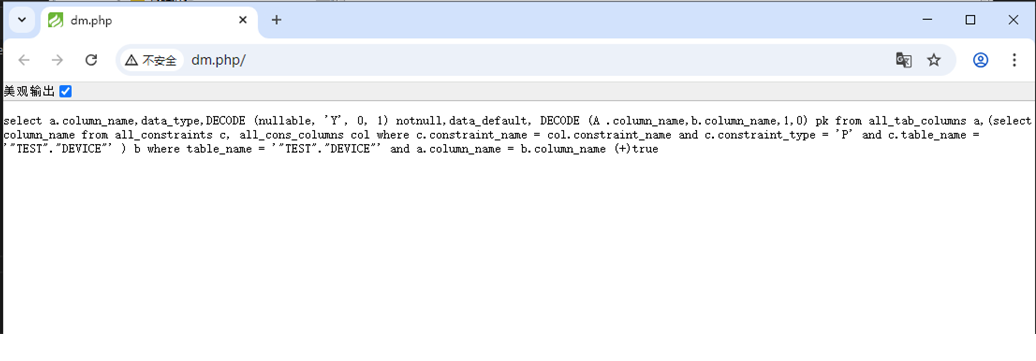
应该如何修改达梦数据库驱动部分代码?
think/db/builder/Dm.php
<?php

namespace think\db\builder;

use think\db\Builder;
use think\db\Query;

/**
 * Dm数据库驱动
 */
class Dm extends Builder
{
    protected $selectSql = 'SELECT * FROM (SELECT thinkphp.*, rownum AS numrow FROM (SELECT  %DISTINCT% %FIELD% FROM %TABLE%%JOIN%%WHERE%%GROUP%%HAVING%%ORDER%) thinkphp ) %LIMIT%%COMMENT%';

    /**
     * limit分析
     * @access protected
     * @param  Query $query 查询对象
     * @param  mixed $limit
     * @return string
     */
    protected function parseLimit($query, $limit)
    {
        $limitStr = '';

        if (!empty($limit)) {
            $limit = explode(',', $limit);

            if (count($limit) > 1) {
                $limitStr = "(numrow>" . $limit[0] . ") AND (numrow<=" . ($limit[0] + $limit[1]) . ")";
            } else {
                $limitStr = "(numrow>0 AND numrow<=" . $limit[0] . ")";
            }

        }

        return $limitStr ? ' WHERE ' . $limitStr : '';
    }

    /**
     * 设置锁机制
     * @access protected
     * @param  Query      $query 查询对象
     * @param  bool|false $lock
     * @return string
     */
    protected function parseLock($query, $lock = false)
    {
        if (!$lock) {
            return '';
        }

        return ' FOR UPDATE NOWAIT ';
    }

    /**
     * 字段和表名处理
     * @access public
     * @param  Query  $query  查询对象
     * @param  string $key
     * @param  string $strict
     * @return string
     */
    public function parseKey($query, $key, $strict = false)
    {
        $key = trim($key);

        if (strpos($key, '->') && false === strpos($key, '(')) {
            // JSON字段支持
            list($field, $name) = explode($key, '->');
            $key                = $field . '."' . $name . '"';
        }

        return $key;
    }

    /**
     * 随机排序
     * @access protected
     * @param  Query $query 查询对象
     * @return string
     */
    protected function parseRand($query)
    {
        return 'DBMS_RANDOM.value';
    }
}
think/db/connector/Dm.php
<?php

namespace think\db\connector;

use PDO;
use think\db\BaseQuery;
use think\db\Connection;

/**
 * Dm数据库驱动
 */
class Dm extends Connection
{
    /**
     * 解析pdo连接的dsn信息
     * @access protected
     * @param array $config 连接信息
     * @return string
     */
    protected function parseDsn($config)
    {
        $dsn = 'dm:';

        if (!empty($config['hostname'])) {
            //  Oracle Instant Client
            $dsn .=  $config['hostname'] . ($config['hostport'] ? ':' . $config['hostport'] : '') . '/';
        }


        if (!empty($config['charset'])) {
            $dsn .= ';charset=' . $config['charset'];
        }

        return $dsn;
    }

    /**
     * 取得数据表的字段信息
     * @access public
     * @param string $tableName
     * @return array
     */
    public function getFields($tableName)
    {
        list($tableName) = explode(' ', $tableName);
        $sql             = "select a.column_name,data_type,DECODE (nullable, 'Y', 0, 1) notnull,data_default, DECODE (A .column_name,b.column_name,1,0) pk from all_tab_columns a,(select column_name from all_constraints c, all_cons_columns col where c.constraint_name = col.constraint_name and c.constraint_type = 'P' and c.table_name = '" . strtoupper($tableName) . "' ) b where table_name = '" . strtoupper($tableName) . "' and a.column_name = b.column_name (+)";

        $pdo    = $this->query($sql, [], false, true);
        $result = $pdo->fetchAll(PDO::FETCH_ASSOC);
        $info   = [];

        if ($result) {
            foreach ($result as $key => $val) {
                $val                       = array_change_key_case($val);
                $info[$val['column_name']] = [
                    'name'    => $val['column_name'],
                    'type'    => $val['data_type'],
                    'notnull' => $val['notnull'],
                    'default' => $val['data_default'],
                    'primary' => $val['pk'],
                    'autoinc' => $val['pk'],
                ];
            }
        }

        return $this->fieldCase($info);
    }

    /**
     * 取得数据库的表信息(暂时实现取得用户表信息)
     * @access   public
     * @param string $dbName
     * @return array
     */
    public function getTables($dbName = '')
    {
        $sql    = 'select table_name from all_tables';
        $pdo    = $this->query($sql, [], false, true);
        $result = $pdo->fetchAll(PDO::FETCH_ASSOC);
        $info   = [];

        foreach ($result as $key => $val) {
            $info[$key] = current($val);
        }

        return $info;
    }

    /**
     * SQL性能分析
     * @access protected
     * @param string $sql
     * @return array
     */
    protected function getExplain($sql)
    {
        return [];
    }

    protected function supportSavepoint()
    {
        return true;
    }
}


