这个js控制台的Document怎么还会变化呢?
这个html文件是由两层Frame嵌套的,我想获取里面frame里一个动态对话框的模拟单击,有时候能成功,有时候获取不到,在控制台测试的,好奇怪啊
document.querySelector('#course_frame').contentDocument.querySelector('.continue .user_choise').click();
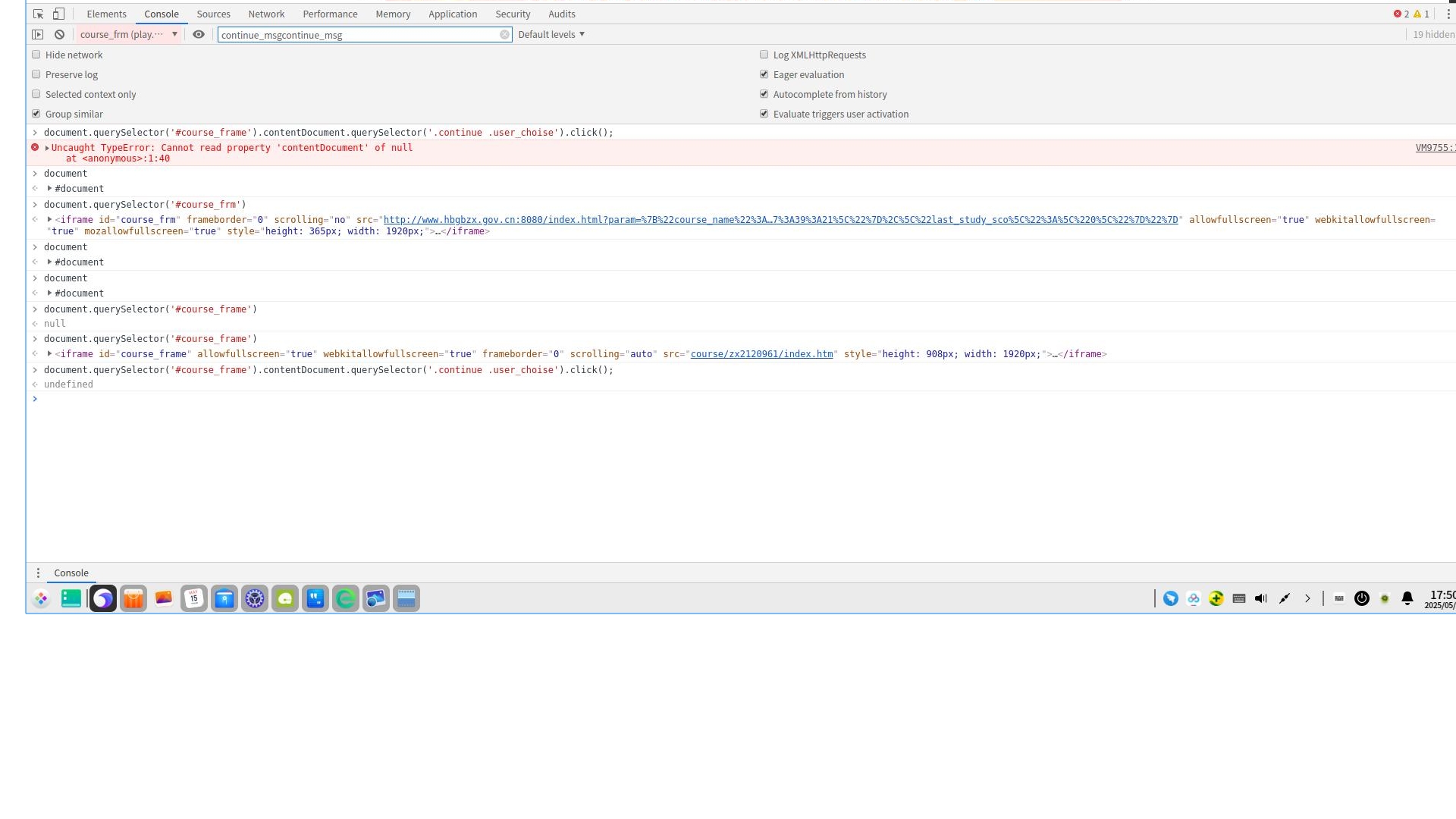

这个js控制台的Document怎么还会变化呢?
这个html文件是由两层Frame嵌套的,我想获取里面frame里一个动态对话框的模拟单击,有时候能成功,有时候获取不到,在控制台测试的,好奇怪啊
document.querySelector('#course_frame').contentDocument.querySelector('.continue .user_choise').click();
 分享
分享
晚上好🌙🌙🌙
本答案参考通义千问
在处理嵌套的 <iframe> 时,document.querySelector 的行为可能会因为以下原因而发生变化:
iframe 的内容来自不同的域名(即跨域),浏览器会阻止 JavaScript 访问其内容。这是出于安全考虑的同源策略。iframe 内容还未完全加载,contentDocument 可能为空或未正确初始化。以下是解决上述问题的步骤和代码示例:
首先检查 iframe 的来源是否与主页面在同一域名下。如果不同,你需要联系后端开发者解决跨域问题,或者使用服务器端代理来访问 iframe 的内容。
if (document.querySelector('#course_frame').contentWindow.location.href.startsWith('https://example.com')) {
    console.log("Same origin, can access iframe content.");
} else {
    console.error("Cross-origin iframe, cannot access content.");
}
iframe 加载完成确保 iframe 的内容已经加载完毕后再尝试访问其内容。
const iframe = document.querySelector('#course_frame');
iframe.onload = () => {
    const iframeDoc = iframe.contentDocument || iframe.contentWindow.document;
    const targetElement = iframeDoc.querySelector('.continue .user_choise');
    if (targetElement) {
        targetElement.click();
    } else {
        console.error("Target element not found in iframe.");
    }
};
如果目标元素是动态生成的,可以使用 MutationObserver 来监听 DOM 的变化,并在目标元素出现时执行点击操作。
const iframe = document.querySelector('#course_frame');
iframe.onload = () => {
    const iframeDoc = iframe.contentDocument || iframe.contentWindow.document;

    // 创建 MutationObserver 实例
    const observer = new MutationObserver((mutationsList) => {
        for (let mutation of mutationsList) {
            if (mutation.type === 'childList') {
                const targetElement = iframeDoc.querySelector('.continue .user_choise');
                if (targetElement) {
                    targetElement.click();
                    console.log("Element found and clicked!");
                    observer.disconnect(); // 停止观察
                }
            }
        }
    });

    // 配置观察选项
    observer.observe(iframeDoc.body, { childList: true, subtree: true });
};
在控制台中添加更多的日志信息,以便更好地理解问题所在。
console.log("Current document:", document);
console.log("Iframe contentDocument:", iframe.contentDocument);
console.log("Target element:", iframe.contentDocument.querySelector('.continue .user_choise'));
通过以上步骤,你可以解决 document.querySelector 在嵌套 iframe 中变化的问题。关键点在于:
iframe 内容已加载。MutationObserver 监听动态生成的元素。如果问题仍然存在,请提供更多上下文信息,例如 iframe 的来源、目标元素的具体结构等,以便进一步分析。
分享 系统已结题
5月23日
系统已结题
5月23日 已采纳回答
5月15日
创建了问题
5月15日
已采纳回答
5月15日
创建了问题
5月15日


