您好 ,请问基恩士的SR-x100W设备,进行读码操作,在代码里面能正常建立TCP连接,并且在基恩士里面能正常读取数据,但是代码里面tcp的读取就不行。
并且报错:
TcpClient 错误:无法从传输连接中读取数据: 由于连接方在一段时间后没有正确答复或连接的主机没有
报错代码:
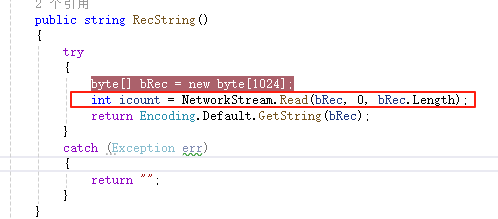
麻烦您给一下解题思路 谢谢

您好 ,请问基恩士的SR-x100W设备,进行读码操作,在代码里面能正常建立TCP连接,并且在基恩士里面能正常读取数据,但是代码里面tcp的读取就不行。
并且报错:
TcpClient 错误:无法从传输连接中读取数据: 由于连接方在一段时间后没有正确答复或连接的主机没有
报错代码:
麻烦您给一下解题思路 谢谢
 分享
分享
下午好🌅🌅🌅
本答案参考通义千问
根据你的描述,基恩士 SR-X100W 设备能够通过 TCP 正常建立连接并在设备端读取数据,但在代码中尝试通过 TcpClient 读取数据时却失败了,报错信息为“无法从传输连接中读取数据”。这种问题通常与网络通信、数据格式或协议实现有关。以下是详细的分析和解决方案:
网络连接问题
数据格式问题
\n),需要确保代码正确处理这些分隔符。超时问题
编码问题
设备端配置问题
以下是解决问题的步骤:
ping 或 telnet)测试设备是否可以被访问:
ping <设备IP地址>
telnet <设备IP地址> <端口号>
如果 telnet 可以成功连接,则说明网络连接正常。
TcpClient 的超时时间:
client.ReceiveTimeout = 5000; // 设置超时时间为 5 秒
string deviceResponse = "OK:123456\r\n"; // 模拟设备返回的数据
byte[] data = Encoding.ASCII.GetBytes(deviceResponse);
NetworkStream stream = client.GetStream();
stream.Write(data, 0, data.Length); // 模拟设备返回数据
using (TcpClient client = new TcpClient("设备IP地址", 端口号))
{
    using (NetworkStream stream = client.GetStream())
    {
        // 发送命令(如果需要)
        byte[] command = Encoding.ASCII.GetBytes("READ_CODE\r\n");
        stream.Write(command, 0, command.Length);

        // 读取数据
        List<byte> buffer = new List<byte>();
        int bytesRead;
        do
        {
            byte[] tempBuffer = new byte[1024];
            bytesRead = stream.Read(tempBuffer, 0, tempBuffer.Length);
            buffer.AddRange(tempBuffer.Take(bytesRead));
        } while (stream.DataAvailable);

        // 解析数据
        string response = Encoding.ASCII.GetString(buffer.ToArray());
        Console.WriteLine(response);
    }
}
以下是一个完整的 C# 示例代码,假设设备返回的数据是 ASCII 格式的字符串:
using System;
using System.Net.Sockets;
using System.Text;

class Program
{
    static void Main()
    {
        try
        {
            // 连接到设备
            using (TcpClient client = new TcpClient("设备IP地址", 端口号))
            {
                using (NetworkStream stream = client.GetStream())
                {
                    // 发送读码命令
                    byte[] command = Encoding.ASCII.GetBytes("READ_CODE\r\n");
                    stream.Write(command, 0, command.Length);

                    // 设置超时时间
                    client.ReceiveTimeout = 5000;

                    // 读取设备返回的数据
                    List<byte> buffer = new List<byte>();
                    int bytesRead;
                    do
                    {
                        byte[] tempBuffer = new byte[1024];
                        bytesRead = stream.Read(tempBuffer, 0, tempBuffer.Length);
                        buffer.AddRange(tempBuffer.Take(bytesRead));
                    } while (stream.DataAvailable);

                    // 解析数据
                    string response = Encoding.ASCII.GetString(buffer.ToArray());
                    Console.WriteLine("设备返回的数据:" + response);
                }
            }
        }
        catch (Exception ex)
        {
            Console.WriteLine($"错误:{ex.Message}");
        }
    }
}
通过以上步骤,你应该能够定位问题并解决它。如果问题仍未解决,请提供更多细节(如设备返回的数据格式、代码片段等),以便进一步分析。
分享 创建了问题
5月16日
创建了问题
5月16日


