
我使用的是vue3,现在想把amchart封装成一个公共方法


4条回答 默认 最新

 关注
关注让【宝码香车】来帮你解答,本回答参考DeepSeek编写,并整理提供。
如果还有疑问可以点击头像关注私信或评论。如果答案让您满意,请采纳、点赞、关注,非常感谢!
Vue3中封装amCharts公共方法指南
在Vue3中封装amCharts为公共方法可以提高代码复用性,使图表创建更简洁。下面我将提供一个完整的封装方案。
1. 安装amCharts依赖
首先确保已安装amCharts:
npm install @amcharts/amcharts52. 创建公共图表组件
创建一个可复用的图表组件
BaseChart.vue:<script setup> import * as am5 from '@amcharts/amcharts5' import * as am5xy from '@amcharts/amcharts5/xy' import { onMounted, onUnmounted, ref } from 'vue' const props = defineProps({ chartId: { type: String, required: true }, chartType: { type: String, default: 'xy' // 默认XY图表 }, options: { type: Object, default: () => ({}) } }) const chartRef = ref(null) let root = null let chart = null onMounted(() => { // 创建根元素 root = am5.Root.new(props.chartId) // 根据类型创建图表 switch(props.chartType) { case 'xy': chart = root.container.children.push( am5xy.XYChart.new(root, props.options) ) break // 可以添加其他图表类型 default: chart = root.container.children.push( am5xy.XYChart.new(root, props.options) ) } }) onUnmounted(() => { if (root) { root.dispose() } }) defineExpose({ getRoot: () => root, getChart: () => chart }) </script> <template> <div :id="chartId" ref="chartRef" class="chart-container"></div> </template> <style scoped> .chart-container { width: 100%; height: 100%; } </style>3. 创建图表工具类
创建一个
chartHelper.js工具类来封装常用方法:import * as am5 from '@amcharts/amcharts5' import * as am5xy from '@amcharts/amcharts5/xy' import * as am5percent from '@amcharts/amcharts5/percent' export const createChart = (containerId, type = 'xy', options = {}) => { const root = am5.Root.new(containerId) let chart switch(type) { case 'xy': chart = root.container.children.push(am5xy.XYChart.new(root, options)) break case 'pie': chart = root.container.children.push(am5percent.PieChart.new(root, options)) break // 添加其他图表类型... default: chart = root.container.children.push(am5xy.XYChart.new(root, options)) } return { root, chart } } export const addSeries = (chart, type, data, options = {}) => { let series switch(type) { case 'line': series = chart.series.push(am5xy.LineSeries.new(chart.root, options)) break case 'column': series = chart.series.push(am5xy.ColumnSeries.new(chart.root, options)) break // 添加其他系列类型... } if (data) { series.data.setAll(data) } return series } export const addAxis = (chart, type, position, options = {}) => { let axis switch(type) { case 'x': axis = chart.xAxes.push(am5xy.ValueAxis.new(chart.root, options)) break case 'y': axis = chart.yAxes.push(am5xy.ValueAxis.new(chart.root, options)) break case 'category': axis = chart.xAxes.push(am5xy.CategoryAxis.new(chart.root, options)) break } return axis } export const addLegend = (chart, options = {}) => { return chart.children.push(am5.Legend.new(chart.root, options)) }4. 使用示例
在Vue组件中使用封装好的方法:
<script setup>
import { onMounted } from 'vue'
import { createChart, addSeries, addAxis } from '@/utils/chartHelper'


onMounted(() => {
  // 创建图表
  const { root, chart } = createChart('chartdiv', 'xy', {
    panX: true,
    panY: true,
    wheelX: 'panX',
    wheelY: 'zoomX'
  })

  // 添加X轴
  const xAxis = addAxis(chart, 'category', 'bottom', {
    categoryField: 'category'
  })

  // 添加Y轴
  const yAxis = addAxis(chart, 'y', 'left', {
    renderer: am5xy.AxisRendererY.new(root, {})
  })

  // 添加系列
  const series = addSeries(chart, 'line', [
    { category: 'A', value: 10 },
    { category: 'B', value: 15 },
    { category: 'C', value: 8 }
  ], {
    name: 'Series 1',
    xAxis: xAxis,
    yAxis: yAxis,
    valueYField: 'value',
    categoryXField: 'category'
  })
})
</script>


<template>
  <div id="chartdiv" style="width: 100%; height: 400px;"></div>
</template>
5. 封装后的优势
- 代码复用:避免重复编写图表初始化代码
- 统一配置:所有图表使用相同的配置方式
- 易于维护:修改图表配置只需修改工具类
- 类型安全:通过TypeScript可以添加类型定义
6. 扩展建议
如果需要更复杂的封装,可以考虑:
- 添加TypeScript类型支持
- 封装更多图表类型和配置选项
- 添加主题管理功能
- 实现响应式尺寸调整
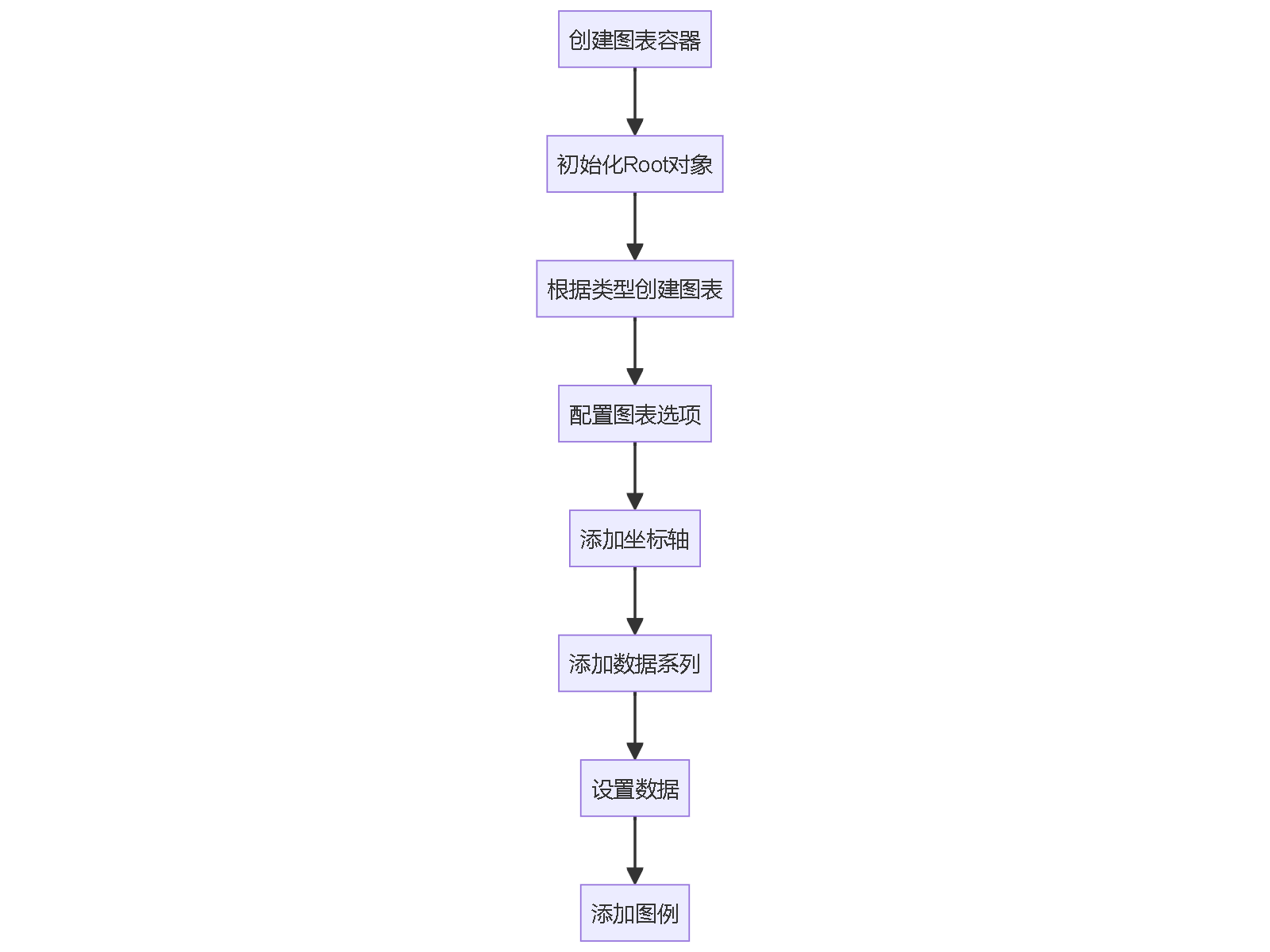
这样封装后,你可以在整个项目中轻松创建和管理amCharts图表,同时保持代码的整洁和一致性。
解决 无用评论 打赏举报 分享
分享
- 2012-02-23 14:02### Amchart 使用方法详解 #### 一、Amchart 概述 Amcharts 是一组功能强大的 Flash 图表组件,被广泛应用于网站和各种基于 Web 的应用中。这些图表不仅外观美观,而且具有高度的定制性和灵活性。Amcharts 支持从 ...
- 2016-04-28 11:22AmChart的实例帮助文档 amcharts 要一个“配置文件”(setting.xml),一个数据文件(amile_data.xml), 一个 SWFObject.js,一个对应的 SWF 就可以生成漂亮的统计报表了 1 SWFObject v1.5的对象结构 view ...
- 2018-11-01 14:05amchart破解,去掉水印
- 2012-06-14 10:44开发者可以通过阅读文档来了解详细的使用方法、配置选项以及解决常见问题的策略。文档是学习和优化 amChart 实现的关键资源。 **Build** `Build` 文件夹通常包含预编译的库文件,这些文件可以被引入到 Flex 项目中...
- 2018-04-25 13:58"amChart_3.14.4" 是一个关于 amChart 图表库的特定版本,版本号为3.14.4。amChart 是一个流行的JavaScript库,用于创建交互式和动态的数据可视化图表。早期版本中,amChart 使用XML(可扩展标记语言)作为数据输入...
- 2021-06-13 06:46### 使用方法 安装完成后,你可以开始在你的React组件中导入并使用Amchart。通常,你需要在组件中引入`AmChart`组件,并传入必要的配置属性。例如,创建一个简单的柱状图,你可能这样写: ```jsx import React ...
- 2019-08-02 11:38NULL 博文链接:https://vti-iteye.iteye.com/blog/1973433
- 2021-04-01 17:31标题 "amchart-geo-map" 暗示我们讨论的是一个与地图图表相关的库,特别是基于AmCharts的地理映射解决方案。AmCharts是一家提供交互式图表、地图和仪表盘组件的公司,他们的产品广泛用于数据可视化。在JavaScript...
- 2022-03-24 09:47前端段的博客 前端图表插件 1.echart https://echarts.apache.org/examples/zh/index.html 2.amchart https://www.amcharts.com/demos/#hierarchy 3.g6 http://antv-2018.alipay.com/zh-cn/g6/3.x/demo/tree/tree-dendrogram.html
- 2014-09-17 21:08c#用来做图表的免费插件代码amchart插件 图表文件
- 2014-01-28 11:58例如,通过调用`chart.setDataProvider()`或`chart.validateData()`方法更新数据。 10. **性能优化**:对于大数据集,可以使用AmCharts的“数据压缩”功能,它会减少传递给浏览器的数据量,提高图表加载速度。 总...
- 2015-01-20 13:57通过这个压缩包中的示例,你可以逐步掌握AMCHART的基本用法,进一步提升你的前端数据可视化能力。同时,也可以借鉴示例中的代码结构和逻辑,为自己的项目提供灵感。记得实践是检验真理的唯一标准,动手尝试并结合...
- 2012-08-21 16:203. **显示和更新图表**:通过`reLoadLine()`方法定期调用(例如,每15分钟),使Flash组件重新加载后台数据,更新图表显示。 #### 四、配置文件详解 配置文件的结构复杂,覆盖了图表的各个方面: - **全局属性**...
- 2021-05-14 02:49您使用此模块的方法非常简单! 模块名称为[AngularAmChart] 将模块放在bower.js中的依赖项中 { "angular-amchart" : "~1.0.5" } 然后使用文件 /bower_components/angular-amchart/src/amchart.js 看下面的例子...
- 2008-08-02 15:48AmChart 是一款强大的数据可视化工具,它主要使用Flash技术来创建动态、交互式的图表和图形。在.NET环境中,开发者可以通过集成AmChart与XML数据结合,为应用程序增添极具吸引力的视觉表现,以直观地展示复杂数据。 ...
- 2013-10-24 12:256. **绘制图表**:最后,调用`validateData()`方法使图表根据配置和数据进行渲染。 7. **交互功能**:AmChart支持多种交互功能,如鼠标悬停提示、点击事件等,可以通过添加相应的配置实现。 在压缩包中,`am....
- 2012-12-03 11:16《amchart1.6:基于Flex的高效图表解决方案》 amchart是一个功能强大的图表库,专为使用Adobe Flex技术的开发者设计。在版本1.6中,amchart进一步提升了其在数据可视化领域的表现力,为用户提供了丰富的图表类型和...
- 2013-09-05 09:29这段时间公司要我让一个关于房产方面的数据折线图,开始找了很多,但都不是很满意,后来无意中发现AMCHARTS可以,因为这个控件支持NULL数据,也就是折线可以是间断的,而且这个控件还是免费破解版本的,也是我从网上...
- 2018-02-13 08:53攻城狮Lee丶的博客 <!DOCTYPE html> <html> <head> <meta charset="UTF-8"> <title></title> <... &
- 2012-06-06 15:07amchart破解版 javascript脚本库,具有强大的画图功能,经过破解处理可以直接使用
- 没有解决我的问题, 去提问


问题事件
 创建了问题
5月19日
创建了问题
5月19日