
我集成PayPal的高级功能,使用托管字段测试付款时出现了问题。
我react 代码
import { PayPalScriptProvider,
         PayPalButtons,
         PayPalHostedFieldsProvider,
         PayPalHostedField,
         usePayPalHostedFields,
        } from "@paypal/react-paypal-js";
import { useState, useEffect, useRef } from "react";
import axios from "axios";
import "../assets/css/ce.css"


// Example of custom component to handle form submit
const SubmitPayment = ({ customStyle , onApprove }) => {
    const [paying, setPaying] = useState(false);
    const cardHolderName = useRef(null);
    const hostedField = usePayPalHostedFields();

    const handleClick = () => {

        if (!hostedField?.cardFields) {
            const childErrorMessage = 'Unable to find any child components in the <PayPalHostedFieldsProvider />';

            alert("托管字段无法使用")
        }

        const isFormInvalid =
            Object.values(hostedField.cardFields.getState().fields).some(
                (field) => !field.isValid
            ) || !cardHolderName?.current?.value;

        if (isFormInvalid) {
            return alert(
                "The payment form is invalid"
            );
        }

        setPaying(true);
        hostedField.cardFields
            .submit({
                cardholderName: cardHolderName?.current?.value,
            })
            .then((data) => {
                alert(data.orderId)
                onApprove(data.orderId);
                setPaying(false);
            })
            .catch((err) => {
                // Here handle error
                setPaying(false);
            });
    };

    return (
        <>
            <label title="This represents the full name as shown in the card">
                Card Holder Name
                <input
                    id="card-holder"
                    ref={cardHolderName}
                    className="card-field"
                    style={{ ...customStyle, outline: "none" }}
                    type="text"
                    placeholder="Full name"
                />
                </label>
            <button
                className={`btn${paying ? "" : " btn-primary"}`}
                style={{ float: "right" }}
                onClick={handleClick}
            >
                {paying ? <div className="spinner tiny" /> : "Pay"}
            </button>
        </>
    );
};


export default function Ce() {

    const [clientId , setClientId] = useState(null);
    const [clientToken , setClientToken] = useState(null);

    useEffect(() => {
        getClientToken();
    }, []);

    const getClientToken = async () =>{
        const response = await axios.post("https://814j671e9.zicp.fun/paypal/getClientToken", {
            withCredentials: true // 必须加这个才能带 cookie(如 session)
          })
        setClientId(response.data.clientId)
        setClientToken(response.data.client_token)
    }

    const createOrder = async () =>{
    const response = await axios.post("https://814j671e9.zicp.fun/paypal/createOrder",{
            payProStr : "C12_1",
            curr : "USD",
            withCredentials: true // 必须加这个才能带 cookie(如 session)
        })
        console.log(response.data)
        return response.data
    }

    const onApprove = async (orderID) => {
        try {
          // 1. 捕获支付(不再需要传递 payerID)
          const captureResponse = await axios.post("https://814j671e9.zicp.fun/paypal/captureOrder", {
            withCredentials: true ,// 必须加这个才能带 cookie(如 session)
            orderID: orderID // v2 API 不需要 payerID
          });

          // 2. 处理成功结果
          if (captureResponse.data.status === "success") {
            alert(`支付成功!交易ID: ${captureResponse.data.transactionId}`);
            // 3. 可选的后续操作
            //window.location.href = `/success?txn_id=${captureResponse.data.transactionId}`;
          }

        } catch (error) {
          // 4. 增强错误处理(适配v2错误格式)
          const errorMsg = error.response?.data?.userMessage ||
                          error.response?.data?.message ||
                          "Payment failed. Please contact support";

          alert(errorMsg);


        }
      };

      const onError = (err) => {
        alert("Payment failed");
      };


    return (
        <div  className="paypal-pay-iframe-mobule">

            {
                clientId  && clientToken ? (
                    <PayPalScriptProvider
                        key={clientToken}
                        options={{
                            clientId: clientId ,
                            components: "buttons,hosted-fields",
                            dataClientToken: clientToken,
                            intent: "capture",
                        }}
                    >

                        <PayPalHostedFieldsProvider
                            createOrder={createOrder}
                        >

                        <PayPalHostedField
                            id="card-number"
                            className=""
                            hostedFieldType="number"
                            options={{ selector: "#card-number", placeholder: 'Card Number' }}
                        />
                        <PayPalHostedField
                            id="cvv"
                            className=""
                            hostedFieldType="cvv"
                            options={{ selector: "#cvv", placeholder: 'CVV' }}
                        />
                        <PayPalHostedField
                            id="expiration-date"
                            className=""
                            hostedFieldType="expirationDate"
                            options={{
                            selector: "#expiration-date",
                            placeholder: "MM/YY",
                            }}
                        />

                        <SubmitPayment onApprove={onApprove} />


                        <PayPalButtons
                            createOrder = {createOrder}
                            onApprove = {(data) => onApprove(data.orderID)}
                            onError={onError}
                            disabled={false}
                            style={{ layout: "horizontal" }}
                        />
                        </PayPalHostedFieldsProvider>

                    </PayPalScriptProvider>
                ) : <span>Loading ...</span>
            }

        </div>
    );
}
后端springboot代码
@Service
@AllArgsConstructor
public class PaypalService implements IPayalService{

    @Autowired
    private PayPalHttpClient payPalClient;

    @Value("${paypal.client.app}")
    private String CLIENTID;


    @Override
    //请求托管字段的ClientToken
    public Map<String, String> getClientToken() throws IOException {
         // 自定义请求对象
        HttpRequest<String> request = new HttpRequest<>("/v1/identity/generate-token", "POST", String.class);
        request.header("Content-Type", "application/json");

        // 发送请求并获取响应
        HttpResponse<String> response = payPalClient.execute(request);
        Map<String, Object> respMap = JSON.parseObject(response.result());
        //将clientId和client_token传到前端
        Map<String, String> clientDataMap = new HashedMap();
        clientDataMap.put("clientId", CLIENTID);
        clientDataMap.put("client_token", (String)(respMap.get("client_token")));
        System.out.println(respMap.get("client_token"));
        return  clientDataMap;
    }


    @Override
    //创建订单
    public String createOrderV2(Map<String, String> map) throws IOException {

            // 2. 构建订单请求(新版API)
            OrderRequest orderRequest = new OrderRequest()
                .checkoutPaymentIntent("CAPTURE") // 直接扣款
                .purchaseUnits(List.of(
                    new PurchaseUnitRequest()
                        .amountWithBreakdown(
                            new AmountWithBreakdown()
                                .currencyCode(map.get("curr"))
                                .value(String.format("%.2f", 0.10))
                        )
                        .description("good china")
                ))
                .applicationContext(
                    new ApplicationContext()
                        .returnUrl("https://814j671e9.zicp.fun/success")
                        .cancelUrl("https://814j671e9.zicp.fun/cancel")
                );

            // 3. 创建订单
            OrdersCreateRequest request = new OrdersCreateRequest().requestBody(orderRequest);
            Order order = payPalClient.execute(request).result();

            return order.id();
        }


    @Override
     public ResponseEntity<Map<String, Object>> captureOrderV2(Map<String, String> params) throws IOException {


            try {

                // 3. 构建捕获请求(新版API)
                OrdersCaptureRequest request = new OrdersCaptureRequest(params.get("orderID"));
                Order order = payPalClient.execute(request).result();

                // 4. 返回标准化响应
                return ResponseEntity.ok(Map.of(
                    "status", "success",
                    "transactionId", order.purchaseUnits().get(0)
                        .payments().captures().get(0).id(),
                    "paymentStatus", order.status() // 通常为"COMPLETED"
                ));

            } catch (HttpException e) {
                // 5. 处理错误(新版SDK错误类型)
                return ResponseEntity.status(e.statusCode()).body(Map.of(
                    "status", "error",
                    "errorCode", extractV2ErrorCode(e),
                    "technicalError", e.getMessage(),
                    "userMessage", getFriendlyError(e),
                    "debugId", e.headers().header("Paypal-Debug-Id")
                ));
            }
        }

         // 新版错误码提取
        private String extractV2ErrorCode(HttpException e) {
            try {
                // 从响应体提取错误码(假设返回JSON)
                JsonNode json = new ObjectMapper().readTree(e.getMessage());
                return json.path("name").asText("UNKNOWN_ERROR");
            } catch (Exception ex) {
                return "UNKNOWN_ERROR";
            }
        }

        // 兼容新版错误消息
        private String getFriendlyError(HttpException e) {
            String errorCode = extractV2ErrorCode(e);

            if ("INSUFFICIENT_FUNDS".equals(errorCode)) {
                return "Insufficient balance, please change payment method";
            } else if ("ORDER_ALREADY_CAPTURED".equals(errorCode)) {
                return "This order has already been paid";
            } else {
                return "Payment processing failed, please try again later";
            }
        }
}
这是付款页面
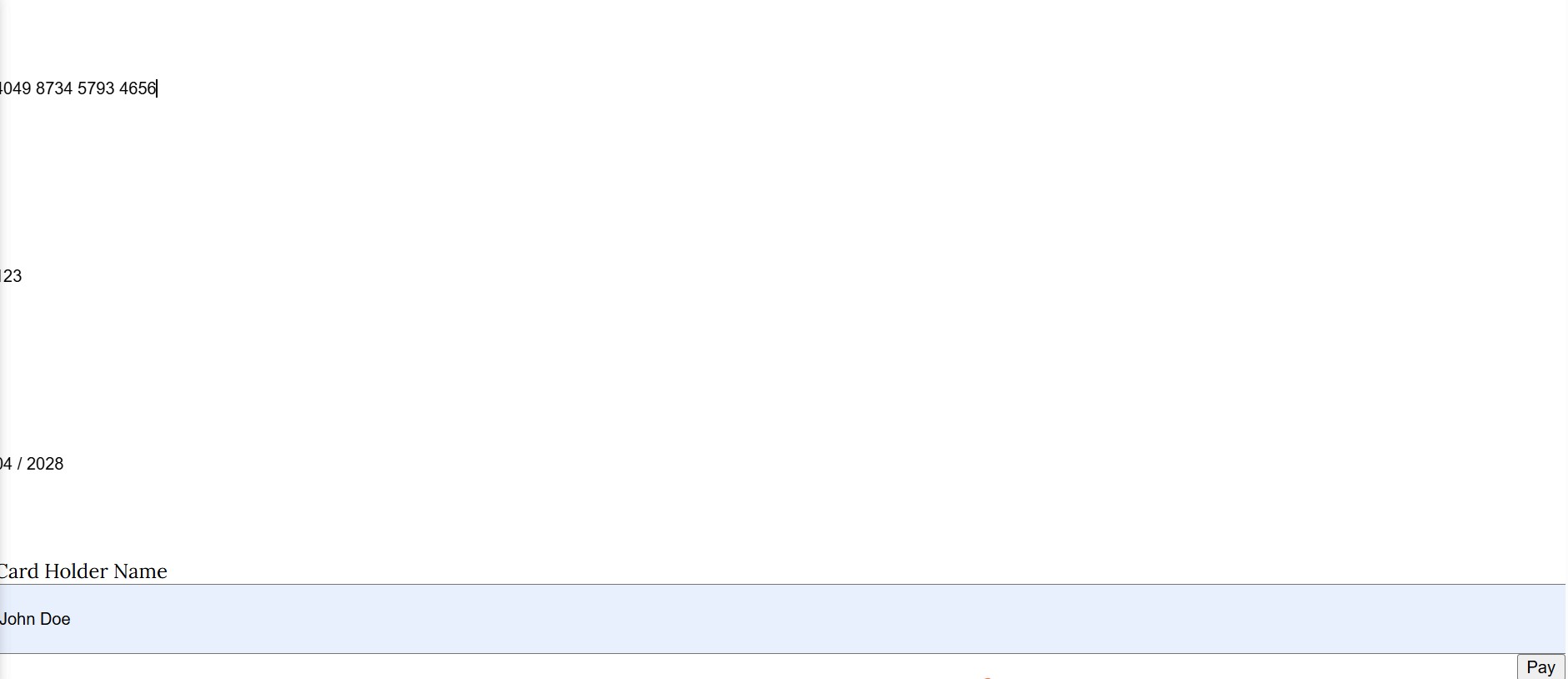
创建订单并返回订单ID后,浏览器控制台报错
https://cors.api.sandbox.paypal.com/v2/checkout/orders/0DA22094Y9930534Y/confirm-payment-source net::ERR_CONNECTION_CLOSED
即使我在真实环境下测试还是一样
https://cors.api.paypal.com/v2/checkout/orders/8GH17510P6670793U/confirm-payment-source net::ERR_CONNECTION_RESET
用PayPal按钮付款没问题,就是这个托管字段不行,已经困扰了一整天了


